Anti-Virtual Environments - Multiple Delay Execution Techniques
Detecting virtualized environments using various timing techniques.
Jump to Section (7)
Learning Objectives
0/3 doneIntroduction
Delay execution is a common technique utilized to bypass sandboxed environments. Sandboxes typically have time constraints that prevent them from analyzing a binary for a long duration. Therefore, malware can introduce long pauses in code execution that forces the sandbox to terminate before being able to analyze the binary.
A sandbox with a two-minute analysis limit will not be able to analyze a payload if the malware sample executes a wait function for three minutes before decrypting and executing it.
This module will introduce functions that can be used to delay the execution of the payload if a sandbox environment is detected.
Detecting Fast-Forwards
Several malware samples have taken advantage of delays in execution,
so the majority of sandboxes have implemented mitigations to counter
execution delays. Such mitigations may involve fast-forwarding the delay
durations, either by changing the parameters passed through API hooking
or via other approaches. Verifying that the delay has taken place is
essential, and can be achieved using the WinAPI, GetTickCount64.
The delay function then would look something like the following.
BOOL DelayFunction(DWORD dwMilliSeconds){

  DWORD T0 = GetTickCount64();

  // The code needed to delay the execution for 'dwMilliSeconds' ms

  DWORD T1 = GetTickCount64();

  // Slept for at least 'dwMilliSeconds' ms, then 'DelayFunction' succeeded
  if ((DWORD)(T1 - T0) < dwMilliSeconds)
    return FALSE;
  else
    return TRUE;
}
Delaying Execution Via WaitForSingleObject
The WaitForSingleObject WinAPI has been used throughout
this course to wait for a specific object to be in a signaled state or
for a time-out to occur. In this section, WaitForSingleObject will be used to wait for an empty event created using CreateEvent, meaning it will wait for a time-out to occur.
The DelayExecutionVia_WFSO function has one parameter, ftMinutes, that represents the time to delay the execution in minutes. The function returns TRUE if WaitForSingleObject succeeded in delaying the execution for the specified duration.
BOOL DelayExecutionVia_WFSO(FLOAT ftMinutes) {

  // converting minutes to milliseconds
  DWORD     dwMilliSeconds  = ftMinutes * 60000;
  HANDLE    hEvent          = CreateEvent(NULL, NULL, NULL, NULL);
  DWORD     _T0             = NULL,
            _T1             = NULL;


  _T0 = GetTickCount64();

  // Sleeping for 'dwMilliSeconds' ms
  if (WaitForSingleObject(hEvent, dwMilliSeconds) == WAIT_FAILED) {
    printf("[!] WaitForSingleObject Failed With Error : %d \n", GetLastError());
    return FALSE;
  }

  _T1 = GetTickCount64();

  // Slept for at least 'dwMilliSeconds' ms, then 'DelayExecutionVia_WFSO' succeeded, otherwize it failed
  if ((DWORD)(_T1 - _T0) < dwMilliSeconds)
    return FALSE;

  CloseHandle(hEvent);

  return TRUE;

}
Delaying Execution Via MsgWaitForMultipleObjectsEx
Another WinAPI that can be used for execution delays is the MsgWaitForMultipleObjectsEx WinAPI. It essentially fulfills that same task as WaitForSingleObject and was also demonstrated in previous modules.
The DelayExecutionVia_MWFMOEx function uses the same logic shown in the previous section except here it utilizes the MsgWaitForMultipleObjectsEx WinAPI. The function has one parameter, ftMinutes, that represents the time to delay the execution in minutes. The function returns TRUE if MsgWaitForMultipleObjectsEx succeeded in delaying the execution for the specified duration.
BOOL DelayExecutionVia_MWFMOEx(FLOAT ftMinutes) {

  // Converting minutes to milliseconds
  DWORD   dwMilliSeconds    = ftMinutes * 60000;
  HANDLE  hEvent            = CreateEvent(NULL, NULL, NULL, NULL);
  DWORD   _T0               = NULL,
          _T1               = NULL;


  _T0 = GetTickCount64();

  // Sleeping for 'dwMilliSeconds' ms
  if (MsgWaitForMultipleObjectsEx(1, &hEvent, dwMilliSeconds, QS_HOTKEY, NULL) == WAIT_FAILED) {
    printf("[!] MsgWaitForMultipleObjectsEx Failed With Error : %d \n", GetLastError());
    return FALSE;
  }

  _T1 = GetTickCount64();

  // Slept for at least 'dwMilliSeconds' ms, then 'DelayExecutionVia_MWFMOEx' succeeded, otherwize it failed
  if ((DWORD)(_T1 - _T0) < dwMilliSeconds)
    return FALSE;

  CloseHandle(hEvent);

  return TRUE;
}
Delaying Execution Via NtWaitForSingleObject
Code execution delays can also be done via the NtWaitForSingleObject syscall. NtWaitForSingleObject is the native API version of WaitForSingleObject and performs the same functionality. NtWaitForSingleObject is shown below.
NTSTATUS NtWaitForSingleObject(
  [in] HANDLE         Handle,       // Handle to the wait object
  [in] BOOLEAN        Alertable,    // Whether an alert can be delivered when the object is waiting
  [in] PLARGE_INTEGER Timeout       // Pointer to LARGE_INTEGER structure specifying time to wait for
);
The wait time for NtWaitForSingleObject is specified in 100-nanosecond negative intervals which are often referred to as ticks. A single tick is equivalent to 0.0001 milliseconds. The value passed to the syscall via the Timeout parameter should be the negative value of dwMilliSeconds x 10000, where dwMilliSeconds is the time to wait in milliseconds.
The DelayExecutionVia_NtWFSO function below uses the NtWaitForSingleObject syscall to delay the execution for a given time specified by the ftMinutes parameter. ftMinutes represents the time to delay the execution in minutes. It returns TRUE if NtWaitForSingleObject succeeds in delaying the execution for the specified duration.
typedef NTSTATUS (NTAPI* fnNtWaitForSingleObject)(
	HANDLE         Handle,
	BOOLEAN        Alertable,
	PLARGE_INTEGER Timeout
);

BOOL DelayExecutionVia_NtWFSO(FLOAT ftMinutes) {

 	// Converting minutes to milliseconds
	DWORD                   dwMilliSeconds          = ftMinutes * 60000;
	HANDLE                  hEvent                  = CreateEvent(NULL, NULL, NULL, NULL);
	LONGLONG                Delay                   = NULL;
	NTSTATUS                STATUS                  = NULL;
	LARGE_INTEGER           DelayInterval           = { 0 };
	fnNtWaitForSingleObject pNtWaitForSingleObject  = (fnNtWaitForSingleObject)GetProcAddress(GetModuleHandle(L"NTDLL.DLL"), "NtWaitForSingleObject");
	DWORD                   _T0                     = NULL,
	                        _T1                     = NULL;

  	// Converting from milliseconds to the 100-nanosecond - negative time interval
	Delay = dwMilliSeconds * 10000;
	DelayInterval.QuadPart = - Delay;

	_T0 = GetTickCount64();

  	// Sleeping for 'dwMilliSeconds' ms
	if ((STATUS = pNtWaitForSingleObject(hEvent, FALSE, &DelayInterval)) != 0x00 && STATUS != STATUS_TIMEOUT) {
		printf("[!] NtWaitForSingleObject Failed With Error : 0x%0.8X \n", STATUS);
		return FALSE;
	}

	_T1 = GetTickCount64();

  	// Slept for at least 'dwMilliSeconds' ms, then 'DelayExecutionVia_NtWFSO' succeeded
	if ((DWORD)(_T1 - _T0) < dwMilliSeconds)
		return FALSE;

	CloseHandle(hEvent);

	return TRUE;
}
Delaying Execution Via NtDelayExecution
The last method in this module to delay execution is using the NtDelayExecution syscall. The name makes it obvious that the syscall is made for delaying the execution of code for synchronization. NtDelayExecution is similar to NtWaitForSingleObject with the exception that an object handle is not needed to wait on; its functionality is similar to Sleep, suspending the current code's execution cycle. NtDelayExecution is shown below.
NTSTATUS NtDelayExecution(
	IN BOOLEAN              Alertable,      // Whether an alert can be delivered when the object is waiting
	IN PLARGE_INTEGER       DelayInterval   // Pointer to LARGE_INTEGER structure specifying time to wait for
);
NtDelayExecution uses ticks for its DelayInterval parameter.
The DelayExecutionVia_NtDE function below uses the NtDelayExecution syscall to delay execution for the given time ftMinutes which represents the time to wait for in minutes. It returns TRUE if NtDelayExecution succeeds in delaying the execution for the specified duration.
typedef NTSTATUS (NTAPI *fnNtDelayExecution)(
	BOOLEAN              Alertable,
	PLARGE_INTEGER       DelayInterval
);

BOOL DelayExecutionVia_NtDE(FLOAT ftMinutes) {

  	// Converting minutes to milliseconds
	DWORD               dwMilliSeconds        = ftMinutes * 60000;
	LARGE_INTEGER       DelayInterval         = { 0 };
	LONGLONG            Delay                 = NULL;
	NTSTATUS            STATUS                = NULL;
	fnNtDelayExecution  pNtDelayExecution     = (fnNtDelayExecution)GetProcAddress(GetModuleHandle(L"NTDLL.DLL"), "NtDelayExecution");
	DWORD               _T0                   = NULL,
                        _T1                   = NULL;

  	// Converting from milliseconds to the 100-nanosecond - negative time interval
	Delay = dwMilliSeconds * 10000;
	DelayInterval.QuadPart = - Delay;

	_T0 = GetTickCount64();

	// Sleeping for 'dwMilliSeconds' ms
	if ((STATUS = pNtDelayExecution(FALSE, &DelayInterval)) != 0x00 && STATUS != STATUS_TIMEOUT) {
		printf("[!] NtDelayExecution Failed With Error : 0x%0.8X \n", STATUS);
		return FALSE;
	}

	_T1 = GetTickCount64();

    // Slept for at least 'dwMilliSeconds' ms, then 'DelayExecutionVia_NtDE' succeeded, otherwize it failed
	if ((DWORD)(_T1 - _T0) < dwMilliSeconds)
		return FALSE;

	return TRUE;
}
Demo
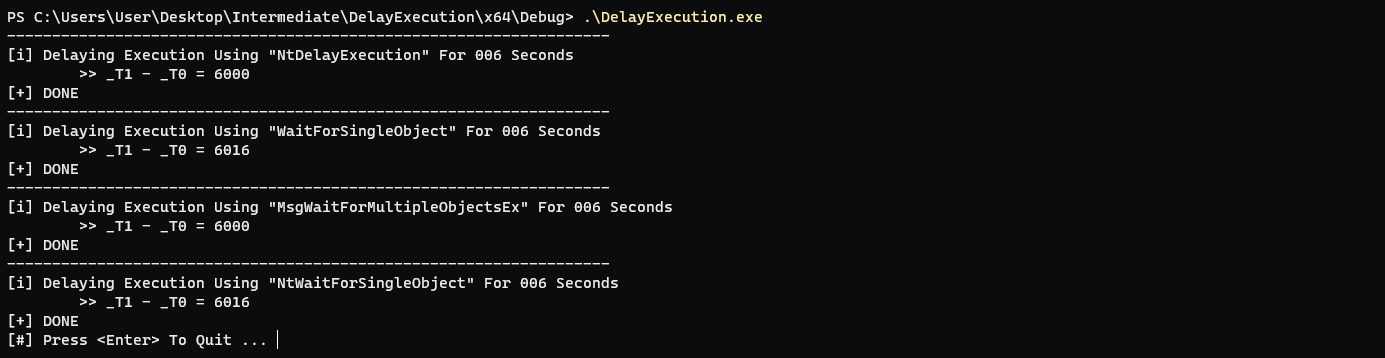
The image below shows the techniques described in this module. The delay for execution is set to 6 seconds or 0.1 minute(s).
Companion Project & Source Code
4 readable source/config files extracted directly from the archive
// @NUL0x4C | @mrd0x : MalDevAcademy

#include <Windows.h>
#include <stdio.h>


/*

examples on the 'ftMinutes' parameter :
		- 1.5 ; minute and half
		- 0.5 ; half a minute
		-  1  ; minute
		- 0.1 ; 6 seconds
		- 0.3 ; 18 seconds

*/

//----------------------------------------------------------------------------------------------------------------------------------------------------------
// tech 1: using NtDelayExecution


typedef NTSTATUS (NTAPI *fnNtDelayExecution)(
	BOOLEAN              Alertable,
	PLARGE_INTEGER       DelayInterval
);

BOOL DelayExecutionVia_NtDE(FLOAT ftMinutes) {

	// converting minutes to milliseconds
	DWORD				dwMilliSeconds		= ftMinutes * 60000;
	LARGE_INTEGER		DelayInterval		= { 0 };
	LONGLONG			Delay				= NULL;
	NTSTATUS			STATUS				= NULL;
	fnNtDelayExecution	pNtDelayExecution	= (fnNtDelayExecution)GetProcAddress(GetModuleHandle(L"NTDLL.DLL"), "NtDelayExecution");
	DWORD				_T0					= NULL,
						_T1					= NULL;

	printf("[i] Delaying Execution Using \"NtDelayExecution\" For %0.3d Seconds", (dwMilliSeconds / 1000));

	// converting from milliseconds to the 100-nanosecond - negative time interval
	Delay = dwMilliSeconds * 10000;
	DelayInterval.QuadPart = - Delay;

	_T0 = GetTickCount64();

	// sleeping for 'dwMilliSeconds' ms
	if ((STATUS = pNtDelayExecution(FALSE, &DelayInterval)) != 0x00 && STATUS != STATUS_TIMEOUT) {
		printf("[!] NtDelayExecution Failed With Error : 0x%0.8X \n", STATUS);
		return FALSE;
	}

	_T1 = GetTickCount64();

	// slept for at least 'dwMilliSeconds' ms, then 'DelayExecutionVia_NtDE' succeeded, otherwize it failed
	if ((DWORD)(_T1 - _T0) < dwMilliSeconds)
		return FALSE;

	printf("\n\t>> _T1 - _T0 = %d \n", (DWORD)(_T1 - _T0));

	printf("[+] DONE \n");

	return TRUE;
}


//----------------------------------------------------------------------------------------------------------------------------------------------------------
// tech 2: using WaitForSingleObject


BOOL DelayExecutionVia_WFSO(FLOAT ftMinutes) {

	// converting minutes to milliseconds
	DWORD	dwMilliSeconds	= ftMinutes * 60000;
	HANDLE	hEvent			= CreateEvent(NULL, NULL, NULL, NULL);
	DWORD	_T0				= NULL,
			_T1				= NULL;


	printf("[i] Delaying Execution Using \"WaitForSingleObject\" For %0.3d Seconds", (dwMilliSeconds / 1000));

	_T0 = GetTickCount64();

	// sleeping for 'dwMilliSeconds' ms
	if (WaitForSingleObject(hEvent, dwMilliSeconds) == WAIT_FAILED) {
		printf("[!] WaitForSingleObject Failed With Error : %d \n", GetLastError());
		return FALSE;
	}

	_T1 = GetTickCount64();

	// slept for at least 'dwMilliSeconds' ms, then 'DelayExecutionVia_WFSO' succeeded, otherwize it failed
	if ((DWORD)(_T1 - _T0) < dwMilliSeconds)
		return FALSE;

	printf("\n\t>> _T1 - _T0 = %d \n", (DWORD)(_T1 - _T0));

	printf("[+] DONE \n");

	CloseHandle(hEvent);

	return TRUE;
}


//----------------------------------------------------------------------------------------------------------------------------------------------------------
// tech 3: using MsgWaitForMultipleObjectsEx


BOOL DelayExecutionVia_MWFMOEx(FLOAT ftMinutes) {

	// converting minutes to milliseconds
	DWORD	dwMilliSeconds	= ftMinutes * 60000;
	HANDLE	hEvent			= CreateEvent(NULL, NULL, NULL, NULL);
	DWORD	_T0				= NULL,
			_T1				= NULL;


	printf("[i] Delaying Execution Using \"MsgWaitForMultipleObjectsEx\" For %0.3d Seconds", (dwMilliSeconds / 1000));

	_T0 = GetTickCount64();

	// sleeping for 'dwMilliSeconds' ms
	if (MsgWaitForMultipleObjectsEx(1, &hEvent, dwMilliSeconds, QS_HOTKEY, NULL) == WAIT_FAILED) {
		printf("[!] MsgWaitForMultipleObjectsEx Failed With Error : %d \n", GetLastError());
		return FALSE;
	}

	_T1 = GetTickCount64();

	// slept for at least 'dwMilliSeconds' ms, then 'DelayExecutionVia_MWFMOEx' succeeded, otherwize it failed
	if ((DWORD)(_T1 - _T0) < dwMilliSeconds)
		return FALSE;

	printf("\n\t>> _T1 - _T0 = %d \n", (DWORD)(_T1 - _T0));

	printf("[+] DONE \n");

	CloseHandle(hEvent);

	return TRUE;
}


//----------------------------------------------------------------------------------------------------------------------------------------------------------
// tech 4: using NtWaitForSingleObject


typedef NTSTATUS (NTAPI* fnNtWaitForSingleObject)(
	HANDLE         Handle,
	BOOLEAN        Alertable,
	PLARGE_INTEGER Timeout
);

BOOL DelayExecutionVia_NtWFSO(FLOAT ftMinutes) {

	// converting minutes to milliseconds
	DWORD					dwMilliSeconds			= ftMinutes * 60000;
	HANDLE					hEvent					= CreateEvent(NULL, NULL, NULL, NULL);
	LONGLONG				Delay					= NULL;
	NTSTATUS				STATUS					= NULL;
	LARGE_INTEGER			DelayInterval			= { 0 };
	fnNtWaitForSingleObject	pNtWaitForSingleObject	= (fnNtWaitForSingleObject)GetProcAddress(GetModuleHandle(L"NTDLL.DLL"), "NtWaitForSingleObject");
	DWORD					_T0						= NULL,
							_T1						= NULL;


	printf("[i] Delaying Execution Using \"NtWaitForSingleObject\" For %0.3d Seconds", (dwMilliSeconds / 1000));

	// converting from milliseconds to the 100-nanosecond - negative time interval
	Delay = dwMilliSeconds * 10000;
	DelayInterval.QuadPart = - Delay;

	_T0 = GetTickCount64();

	// sleeping for 'dwMilliSeconds' ms
	if ((STATUS = pNtWaitForSingleObject(hEvent, FALSE, &DelayInterval)) != 0x00 && STATUS != STATUS_TIMEOUT) {
		printf("[!] NtWaitForSingleObject Failed With Error : 0x%0.8X \n", STATUS);
		return FALSE;
	}

	_T1 = GetTickCount64();

	// slept for at least 'dwMilliSeconds' ms, then 'DelayExecutionVia_NtWFSO' succeeded, otherwize it failed
	if ((DWORD)(_T1 - _T0) < dwMilliSeconds)
		return FALSE;

	printf("\n\t>> _T1 - _T0 = %d \n", (DWORD)(_T1 - _T0));

	printf("[+] DONE \n");

	CloseHandle(hEvent);

	return TRUE;
}


//----------------------------------------------------------------------------------------------------------------------------------------------------------


int main() {

//-----------------------------------
// tech 1:


	printf("-------------------------------------------------------------------\n");
	if (!DelayExecutionVia_NtDE(0.1)) {
		printf("\n\t\t<<!>> DelayExecutionVia_NtDE FAILED <<!>>\n");
	}

//-----------------------------------
// tech 2:

	printf("-------------------------------------------------------------------\n");
	if (!DelayExecutionVia_WFSO(0.1)) {
		printf("\n\t\t<<!>> DelayExecutionVia_WFSO FAILED <<!>>\n");
	}

//-----------------------------------
// tech 3:

	printf("-------------------------------------------------------------------\n");
	if (!DelayExecutionVia_MWFMOEx(0.1)) {
		printf("\n\t\t<<!>> DelayExecutionVia_MWFMOEx FAILED <<!>>\n");
	}

//-----------------------------------
// tech 4:

	printf("-------------------------------------------------------------------\n");
	if (!DelayExecutionVia_NtWFSO(0.1)) {
		printf("\n\t\t<<!>> DelayExecutionVia_NtWFSO FAILED <<!>>\n");
	}

//-----------------------------------


	printf("[#] Press <Enter> To Quit ... ");
	getchar();

	return 0;
}
Full Archive Manifest (5 files inside .zip)
- DelayExecution/DelayExecution.sln
- DelayExecution/DelayExecution/DelayExec.c
- DelayExecution/DelayExecution/DelayExecution.vcxproj
- DelayExecution/DelayExecution/DelayExecution.vcxproj.filters
- DelayExecution/DelayExecution/DelayExecution.vcxproj.user