Custom WinAPI Functions
In the IAT Hiding & Obfuscation Custom Pseudo Handles module, it was demonstrated that creating custom WinAPIs is a preferable approach over dynamically importing them (if pos...
Jump to Section (27)
- Introduction
- Custom Functions
- Fetch Directory Functions
- Fetch System Processors Function
- Fetch Current Directory & Command Line
- Fetch PID & TID
- Environment Variables
- PEB & Environment Variables
- Enumerating PEB's Environment Variables
- Utilizing Environment Variables
- GetTmpPath
- GetAppDataPath
- GetWinDirPath
- GetNumberOfProcessors
- Replacing GetCurrentDirectory
- CURDIR Structure
- GetCurrentDir Function
- Replacing GetCommandLine
- Replacing GetCurrentProcessId
- 64-bit Systems
- 32-bit Systems
- _GetCurrentProcessId Function
- Replacing GetCurrentThreadId
- 64-bit Systems
- 32-bit Systems
- Demo
- Video Demo
- Companion Source Code
Introduction
In the IAT Hiding & Obfuscation Custom Pseudo Handles module, it was demonstrated that creating custom WinAPIs is a preferable approach over dynamically importing them (if possible). This approach reduces heuristic signatures and allows for code reuse in multiple implementations without causing an inconvenience, which can be the case when using API hashing.
Previously, WinAPI replacement functions were also found in the VX API, but this module will introduce custom WinAPI functions that are not found there.
Custom Functions
As mentioned, this module will demonstrate how to build custom functions that replicate the functionality of specific WinAPIs. The custom functions that will be created are shown below.
Fetch Directory Functions
This module will utilize the PEB structure to fetch the following folders paths:
- The Temp folder path Typically
C:\Windows\temp). - The Windir folder path Typically
C:\Windows). - The AppData folder path Typically
C:\Users\username\AppData).
Fetch System Processors Function
Additionally, the same search approach will be utilized to fetch the number of processors on the machine, serving as a partial replacement for the GetSystemInfo WinAPI.
Fetch Current Directory & Command Line
The PEB structure will also be utilized to fetch the following values:
- Current Directory Path Replacing GetCurrentDirectory.
- Process's Command Line Replacing GetCommandLine.
Fetch PID & TID
Finally, the module will introduce two other functions that fetch the current PID and TID of a thread, replacing GetCurrentProcessId and GetCurrentThreadId, respectively.
Environment Variables
In Windows, environment variables are dynamic values that impact the behavior of processes running on a system. They store various data related to the operating system, including specific directory paths, domain and computer names, processor information, and more. These variables serve as placeholders, allowing applications to access specific system resources, directories, and configuration settings. Here are a few examples of environment variables:
%USERPROFILE%This variable represents the current user's profile folder, which contains the user's files and settings.%PATH%This variable specifies the system's search path for executable files. It allows the user to run commands or programs from any directory without having to specify the full path to the executable.%TEMP%This variable points to the system's temporary folder, which is used by applications to store temporary files.
To view the environment variables on a machine one can run the set command on Windows Command Line or Get-ChildItem Env: on PowerShell. Microsoft discusses Powershell and environment variables here. To view the value of a specific variable one can run echo %VARIABLE-NAME% on Cmd or $env:USERPROFILE in Powershell.
Environment variables are saved in the Windows Registry and are found in the following registry keys:
HKEY_LOCAL_MACHINE\SYSTEM\CurrentControlSet\Control\Session Manager\EnvironmentUsed to save system-wide environment variables.HKEY_CURRENT_USER\EnvironmentUsed to save user-specific environment variables.
PEB & Environment Variables
When a process is created in Windows, a copy of the system environment variables is saved in the PEB structure. This allows the process to access the same environment variables as the parent process but also allows it to modify its copy of the environment variables without affecting the parent process or other processes on the system.
The image below shows the output of executing the !peb command in Windbg (note that the output is truncated due to size constraints).
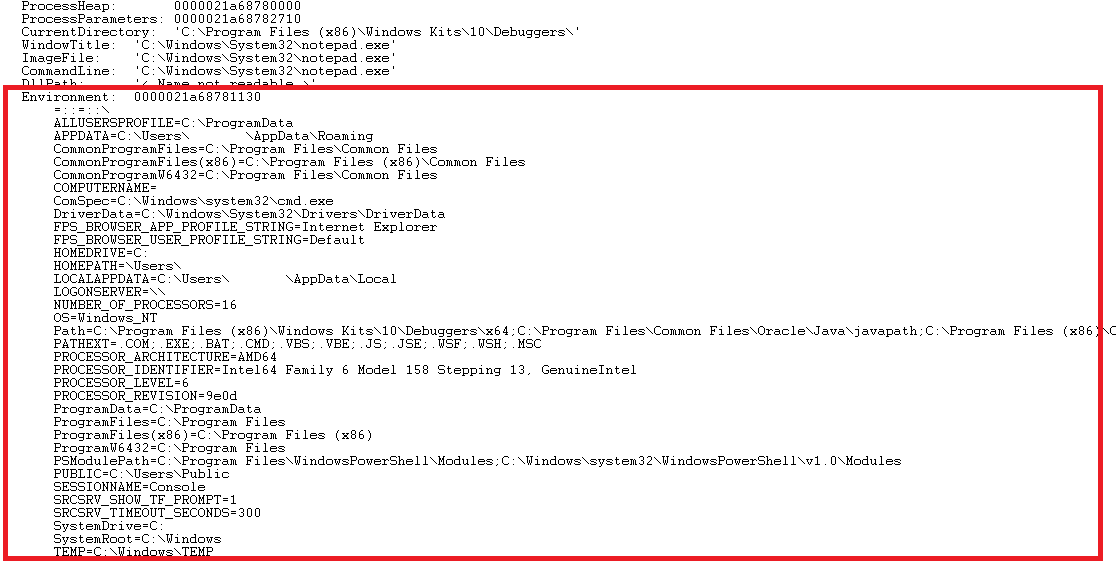
In the Undocumented Structures module, it was noted that Microsoft's official documentation for the PEB structure was missing certain members. One of those excluded members is the Environment member, which provides information about where the environment variables are stored. Consequently, the original definition of the PEB structure lacks this important detail. To address this gap, the module will utilize the PEB definition from Process Hacker, which includes the previously mentioned Environment member. This alternative definition allows us to access the necessary information regarding where the environment variables are saved.
Enumerating PEB's Environment Variables
The Environment member is saved inside of the RTL_USER_PROCESS_PARAMETERS structure. This structure is found in the PEB structure, and was discussed in earlier modules - recall Process Argument Spoofing 1. RTL_USER_PROCESS_PARAMETERS is defined as below
typedef struct _RTL_USER_PROCESS_PARAMETERS
{
    ULONG MaximumLength;
    ULONG Length;

    ULONG Flags;
    ULONG DebugFlags;

    HANDLE ConsoleHandle;
    ULONG ConsoleFlags;
    HANDLE StandardInput;
    HANDLE StandardOutput;
    HANDLE StandardError;

    CURDIR CurrentDirectory;
    UNICODE_STRING DllPath;
    UNICODE_STRING ImagePathName;
    UNICODE_STRING CommandLine;
    PVOID Environment;               // The 'Environment' element

    ULONG StartingX;
    ULONG StartingY;
    ULONG CountX;
    ULONG CountY;
    ULONG CountCharsX;
    ULONG CountCharsY;
    ULONG FillAttribute;

    ULONG WindowFlags;
    ULONG ShowWindowFlags;
    UNICODE_STRING WindowTitle;
    UNICODE_STRING DesktopInfo;
    UNICODE_STRING ShellInfo;
    UNICODE_STRING RuntimeData;
    RTL_DRIVE_LETTER_CURDIR CurrentDirectories[RTL_MAX_DRIVE_LETTERS];

    ULONG_PTR EnvironmentSize;
    ULONG_PTR EnvironmentVersion;

    PVOID PackageDependencyData;
    ULONG ProcessGroupId;
    ULONG LoaderThreads;

    UNICODE_STRING RedirectionDllName;
    UNICODE_STRING HeapPartitionName;
    ULONG_PTR DefaultThreadpoolCpuSetMasks;
    ULONG DefaultThreadpoolCpuSetMaskCount;
    ULONG DefaultThreadpoolThreadMaximum;
    ULONG HeapMemoryTypeMask;
} RTL_USER_PROCESS_PARAMETERS, *PRTL_USER_PROCESS_PARAMETERS;
The image below shows the PEB being fetched and a breakpoint being set before the end of the execution of the program. The Environment member can then be seen within the PEB structure.
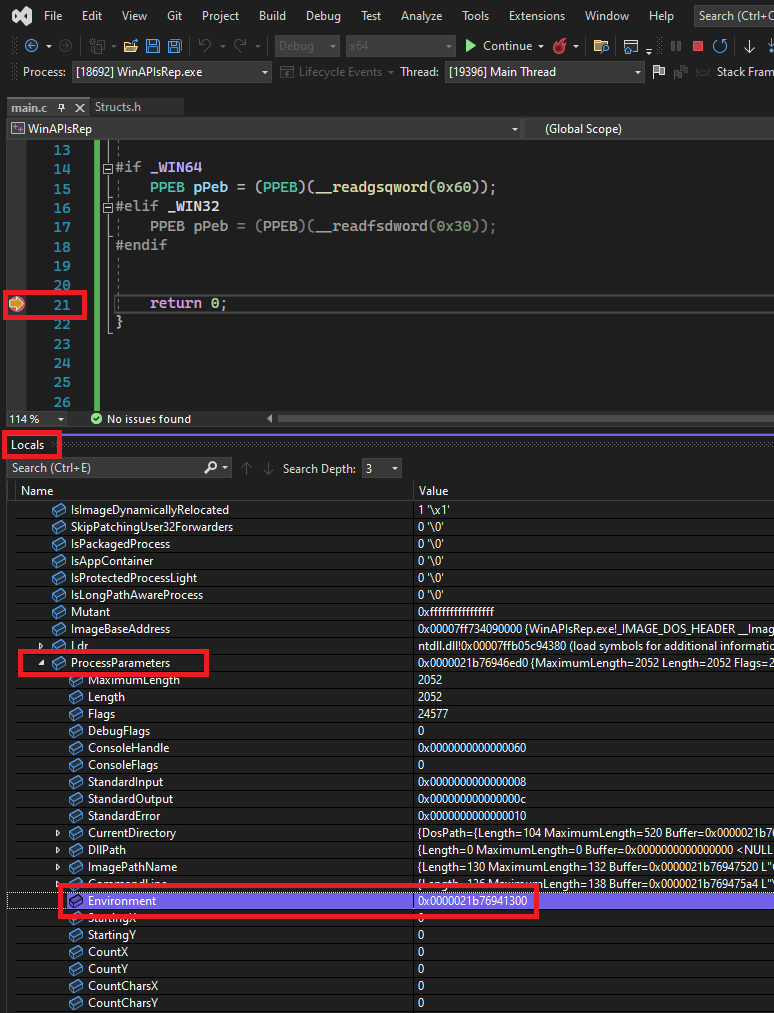
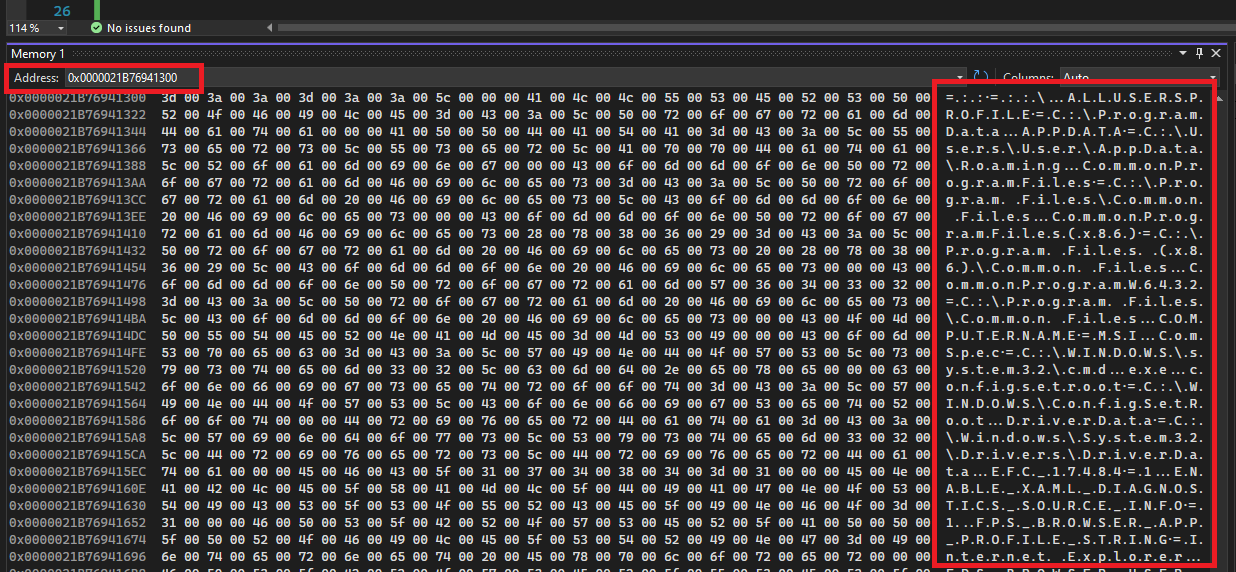
Based on the previous image, the Environment member can be seen as a Unicode string array of environment variables, in which each element of that array is a variable. The PrintAllEnvValues function, shown below, uses that information to print all the elements of the environment variables array.
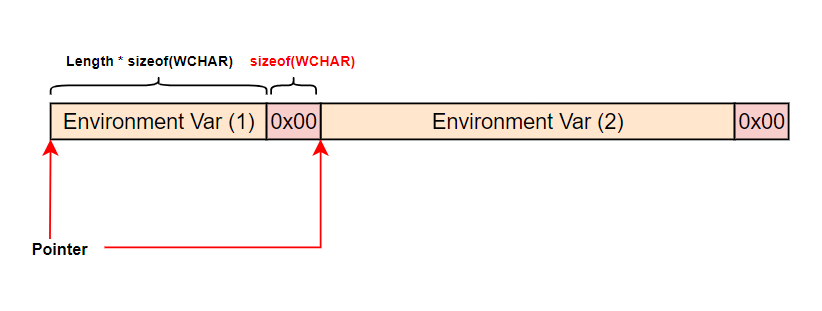
In order to iterate through the array, the PrintAllEnvValues function adds the size of the current environment variable, in bytes, to the current array pointer. This operation causes the pointer to point to the next element. This process continues until there are no remaining elements, which is detected by encountering a zero-sized string. The algorithm demonstrating this behavior is illustrated in the following image.
The PrintAllEnvValues function shown below uses another helper function, GetPeb, to fetch a pointer to the PEB structure.
// A helper function that returns a pointer to the PEB structure
PPEB GetPeb () {

#if _WIN64
    return (PPEB)(__readgsqword(0x60));
#elif _WIN32
    return (PPEB)(__readfsdword(0x30));
#endif

    return NULL;
}VOID PrintAllEnvValues() {
// Get the PEB structure
PPEB pPeb = NULL;
if ((pPeb = GetPeb()) == NULL)
return;
// Get the "Environment" pointer in the "RTL_USER_PROCESS_PARAMETERS" structure
PBYTE pTmp = (PBYTE)pPeb->ProcessParameters->Environment;
// Loop to enumerate all pTmp's elements
while (1)
{
// Get the length of "pTmp"
int j = lstrlenW(pTmp);
// If zero, break
if (!j) {
pTmp = NULL;
break;
}
// Print "pTmp"
wprintf(L"%s \n\n", pTmp);
// Add the size (in bytes) of the current environemnt variable to the pointer
// The "+ sizeof(WCHAR)" is to skip the null terminator of the current environemnt variable
pTmp = (PBYTE)pTmp + (j * sizeof(WCHAR)) + sizeof(WCHAR);
}
}PrintAllEnvValues return the following output, which again is truncated due to its size.
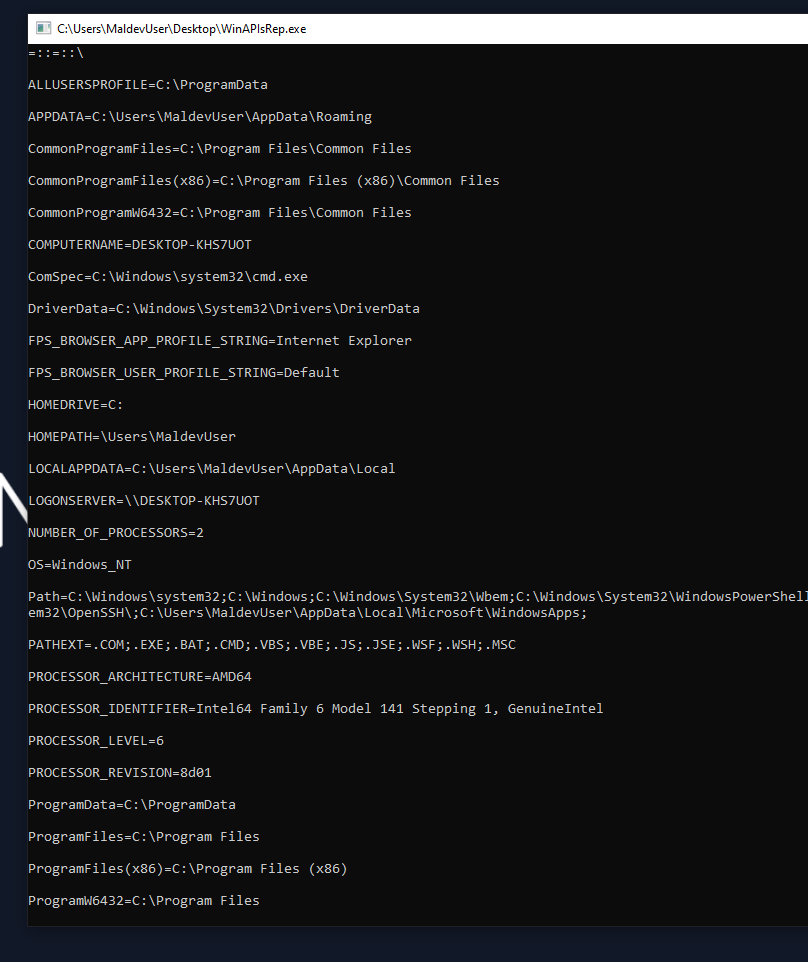
Utilizing Environment Variables
This section will introduce four functions that will use the same enumeration algorithm explained earlier.
GetTmpPathReplacing GetTempPathW, used to retrieve the path of the "Temp" directory.GetAppDataPathRetrieve the path of the "AppData" directory.GetWinDirPathReplacing GetWindowsDirectoryW, used to retrieve the path of the "Windir" directory.GetNumberOfProcessorsRetrieve the number of processors in the system.
GetTmpPath
The "Temp" directory, derived from "Temporary" directory, serves as a temporary storage location for files generated during application installations or program execution. Temporary files are created when an application requires temporary data storage, such as when downloading files from the internet or executing resource-intensive processes that demand additional disk space.
Looking at PrintAllEnvValues's output, one can notice a TEMP environment variable that contains the path to the temp directory of the system as shown below.
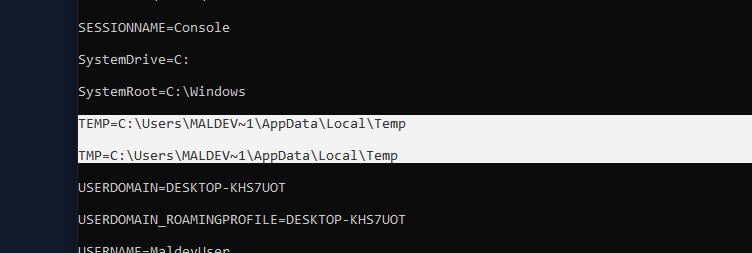
The GetTmpPath function shown below utilizes this information to return the temp directory path. It does this by searching for the "TEMP" keyword, then it skips over the equal sign to return a pointer to the start of the path, which is the temp directory path.
PWSTR GetTmpPath() {

    // Get the PEB structure
    PPEB pPeb = NULL;
    if ((pPeb = GetPeb()) == NULL)
        return NULL;

    // Get the "Environment" pointer in the "RTL_USER_PROCESS_PARAMETERS" structure
    PBYTE   pTmp = (PBYTE)pPeb->ProcessParameters->Environment;

    while (1)
    {
        // Get the length of "pTmp"
        int j = lstrlenW(pTmp);

        // If zero, break
        if (!j) {
            pTmp = NULL;
            break;
        }

        // If 'pTmp' starts with the "TEMP" keyword, break
        if (*(ULONG_PTR*)pTmp == *(ULONG_PTR*)L"TEMP")
            break;

        // Else, move to the next element
        pTmp = (PBYTE)pTmp + (j * sizeof(WCHAR)) + sizeof(WCHAR);
} if (pTmp) {
// The length of "pTmp" in bytes
int j = lstrlenW(pTmp) * sizeof(WCHAR);
for (int i = 0; i <= j; i++) {
if ((WCHAR)pTmp[i] == (WCHAR)L'=')
return (PWSTR)&pTmp[i + sizeof(WCHAR)]; // skipping the equal sign
}
} return NULL;
}GetAppDataPath
The "AppData" directory, also known as the "Application Data" folder, is a hidden folder on the Windows system that stores user-specific application data, typically under "C \Users\username\AppData". Applications can use the AppData directory to store user-specific settings, configuration files, caches, and other user-specific data.
Within the AppData directory, there are three sub-folders:
LocalContains data that is specific to the machine it is stored on.RoamingContains data that is synchronized with other computers when the user logs in with their account.LocalLowContains data that is specific to low-integrity applications, such as Internet Explorer's Protected Mode.
To fetch AppData's directory path, the previously explained algorithm used for GetTmpPath will be used. The only difference is the keyword that GetAppDataPath searches for; "APPDATA" instead of "TEMP".
PWSTR GetAppDataPath() {
// Get the PEB structure
PPEB pPeb = NULL;
if ((pPeb = GetPeb()) == NULL)
return NULL;
// Get the "Environment" pointer in the "RTL_USER_PROCESS_PARAMETERS" structure
PBYTE pTmp = (PBYTE)pPeb->ProcessParameters->Environment;
while (1)
{
// Get the length of "pTmp"
int j = lstrlenW(pTmp);
// If zero, break
if (!j) {
pTmp = NULL;
break;
}
// If 'pTmp' starts with the "APPDATA" keyword, break
if (*(ULONG_PTR*)pTmp == *(ULONG_PTR*)L"APPDATA")
break;
// Else, move to to the next element
pTmp = (PBYTE)pTmp + (j * sizeof(WCHAR)) + sizeof(WCHAR);
} if (pTmp) {
// The length of "pTmp" in bytes
int j = lstrlenW(pTmp) * sizeof(WCHAR);
for (int i = 0; i <= j; i++) {
if ((WCHAR)pTmp[i] == (WCHAR)L'=')
return (PWSTR)&pTmp[i + sizeof(WCHAR)]; // skipping the equal sign
}
} return NULL;
}GetWinDirPath
The WinDir directory, short for "Windows Directory", is a folder in Windows that contains the core files and system components necessary for the operating system to function properly. The WinDir directory is typically located in the root directory of the system drive (usually C and includes subfolders such as "System32" and "SysWOW64" that contain essential system files, libraries, drivers, and executables.
The GetWinDirPath function searches for the "windir" keyword, skips over the equal sign and returns a pointer to the beginning of the WinDir path, as demonstrated in previous functions.
PWSTR GetWinDirPath() {
// Get the PEB structure
PPEB pPeb = NULL;
if ((pPeb = GetPeb()) == NULL)
return NULL;
// Get the "Environment" pointer in the "RTL_USER_PROCESS_PARAMETERS" structure
PBYTE pTmp = (PBYTE)pPeb->ProcessParameters->Environment;
while (1)
{
// Get the length of "pTmp"
int j = lstrlenW(pTmp);
// If zero, break
if (!j) {
pTmp = NULL;
break;
}
// If 'pTmp' starts with the "windir" keyword, break
if (*(ULONG_PTR*)pTmp == *(ULONG_PTR*)L"windir")
break;
// Else, move to to the next element
pTmp = (PBYTE)pTmp + (j * sizeof(WCHAR)) + sizeof(WCHAR);
} if (pTmp) {
// The length of "pTmp" in bytes
int j = lstrlenW(pTmp) * sizeof(WCHAR);
for (int i = 0; i <= j; i++) {
if ((WCHAR)pTmp[i] == (WCHAR)L'=')
return (PWSTR)&pTmp[i + sizeof(WCHAR)]; // skipping the equal sign
}
} return NULL;
}GetNumberOfProcessors
Unlike the previous functions, GetNumberOfProcessors can be further utilized as an anti-analysis approach, where detecting a small number of processors can be an indicator of a virtualized environment. The GetNumberOfProcessors function searches for the "NUMBER_OF_PROCESSORS" keyword, skips over the equal sign and then calls wcstoul to convert the fetched value's data type from PWSTR to DWORD.
GetNumberOfProcessors returns the number of processors on a system based off its environment variables.
DWORD GetNumberOfProcessors() {
// Get the PEB structure
PPEB pPeb = NULL;
if ((pPeb = GetPeb()) == NULL)
return NULL;
// Get the "Environment" pointer in the "RTL_USER_PROCESS_PARAMETERS" structure
PBYTE pTmp = (PBYTE)pPeb->ProcessParameters->Environment;
while (1)
{
// Get the length of "pTmp"
int j = lstrlenW(pTmp);
// If zero, break
if (!j) {
pTmp = NULL;
break;
}
// If 'pTmp' starts with the "NUMBER" keyword, break
if (*(ULONG_PTR*)pTmp == *(ULONG_PTR*)L"NUMBER") // NUMBER_OF_PROCESSORS
break;
pTmp = (PBYTE)pTmp + (j * sizeof(WCHAR)) + sizeof(WCHAR);
} if (pTmp) {
// The length of "pTmp" in bytes
int j = lstrlenW(pTmp) * sizeof(WCHAR);
// skipping the equal sign & converting LPWSTR to DWORD
for (int i = 0; i <= j; i++) {
if ((WCHAR)pTmp[i] == (WCHAR)L'=')
return (DWORD)wcstoul((PWSTR)&pTmp[i + sizeof(WCHAR)], NULL, 10);
}
} return NULL;
}Replacing GetCurrentDirectory
The GetCurrentDirectory WinAPI is used to retrieve the current directory path of the current process. The current directory value can be retrieved from within the CurrentDirectory member inside the RTL_USER_PROCESS_PARAMETERS structure. The CurrentDirectory member is declared as a CURDIR structure.
CURDIR Structure
The CURDIR structure is shown below.
typedef struct _CURDIR
{
UNICODE_STRING DosPath; // UNICODE_STRING.Buffer = Directory path && UNICODE_STRING.Length = Length of path
HANDLE Handle;
} CURDIR, *PCURDIR;GetCurrentDir Function
The GetCurrentDir function below utilizes the previous information to return the path of the current directory of an implementation. It takes an optional parameter, pSize, and sets it to the length of the returned string.
PWSTR GetCurrentDir(OPTIONAL OUT PSIZE_T pSize) {
// Get the PEB structure
PPEB pPeb = NULL;
if ((pPeb = GetPeb()) == NULL)
return NULL;
// If "pSize" is passed, set it to the length of the returned buffer
if (pSize)
*pSize = (SIZE_T)pPeb->ProcessParameters->CurrentDirectory.DosPath.Length;
// return the path of the current directory
return (PWSTR)pPeb->ProcessParameters->CurrentDirectory.DosPath.Buffer;
}Replacing GetCommandLine
The GetCommandLine WinAPI is used to retrieve the command-line string for the current process. The CommandLine member is defined as a UNICODE_STRING structure, and is found inside the RTL_USER_PROCESS_PARAMETERS structure.
The GetCmdLine function below utilizes the previously stated information to return the command-line argument passed to the current process. GetCmdLine takes an optional parameter, pSize, and sets it to the length of the returned string.
PWSTR GetCmdLine(OPTIONAL OUT PSIZE_T pSize) {
// Get the PEB structure
PPEB pPeb = NULL;
if ((pPeb = GetPeb()) == NULL)
return NULL;
// If "pSize" is passed, set it to the length of the returned buffer
if (pSize)
*pSize = (SIZE_T)pPeb->ProcessParameters->CommandLine.Length;
// return the command-line string
return (PWSTR)pPeb->ProcessParameters->CommandLine.Buffer;
}Replacing GetCurrentProcessId
GetCurrentProcessId is used to retrieve the process identifier of the calling process. To replace this WinAPI, one should first check if this is doable by inspecting it under a debugger or a disassembler.
64-bit Systems
The following image shows IDA's representation of the 64-bit GetCurrentProcessId WinAPI.
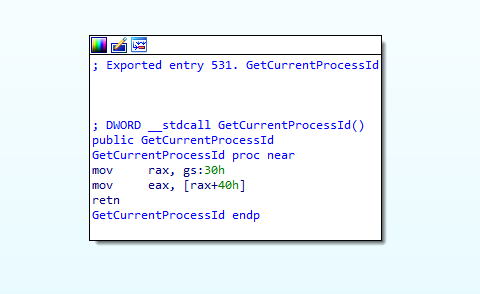
Based on the above image, GetCurrentProcessId executes the following instructions:
mov rax, gs:30hLoads a value that's located at offset0x3048 in decimal) from thegsregister.mov eax, [rax+40h]Reads0x40bytes 64 in decimal) from theraxregister.
32-bit Systems
On the other hand, the 32-bit GetCurrentProcessId WinAPI looks like the following.
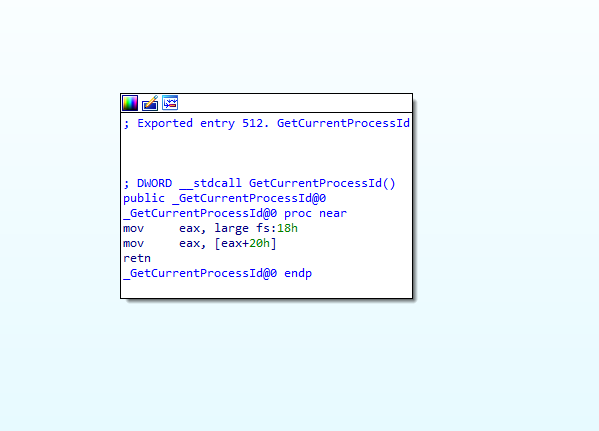
On the 32-bit system, GetCurrentProcessId executes the following instructions:
mov eax, large fs:18hLoads a value that's located at offset0x1824 in decimal) from thefsregister.mov eax, [eax+20h]Reads0x20bytes 32 in decimal) from theeaxregister.
Based on the above analysis, when aiming to replace the functionality of GetCurrentProcessId on 64-bit systems, one should retrieve a DWORD value from a memory location located 0x40 bytes beyond the gs register. Whereas on 32-bit systems, the same value should be obtained from a memory location positioned 0x20 bytes past the fs register. The first instruction from both 64-bit and 32-bit versions is handled using the __readgsdword and __readfsdword functions, respectively.
_GetCurrentProcessId Function
The following function utilizes __readgsdword and __readfsdword to read the specified number of bytes.
DWORD _GetCurrentProcessId() {
#if _WIN64
return (DWORD)(__readgsdword(0x40));
#elif _WIN32
return (DWORD)(__readfsdword(0x20));
#endif
return NULL;
}Replacing GetCurrentThreadId
The GetCurrentThreadId WinAPI function is used to retrieve the thread identifier of the calling thread.
64-bit Systems
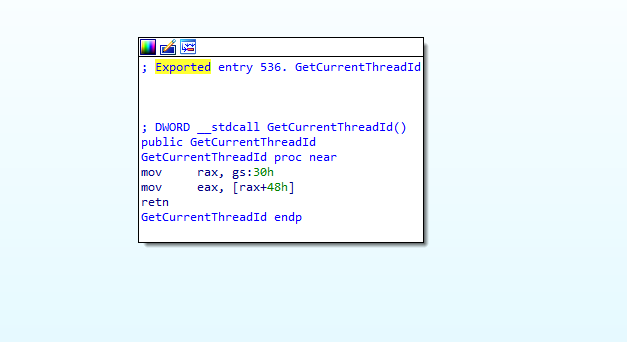
Under IDA, the function looks like this on 64-bit systems
32-bit Systems
On the other hand, on 32-bit systems, GetCurrentThreadId looks like the following
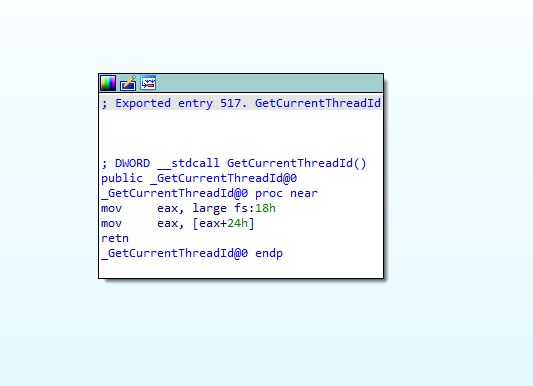
As one can see, both GetCurrentThreadId and GetCurrentProcessId execute similar instructions, with the only difference being the offset that they read from. On 64-bit systems, GetCurrentThreadId read the TID from 0x48 bytes past the gs register. While on 32-bit systems, GetCurrentThreadId reads the TID from a position of 0x24 bytes past the fs register.
The below _GetCurrentThreadId function utilizes the __readgsdword and __readfsdword to read the specified number of bytes.
DWORD _GetCurrentThreadId() {
#if _WIN64
return (DWORD)(__readgsdword(0x48));
#elif _WIN32
return (DWORD)(__readfsdword(0x24));
#endif
return NULL;
}Demo
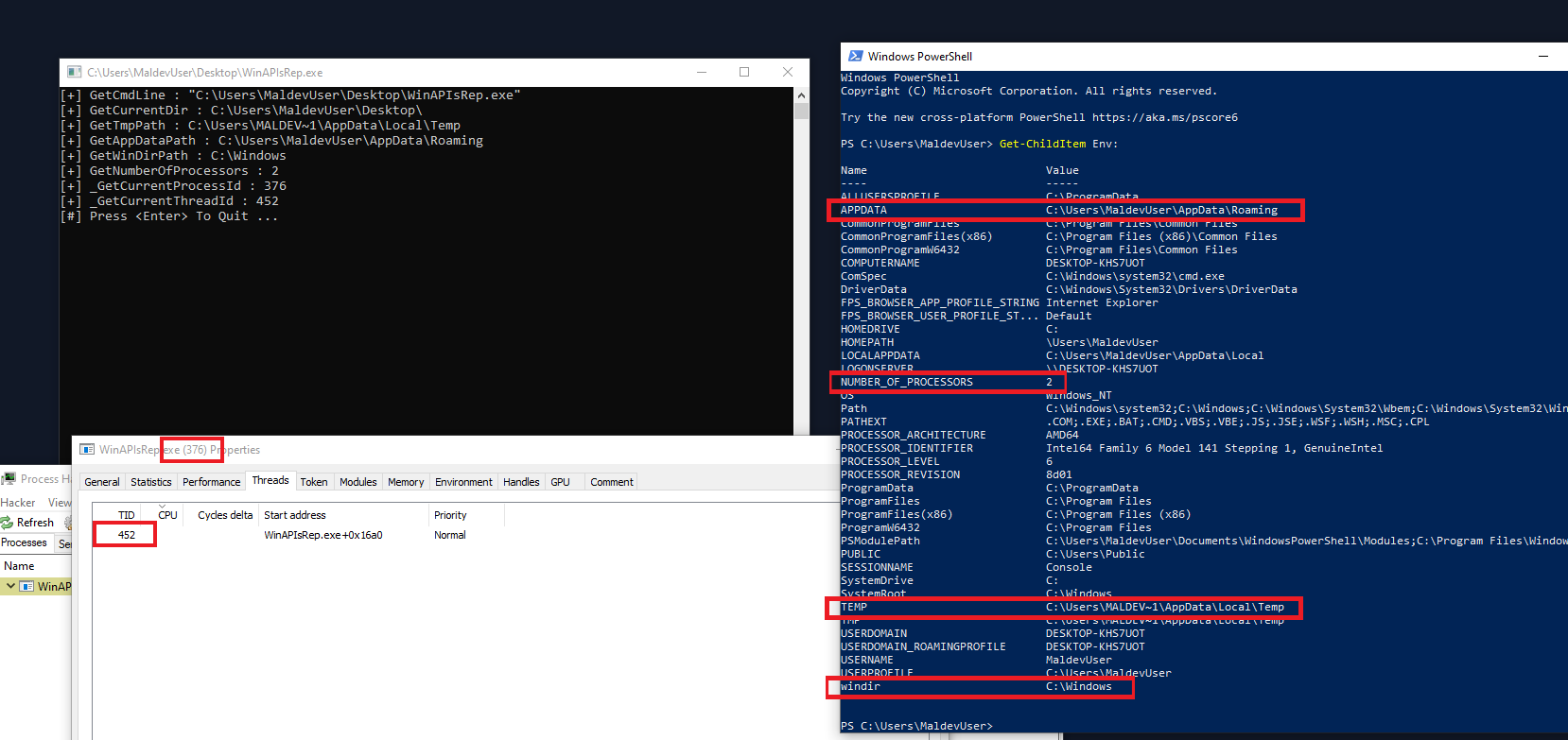
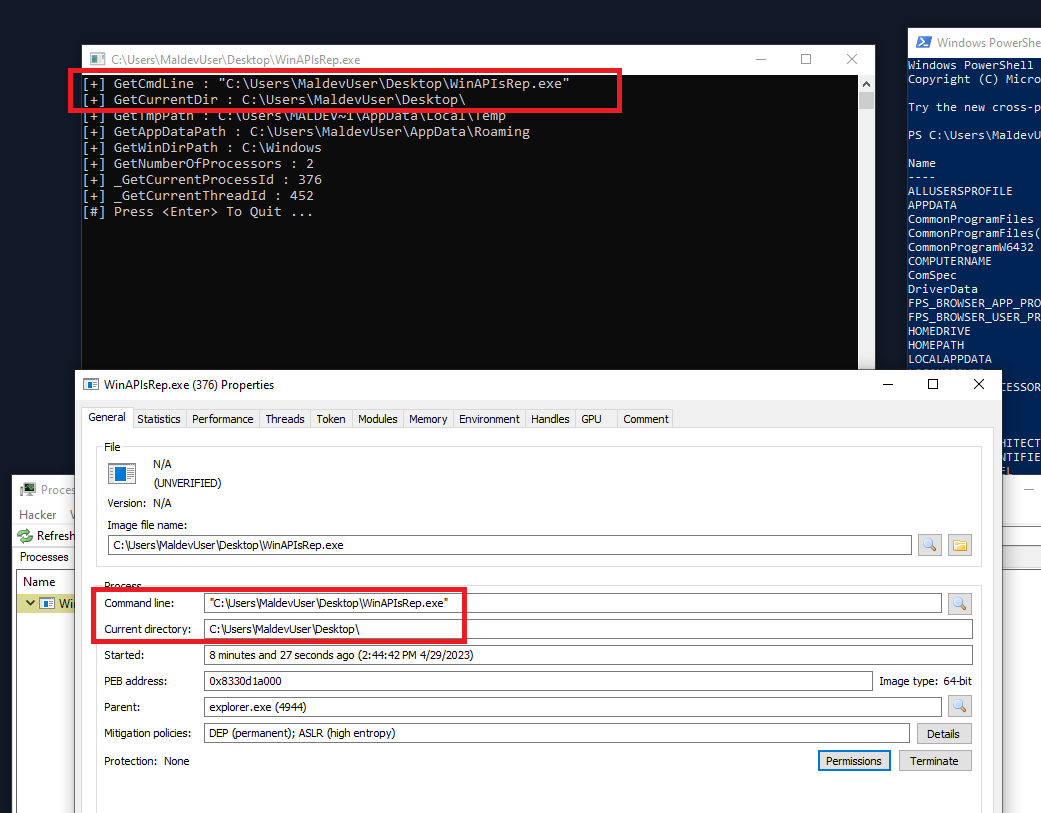
The below images show the output of all the implemented functions.
Video Demo
Companion Project & Source Code
5 readable source/config files extracted directly from the archive
// @NUL0x4C | @mrd0x : MalDevAcademy
#include <Windows.h>
#include <stdio.h>
#include "Structs.h"
// A helper function that returns a pointer to the PEB structure
PPEB GetPeb () {
#if _WIN64
return (PPEB)(__readgsqword(0x60));
#elif _WIN32
return (PPEB)(__readfsdword(0x30));
#endif
return NULL;
}
//------------------------------------------------------------------------------------------------------------------------------------------------
// Returns the command line
PWSTR GetCmdLine(OPTIONAL OUT PSIZE_T pSize) {
// Get the PEB structure
PPEB pPeb = NULL;
if ((pPeb = GetPeb()) == NULL)
return NULL;
// If "pSize" is passed, set it to the length of the returned buffer
if (pSize)
*pSize = (SIZE_T)pPeb->ProcessParameters->CommandLine.Length;
// return the command-line string
return (PWSTR)pPeb->ProcessParameters->CommandLine.Buffer;
}
//------------------------------------------------------------------------------------------------------------------------------------------------
// Returns the current directory of the binary
PWSTR GetCurrentDir(OPTIONAL OUT PSIZE_T pSize) {
// Get the PEB structure
PPEB pPeb = NULL;
if ((pPeb = GetPeb()) == NULL)
return NULL;
// If "pSize" is passed, set it to the length of the returned buffer
if (pSize)
*pSize = (SIZE_T)pPeb->ProcessParameters->CurrentDirectory.DosPath.Length;
// return the path of the current directory
return (PWSTR)pPeb->ProcessParameters->CurrentDirectory.DosPath.Buffer;
}
//------------------------------------------------------------------------------------------------------------------------------------------------
// Used to print all the environment variables saved in PEB
VOID PrintAllEnvValues() {
// Get the PEB structure
PPEB pPeb = NULL;
if ((pPeb = GetPeb()) == NULL)
return;
// Get the "Environment" pointer in the "RTL_USER_PROCESS_PARAMETERS" structure
PBYTE pTmp = (PBYTE)pPeb->ProcessParameters->Environment;
while (1)
{
// Get the length of "pTmp"
int j = lstrlenW(pTmp);
// If zero, break
if (!j) {
pTmp = NULL;
break;
}
// Print "pTmp"
wprintf(L"%s \n\n", pTmp);
Sleep(10);
// Add the size (in bytes) of the current environemnt variable to the pointer
// The "+ sizeof(WCHAR)" is to skip the null terminator of the current environemnt variable
pTmp = (PBYTE)pTmp + (j * sizeof(WCHAR)) + sizeof(WCHAR);
}
}
//------------------------------------------------------------------------------------------------------------------------------------------------
// Return the temporary dir path - often "C:\Windows\temp"
PWSTR GetTmpPath() {
// Get the PEB structure
PPEB pPeb = NULL;
if ((pPeb = GetPeb()) == NULL)
return NULL;
// Get the "Environment" pointer in the "RTL_USER_PROCESS_PARAMETERS" structure
PBYTE pTmp = (PBYTE)pPeb->ProcessParameters->Environment;
while (1)
{
// Get the length of "pTmp"
int j = lstrlenW(pTmp);
// If zero, break
if (!j) {
pTmp = NULL;
break;
}
// If 'pTmp' starts with the "TEMP" keyword, break
if (*(ULONG_PTR*)pTmp == *(ULONG_PTR*)L"TEMP")
break;
// Else, move to to the next element
pTmp = (PBYTE)pTmp + (j * sizeof(WCHAR)) + sizeof(WCHAR);
}
    if (pTmp) {
        // The length of "pTmp" in bytes
        int j = lstrlenW(pTmp) * sizeof(WCHAR);

        for (int i = 0; i <= j; i++) {
            if ((WCHAR)pTmp[i] == (WCHAR)L'=')
                return (PWSTR)&pTmp[i + sizeof(WCHAR)]; // skipping the equal sign
        }
    }
    return NULL;
}
//------------------------------------------------------------------------------------------------------------------------------------------------
// Return the AppData dir path - often "C:\Users\<username>\AppData"
PWSTR GetAppDataPath() {

    // Get the PEB structure
    PPEB pPeb = NULL;
    if ((pPeb = GetPeb()) == NULL)
        return NULL;

    // Get the "Environment" pointer in the "RTL_USER_PROCESS_PARAMETERS" structure
    PBYTE   pTmp = (PBYTE)pPeb->ProcessParameters->Environment;

    while (1)
    {
        // Get the length of "pTmp"
        int j = lstrlenW(pTmp);

        // If zero, break
        if (!j) {
            pTmp = NULL;
            break;
        }

        // If 'pTmp' starts with the "APPDATA" keyword, break
        if (*(ULONG_PTR*)pTmp == *(ULONG_PTR*)L"APPDATA")
            break;

        // Else, move to to the next element
        pTmp = (PBYTE)pTmp + (j * sizeof(WCHAR)) + sizeof(WCHAR);
    }
    if (pTmp) {
        // The length of "pTmp" in bytes
        int j = lstrlenW(pTmp) * sizeof(WCHAR);

        for (int i = 0; i <= j; i++) {
            if ((WCHAR)pTmp[i] == (WCHAR)L'=')
                return (PWSTR)&pTmp[i + sizeof(WCHAR)];  // skipping the equal sign
        }
    }
    return NULL;
}
//------------------------------------------------------------------------------------------------------------------------------------------------
// Return the windir dir path - often "C:\Windows"
PWSTR GetWinDirPath() {

    // Get the PEB structure
    PPEB pPeb = NULL;
    if ((pPeb = GetPeb()) == NULL)
        return NULL;

    // Get the "Environment" pointer in the "RTL_USER_PROCESS_PARAMETERS" structure
    PBYTE   pTmp = (PBYTE)pPeb->ProcessParameters->Environment;

    while (1)
    {
        // Get the length of "pTmp"
        int j = lstrlenW(pTmp);

        // If zero, break
        if (!j) {
            pTmp = NULL;
            break;
        }

        // If 'pTmp' starts with the "windir" keyword, break
        if (*(ULONG_PTR*)pTmp == *(ULONG_PTR*)L"windir")
            break;

        // Else, move to to the next element
        pTmp = (PBYTE)pTmp + (j * sizeof(WCHAR)) + sizeof(WCHAR);
    }
    if (pTmp) {
        // The length of "pTmp" in bytes
        int j = lstrlenW(pTmp) * sizeof(WCHAR);

        for (int i = 0; i <= j; i++) {
            if ((WCHAR)pTmp[i] == (WCHAR)L'=')
                return (PWSTR)&pTmp[i + sizeof(WCHAR)]; // skipping the equal sign
        }
    }
    return NULL;
}
//------------------------------------------------------------------------------------------------------------------------------------------------
// Return the number of processors of the system - The value of the NUMBER_OF_PROCESSORS environment variable
DWORD GetNumberOfProcessors() {

    // Get the PEB structure
    PPEB pPeb = NULL;
    if ((pPeb = GetPeb()) == NULL)
        return NULL;

    // Get the "Environment" pointer in the "RTL_USER_PROCESS_PARAMETERS" structure
    PBYTE   pTmp = (PBYTE)pPeb->ProcessParameters->Environment;

    while (1)
    {
        // Get the length of "pTmp"
        int j = lstrlenW(pTmp);

        // If zero, break
        if (!j) {
            pTmp = NULL;
            break;
        }

        // If 'pTmp' starts with the "NUMBER" keyword, break
        if (*(ULONG_PTR*)pTmp == *(ULONG_PTR*)L"NUMBER") // NUMBER_OF_PROCESSORS
            break;

        pTmp = (PBYTE)pTmp + (j * sizeof(WCHAR)) + sizeof(WCHAR);
    }
    if (pTmp) {
        // The length of "pTmp" in bytes
        int j = lstrlenW(pTmp) * sizeof(WCHAR);

        // skipping the equal sign & converting LPWSTR to DWORD
        for (int i = 0; i <= j; i++) {
            if ((WCHAR)pTmp[i] == (WCHAR)L'=')
                return (DWORD)wcstoul((PWSTR)&pTmp[i + sizeof(WCHAR)], NULL, 10);
        }
    }
    return NULL;
}
//------------------------------------------------------------------------------------------------------------------------------------------------
// Get process ID of the current process
DWORD _GetCurrentProcessId() {

#if _WIN64
    return (DWORD)(__readgsdword(0x40));
#elif _WIN32
    return (DWORD)(__readfsdword(0x20));
#endif

    return NULL;
}
//------------------------------------------------------------------------------------------------------------------------------------------------
// Get process ID of the current thread
DWORD _GetCurrentThreadId() {

#if _WIN64
    return (DWORD)(__readgsdword(0x48));
#elif _WIN32
    return (DWORD)(__readfsdword(0x24));
#endif

    return NULL;
}
//------------------------------------------------------------------------------------------------------------------------------------------------
// The entry point
int main() {
// Uncomment to print all environment variables
// PrintAllEnvValues();
wprintf(L"[+] GetCmdLine : %s \n", GetCmdLine(NULL));
wprintf(L"[+] GetCurrentDir : %s \n", GetCurrentDir(NULL));
wprintf(L"[+] GetTmpPath : %s \n", GetTmpPath());
wprintf(L"[+] GetAppDataPath : %s \n", GetAppDataPath());
wprintf(L"[+] GetWinDirPath : %s \n", GetWinDirPath());
wprintf(L"[+] GetNumberOfProcessors : %d \n", GetNumberOfProcessors());
printf("[+] _GetCurrentProcessId : %d \n", _GetCurrentProcessId());
printf("[+] _GetCurrentThreadId : %d \n", _GetCurrentThreadId());
printf("[#] Press <Enter> To Quit ... ");
getchar();
return 0;
}
Full Archive Manifest (6 files inside .zip)
- WinAPIsRep/WinAPIsRep.sln
- WinAPIsRep/WinAPIsRep/Structs.h
- WinAPIsRep/WinAPIsRep/WinAPIsRep.vcxproj
- WinAPIsRep/WinAPIsRep/WinAPIsRep.vcxproj.filters
- WinAPIsRep/WinAPIsRep/WinAPIsRep.vcxproj.user
- WinAPIsRep/WinAPIsRep/main.c