Maldev Academy Tool - MiniShell
Demonstrating a tool that performs RC4 & AES encryption.
Learning Objectives
0/1 doneIntroduction
This is another Maldev Academy tool, similar to HellShell, which allows encryption of raw payloads. The tool only supports RC4 and AES.
Features
-
Outputs the decryption function of the selected encryption type
-
Outputs the encrypted bytes as a
binfile -
Randomly generated keys for the encryption algorithms
Usage
                         ###########################################################
                         # MiniShell - Designed By MalDevAcademy @NUL0x4C | @mrd0x #
                         ###########################################################

[!] Usage: C:\Users\User\source\repos\MiniShell\x64\Debug\MiniShell.exe <Input Payload FileName> <Enc *Option*>  <Output FileName>
[i] Encryption Options Can Be :
        1.>>> "aes"     ::: Output The File As A Encrypted File Using AES-256 Algorithm With Random Key And IV
        2.>>> "rc4"     ::: Output The File As A Encrypted File Using Rc4 Algorithm With Random Key
Examples
-
.\MiniShell.exe .\calc.bin rc4 encpayload.bin- Use RC4 for encryption, write the encrypted bytes toencpayload.bin, output the decryption functionality to the console -
.\MiniShell.exe .\calc.bin rc4 encpayload.bin > rc4.c- Use RC4 for encryption, write the encrypted bytes toencpayload.bin- output the decryption function torc4.c. -
.\MiniShell.exe .\calc.bin aes calcenc.bin- Use AES for encryption, write the encrypted bytes tocalcenc.bin, and output the decryption function to the console. -
.\MiniShell.exe .\calc.bin aes calcenc.bin > aes.c- Use AES for encryption, write the encrypted bytes tocalcenc.bin, and output the decryption function toaes.c.
Demo
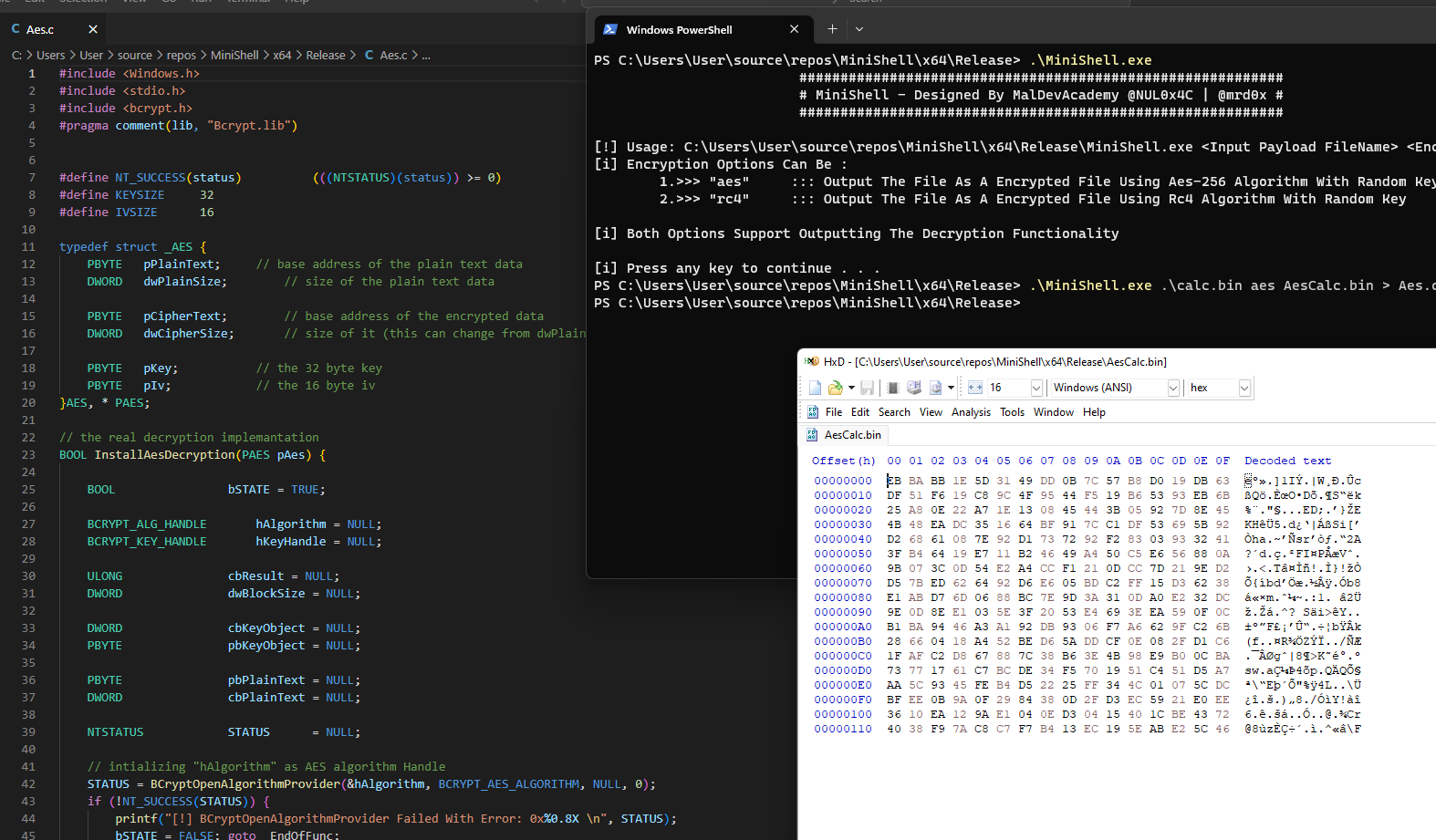
The image below shows MiniShell being used to encrypt the calc.bin file with the encrypted bytes being written to AesCalc.bin and the decryption function being saved to Aes.c.
Companion Project & Source Code
8 readable source/config files extracted directly from the archive
#pragma once


#include <Windows.h>

#ifndef COMMON_H
#define COMMON_H


// to help identifying user input
#define AESENCRYPTION		0x311
#define RC4ENCRYPTION		0x133

// to help working with encryption algorithms
#define RC4KEYSIZE				16

#define AESKEYSIZE				32
#define AESIVSIZE				16


//-------------------------------------------------------------------------------------------------------------------------------
//
// from IO.c
// read file from disk
BOOL ReadPayloadFile(const char* FileInput, PDWORD sPayloadSize, unsigned char** pPayloadData);
// write file to disk
BOOL WritePayloadFile(const char* FileInput, DWORD sPayloadSize, unsigned char* pPayloadData);
//-------------------------------------------------------------------------------------------------------------------------------


//-------------------------------------------------------------------------------------------------------------------------------
//
// from StringFunctions.c
// print the decryption / deobfuscation function (as a string) to the screen
VOID PrintDecodeFunctionality(IN INT TYPE);
//-------------------------------------------------------------------------------------------------------------------------------


//-------------------------------------------------------------------------------------------------------------------------------
//
// from Encryption.c
// generate random bytes of size "sSize"
VOID GenerateRandomBytes(PBYTE pByte, SIZE_T sSize);
// print the input buffer as a hex char array (c syntax)
VOID PrintHexData(LPCSTR Name, PBYTE Data, SIZE_T Size);
//-------------------------------------------------------------------------------------------------------------------------------


//-------------------------------------------------------------------------------------------------------------------------------
//
// from Encryption.c
// wrapper function for InstallAesEncryption that make things easier
BOOL SimpleEncryption(IN PVOID pPlainTextData, IN DWORD sPlainTextSize, IN PBYTE pKey, IN PBYTE pIv, OUT PVOID* pCipherTextData, OUT DWORD* sCipherTextSize);
// do the rc4 encryption
BOOL Rc4EncryptionViSystemFunc032(IN PBYTE pRc4Key, IN PBYTE pPayloadData, IN DWORD dwRc4KeySize, IN DWORD sPayloadSize);
//-------------------------------------------------------------------------------------------------------------------------------


#endif // !COMMON_H
Full Archive Manifest (9 files inside .zip)
- MiniShell/MiniShell.sln
- MiniShell/MiniShell/Common.h
- MiniShell/MiniShell/Encryption.c
- MiniShell/MiniShell/IO.c
- MiniShell/MiniShell/MiniShell.vcxproj
- MiniShell/MiniShell/MiniShell.vcxproj.filters
- MiniShell/MiniShell/MiniShell.vcxproj.user
- MiniShell/MiniShell/StringFunctions.c
- MiniShell/MiniShell/main.c