API Hooking - Using Windows APIs
Performing API hooking using WinAPIs.
Jump to Section (8)
Learning Objectives
0/2 doneIntroduction
The SetWindowsHookEx
WinAPI call is an alternate method of API hooking. It is mainly
employed to keep track of certain types of system events, which is
distinct from the techniques used in earlier modules, as SetWindowsHookExW/A
does not modify the functionality of a function, instead it executes a
callback function whenever a certain event is triggered. The type of
events is limited to those provided by Windows.
SetWindowsHookEx Usage
The SetWindowsHookExW WinAPI is shown below.
HHOOK SetWindowsHookExW(
  [in] int       idHook,      // The type of hook procedure to be installed
  [in] HOOKPROC  lpfn,        // A pointer to the hook procedure (function to execute)
  [in] HINSTANCE hmod,        // Handle to the DLL containing the hook procedure (this is kept as NULL)
  [in] DWORD     dwThreadId   // A thread Id with which the hook procedure is to be associated with (this is kept as NULL)
);
-
idHook- The event that will be monitored. For example, theWH_KEYBOARD_LLflag is used to monitor keystroke messages which can act as a keylogger. Note that usingSetWindowsHookExto perform keylogging is an old trick. For this module, theWH_MOUSE_LLflag will be used to monitor mouse clicks. -
lpfn- A pointer to the callback function that executes whenever the specified event occurs. In this case, the function will execute whenever there is a mouse click.
Callback Function
The callback function should be of type HOOKPROC, which is shown below.
typedef LRESULT (CALLBACK* HOOKPROC)(int nCode, WPARAM wParam, LPARAM lParam);
Therefore a callback function should be defined like the function below.
LRESULT HookCallbackFunc(int nCode, WPARAM wParam, LPARAM lParam){
  // function's code
}
The callback function should also use the CallNextHookEx WinAPI and return its output. CallNextHookEx
passes the hook information to the next hook procedure in the hook
chain. In other words, it will pass the hook's information to the
callback function the next time it is executed.
The callback function is updated to include CallNextHookEx.
LRESULT HookCallbackFunc(int nCode, WPARAM wParam, LPARAM lParam){
  // Function's code

  return CallNextHookEx(NULL, nCode, wParam, lParam)
}
Based on Microsoft's Remark section, calling CallNextHookEx
is optional but highly recommended. Otherwise, other applications that
have installed hooks will not receive hook notifications and may behave
incorrectly.
Finally, the last part is the callback function's code. The code will be monitoring the action therefore in this example the function is checking what mouse button was clicked via the following code.
LRESULT HookCallbackFunc(int nCode, WPARAM wParam, LPARAM lParam){

    if (wParam == WM_LBUTTONDOWN){
        printf("[ # ] Left Mouse Click \n");
    }

    if (wParam == WM_RBUTTONDOWN) {
        printf("[ # ] Right Mouse Click \n");
    }

    if (wParam == WM_MBUTTONDOWN) {
        printf("[ # ] Middle Mouse Click \n");
    }

  return CallNextHookEx(NULL, nCode, wParam, lParam)
}
Processing Messages
Having obtained the code required to monitor the user's mouse clicks,
the next step is to ensure that the hooking process is maintained. This
is achieved by executing the monitoring code over a specific period. To
do so, SetWindowsHookExW is called within a thread, which is kept active for the desired duration using the WaitForSingleObject WinAPI.
// The callback function that will be executed whenever the user clicks a mouse button
LRESULT HookCallback(int nCode, WPARAM wParam, LPARAM lParam){

    if (wParam == WM_LBUTTONDOWN){
        printf("[ # ] Left Mouse Click \n");
    }

    if (wParam == WM_RBUTTONDOWN) {
        printf("[ # ] Right Mouse Click \n");
    }

    if (wParam == WM_MBUTTONDOWN) {
        printf("[ # ] Middle Mouse Click \n");
    }

    // moving to the next hook in the hook chain
    return CallNextHookEx(NULL, nCode, wParam, lParam);
}


BOOL MouseClicksLogger(){

    // Installing hook
    HHOOK hMouseHook = SetWindowsHookExW(
        WH_MOUSE_LL,
        (HOOKPROC)HookCallback,
        NULL,
        NULL
    );
    if (!hMouseHook) {
        printf("[!] SetWindowsHookExW Failed With Error : %d \n", GetLastError());
        return FALSE;
    }

    // Keeping the thread running
    while(1){

    }

    return TRUE;
}


int main() {

    HANDLE hThread = CreateThread(NULL, NULL, (LPTHREAD_START_ROUTINE)MouseClicksLogger, NULL, NULL, NULL);
    if (hThread)
        WaitForSingleObject(hThread, 10000); // Monitor mouse clicks for 10 seconds

    return 0;
}
Improving The Implementation
The issue with the prior code was that the while loop fails to
process hooked mouse messages, which resulted in a laggy mouse movement
on the target machine. To resolve this issue, it is necessary to process
all message events using DefWindowProc. This will ensure that the event is properly handled by the system and that any associated default behavior is carried out. DefWindowProcW calls the default window procedure to provide default processing for any window messages that an application does not process.
To get the message's details, GetMessageW must be called first, which retrieves a message from the calling thread's message queue. This message is then passed to DefWindowProcW, which will process it. GetMessageW returns the message information in an MSG structure which includes everything required for the following DefWindowProcW call.
All of this should be performed within a loop to ensure every unprocessed message is manually handled.
// The callback function that will be executed whenever the user clicked a mouse button
LRESULT HookCallback(int nCode, WPARAM wParam, LPARAM lParam){

    if (wParam == WM_LBUTTONDOWN){
        printf("[ # ] Left Mouse Click \n");
    }

    if (wParam == WM_RBUTTONDOWN) {
        printf("[ # ] Right Mouse Click \n");
    }

    if (wParam == WM_MBUTTONDOWN) {
        printf("[ # ] Middle Mouse Click \n");
    }

    // Moving to the next hook in the hook chain
    return CallNextHookEx(NULL, nCode, wParam, lParam);
}


BOOL MouseClicksLogger(){

    MSG         Msg         = { 0 };

    // Installing hook
    HHOOK hMouseHook = SetWindowsHookExW(
        WH_MOUSE_LL,
        (HOOKPROC)HookCallback,
        NULL,
        NULL
    );
    if (!hMouseHook) {
        printf("[!] SetWindowsHookExW Failed With Error : %d \n", GetLastError());
        return FALSE;
    }

    // Process unhandled events
    while (GetMessageW(&Msg, NULL, NULL, NULL)) {
        DefWindowProcW(Msg.hwnd, Msg.message, Msg.wParam, Msg.lParam);
    }

    return TRUE;
}


int main() {

    HANDLE hThread = CreateThread(NULL, NULL, (LPTHREAD_START_ROUTINE)MouseClicksLogger, NULL, NULL, NULL);
    if (hThread)
        WaitForSingleObject(hThread, 10000); // Monitor mouse clicks for 10 seconds

    return 0;
}
Removing Hooks
To remove any hook installed by the SetWindowsHookEx function, the UnhookWindowsHookEx WinAPI must be called. UnhookWindowsHookEx only takes a handle to the hook to be removed.
SetWindowsHookEx Hooking Code
The code snippet below puts everything discussed in this module to perform hooking on mouse click events and then removes the hook.
// Global hook handle variable
HHOOK g_hMouseHook      = NULL;


// The callback function that will be executed whenever the user clicked a mouse button
LRESULT HookCallback(int nCode, WPARAM wParam, LPARAM lParam){

    if (wParam == WM_LBUTTONDOWN){
        printf("[ # ] Left Mouse Click \n");
    }

    if (wParam == WM_RBUTTONDOWN) {
        printf("[ # ] Right Mouse Click \n");
    }

    if (wParam == WM_MBUTTONDOWN) {
        printf("[ # ] Middle Mouse Click \n");
    }

    // Moving to the next hook in the hook chain
    return CallNextHookEx(NULL, nCode, wParam, lParam);
}


BOOL MouseClicksLogger(){

    MSG         Msg         = { 0 };

    // Installing hook
    g_hMouseHook = SetWindowsHookExW(
        WH_MOUSE_LL,
        (HOOKPROC)HookCallback,
        NULL,
        NULL
    );
    if (!g_hMouseHook) {
        printf("[!] SetWindowsHookExW Failed With Error : %d \n", GetLastError());
        return FALSE;
    }

    // Process unhandled events
    while (GetMessageW(&Msg, NULL, NULL, NULL)) {
        DefWindowProcW(Msg.hwnd, Msg.message, Msg.wParam, Msg.lParam);
    }

    return TRUE;
}


int main() {

    HANDLE hThread = CreateThread(NULL, NULL, (LPTHREAD_START_ROUTINE)MouseClicksLogger, NULL, NULL, NULL);
    if (hThread)
        WaitForSingleObject(hThread, 10000); // Monitor mouse clicks for 10 seconds

    // Unhooking
    if (g_hMouseHook && !UnhookWindowsHookEx(g_hMouseHook)) {
        printf("[!] UnhookWindowsHookEx Failed With Error : %d \n", GetLastError());
    }
    return 0;
}
Demo
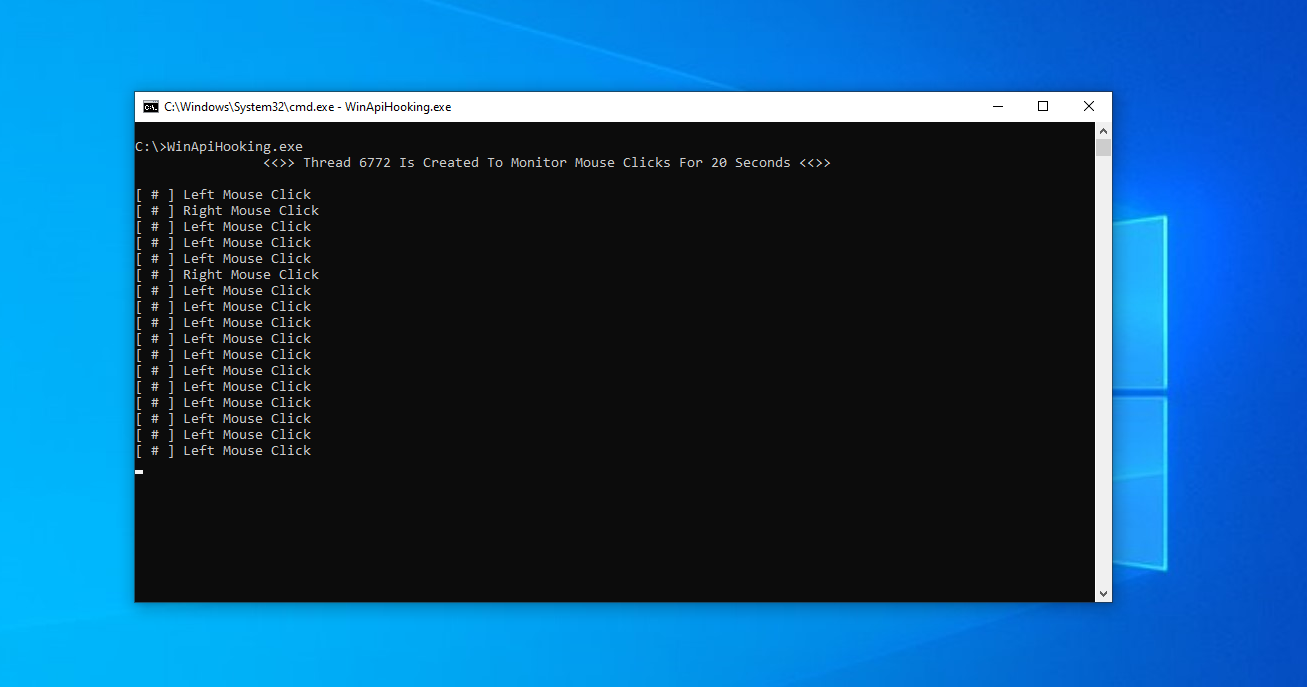
Companion Project & Source Code
4 readable source/config files extracted directly from the archive
// @NUL0x4C | @mrd0x : MalDevAcademy

#include <Windows.h>
#include <stdio.h>

#define MONITOR_TIME   20000 // monitor mouse clicks for 20 seconds

/*
    - SetWindowsHookExW: https://learn.microsoft.com/en-us/windows/win32/api/winuser/nf-winuser-setwindowshookexw
    - CallNextHookEx: https://learn.microsoft.com/en-us/windows/win32/api/winuser/nf-winuser-callnexthookex
    - UnhookWindowsHookEx: https://learn.microsoft.com/en-us/windows/win32/api/winuser/nf-winuser-unhookwindowshookex

    - GetMessageW: https://learn.microsoft.com/en-us/windows/win32/api/winuser/nf-winuser-getmessagew
    - DefWindowProcW: https://learn.microsoft.com/en-us/windows/win32/api/winuser/nf-winuser-defwindowprocw
*/

// global hook handle variable
HHOOK g_hMouseHook      = NULL;


// the callback function that will be executed whenever the user clicked a mouse button
LRESULT HookCallback(int nCode, WPARAM wParam, LPARAM lParam){

    if (wParam == WM_LBUTTONDOWN){
        printf("[ # ] Left Mouse Click \n");
    }

    if (wParam == WM_RBUTTONDOWN) {
        printf("[ # ] Right Mouse Click \n");
    }

    if (wParam == WM_MBUTTONDOWN) {
        printf("[ # ] Middle Mouse Click \n");
    }

    // moving to the next hook in the hook chain
    return CallNextHookEx(NULL, nCode, wParam, lParam);
}


BOOL MouseClicksLogger(){

    MSG         Msg         = { 0 };

    // installing hook
    g_hMouseHook = SetWindowsHookExW(
        WH_MOUSE_LL,
        (HOOKPROC)HookCallback,
        NULL,
        NULL
    );
    if (!g_hMouseHook) {
        printf("[!] SetWindowsHookExW Failed With Error : %d \n", GetLastError());
        return FALSE;
    }

    // process unhandled events
    while (GetMessageW(&Msg, NULL, NULL, NULL)) {
        DefWindowProcW(Msg.hwnd, Msg.message, Msg.wParam, Msg.lParam);
    }

    /*
    This is another way to process unhandled events

    while (GetMessageW(&Msg, NULL, NULL, NULL)) {
        TranslateMessage(&Msg);
        DispatchMessageW(&Msg);
    }
    */

    return TRUE;
}


int main() {


    HANDLE  hThread         = NULL;
    DWORD   dwThreadId      = NULL;

    hThread = CreateThread(NULL, NULL, (LPTHREAD_START_ROUTINE)MouseClicksLogger, NULL, NULL, &dwThreadId);
    if (hThread) {
        printf("\t\t<<>> Thread %d Is Created To Monitor Mouse Clicks For %d Seconds <<>>\n\n", dwThreadId, (MONITOR_TIME / 1000));
        WaitForSingleObject(hThread, MONITOR_TIME);
    }


    if (g_hMouseHook && !UnhookWindowsHookEx(g_hMouseHook)) {
        printf("[!] UnhookWindowsHookEx Failed With Error : %d \n", GetLastError());
    }

    return 0;
}
Full Archive Manifest (5 files inside .zip)
- WinApiHooking/WinApiHooking.sln
- WinApiHooking/WinApiHooking/MouseCounter.c
- WinApiHooking/WinApiHooking/WinApiHooking.vcxproj
- WinApiHooking/WinApiHooking/WinApiHooking.vcxproj.filters
- WinApiHooking/WinApiHooking/WinApiHooking.vcxproj.user